
Doruva Migrate
Version 1.0.3 · Free
Back a site up into one .doruva file and move it to any server. No size limit; URLs, paths and the table prefix are adapted without breaking serialized data.


WORDPRESS SEO PLUGIN · FREE
 Doruva SEO
 brings a connected schema graph, live content analysis that understands Turkish grammar, XML sitemaps and redirects together in one fast, modular plugin. Completely free.
DORUVA SEO
Doruva SEO is built on three ideas: structured data that never breaks, content analysis that truly understands the language you write in, and a light core that loads only the features you use. No "Pro" version, no locked options; every feature is free for everyone. Bring your data over from Yoast SEO or Rank Math in a few clicks and start right away.
One JSON-LD @graph per page, every piece linked by @id. No disconnected schema blocks.
Finds the keyword "ayakkabı" inside "ayakkabıları" and scores Turkish readability with the Ateşman formula.
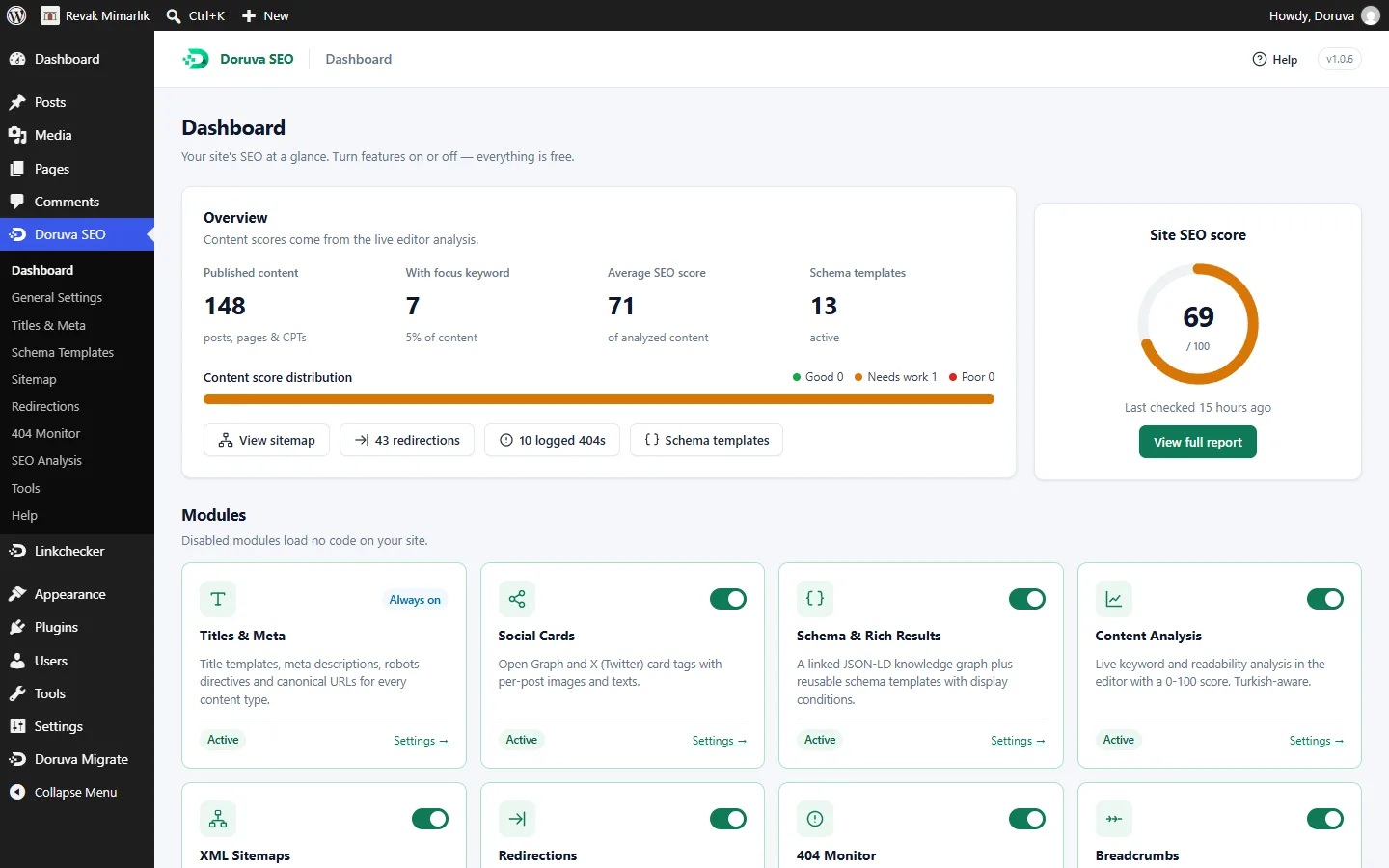
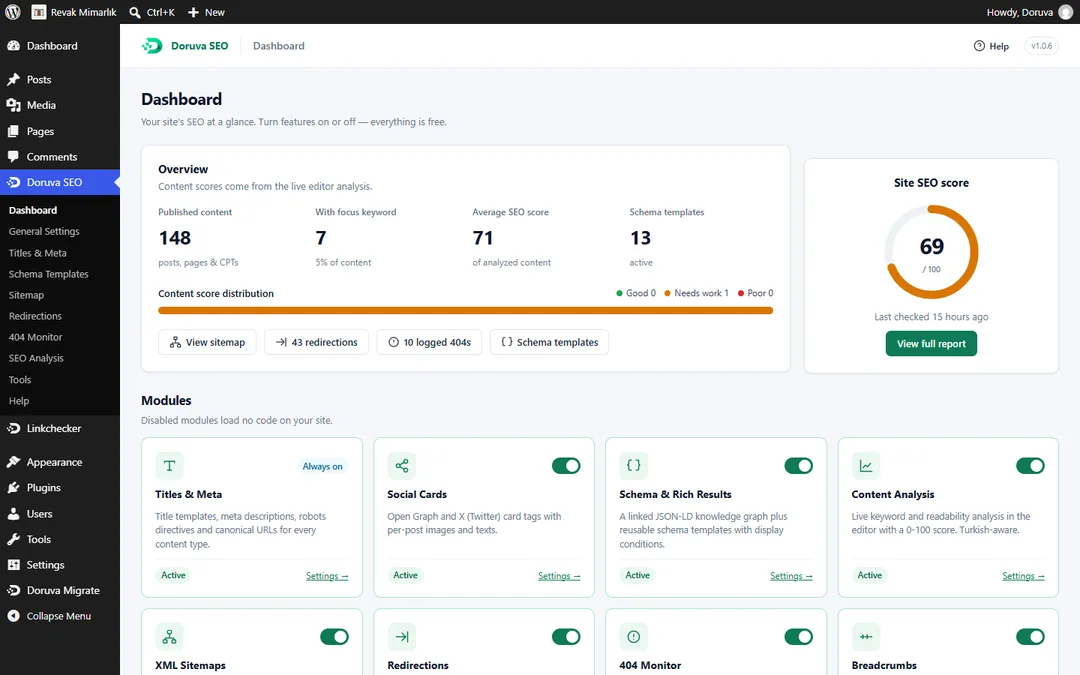
Each of the 14 modules turns on and off on its own. Disabled modules load no code.
FEATURES
Each one is a separate module: turn on what you need, switch off what you don't.
SCHEMA & RICH RESULTS
Every page gets one JSON-LD @graph whose pieces are linked by @id: WebSite (including the sitelinks search box), Organization / LocalBusiness / OnlineStore or Person, WebPage with the right subtype (AboutPage, ContactPage, CollectionPage, SearchResultsPage, ProfilePage, ItemPage), BreadcrumbList, and Article / BlogPosting / NewsArticle with its author and publisher. Instead of scattered schema blocks, search engines read one consistent knowledge graph.
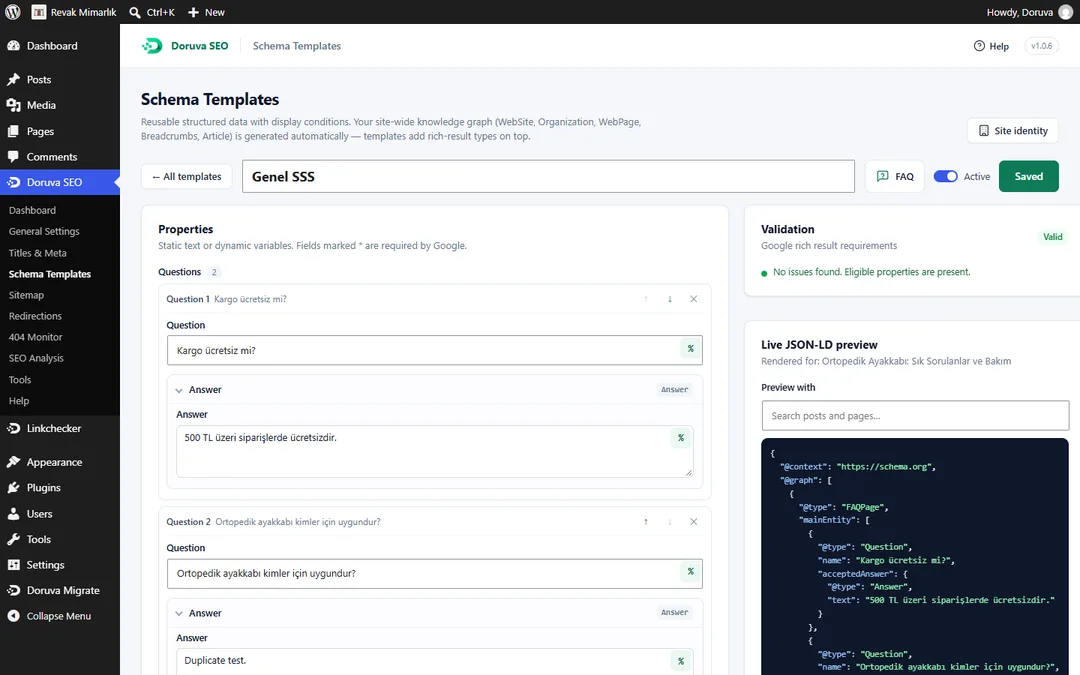
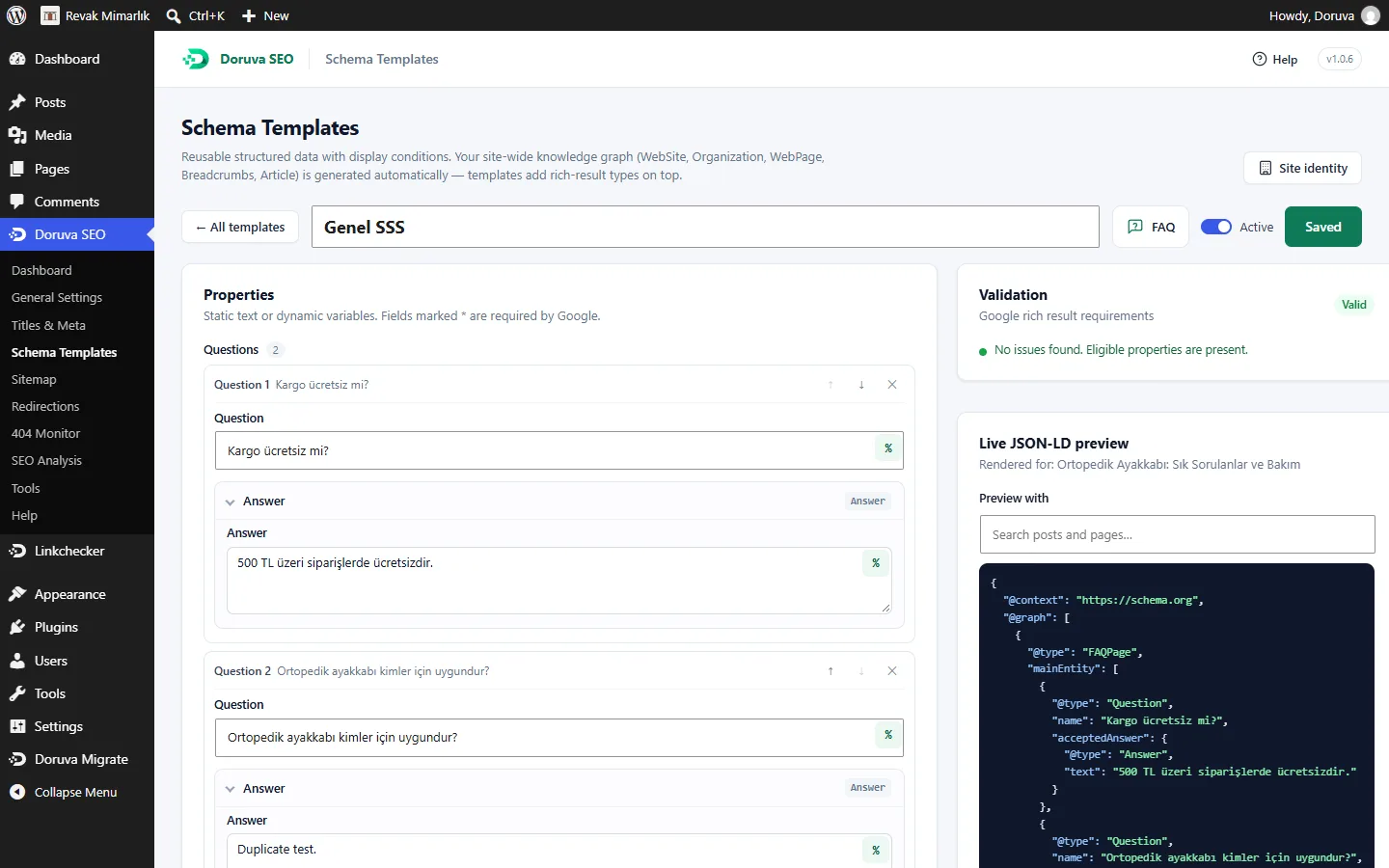
Article, Product (offers, rating, reviews, brand, GTIN/SKU), Service, LocalBusiness and 35+ subtypes, FAQ, How-to, Event, Course, Recipe, Job Posting, Software App, Video, Book, Review and Custom JSON-LD. Every field takes fixed text or variables such as %title%, %featured_image% or %customfield(_price)%.
Decide where a template runs with include and exclude rules: the whole site, post types, specific posts and terms, page templates, archives and the search page. Define one Product template once for all your products.
See which templates apply to each post; switch one off, add another, edit fields for that post only. Global rules and exceptions live on the same screen.
All FAQ blocks and FAQ templates on a page are merged into a single FAQPage, so no duplicate schema is produced.
Required and recommended field checks per type, based on Google's rich result rules; ISO date, duration and price format checks; a live JSON-LD preview. Google Rich Results Test and the Schema.org validator are one click away.
MedicalWebPage, Physician, Hospital and MedicalClinic templates come ready for clinic, hospital and doctor sites.
Add pieces to the graph or change existing ones with the doruva_seo_schema_graph, doruva_seo_schema_piece_{key} and doruva_seo_schema_types filters.
LANGUAGE-AWARE CONTENT ANALYSIS
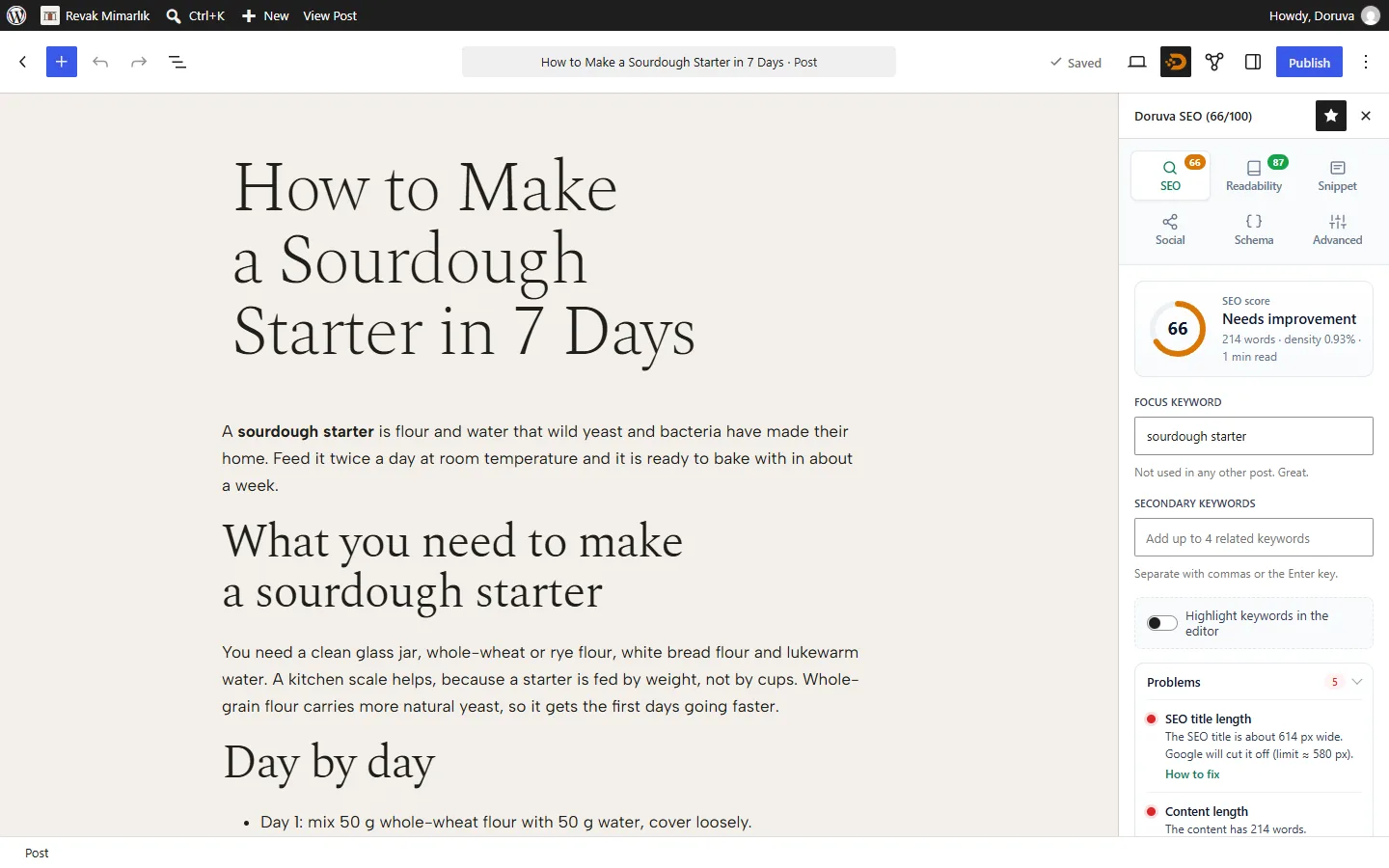
Most analysis tools read Turkish as if it were English and miss the keyword "ayakkabı" (shoe) inside "ayakkabılar" (shoes). Doruva SEO reads Turkish with Turkish grammar, English with English rules, and tells you how to fix every check.
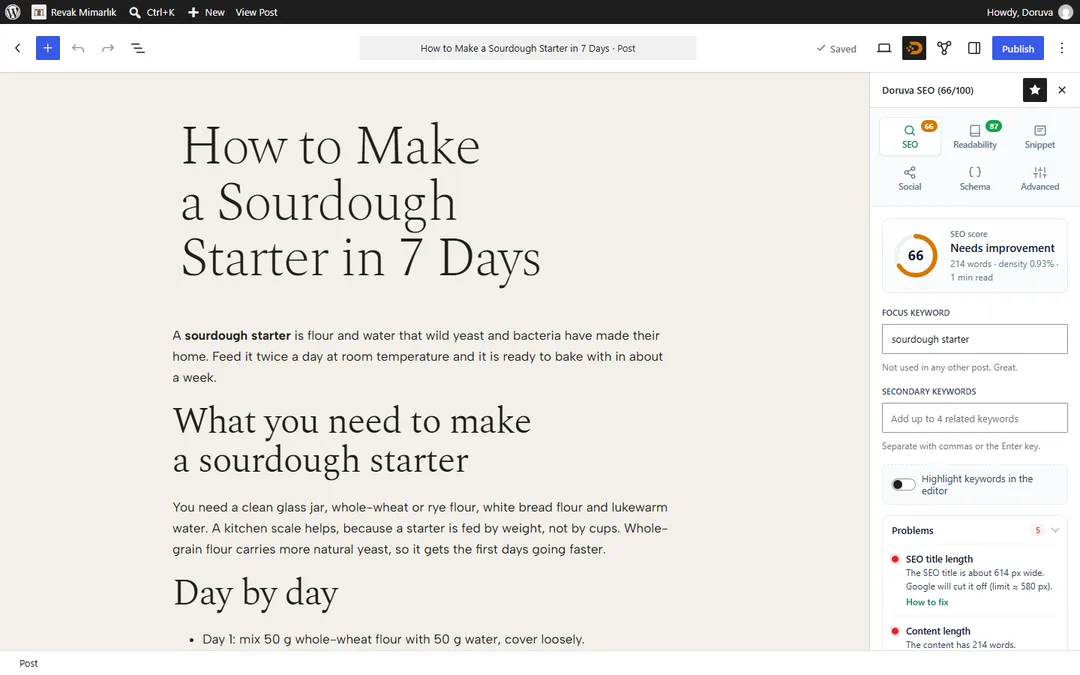
"ayakkabı" → "ayakkabılar", "ayakkabıyı". It recognises consonant mutation ("kitap" → "kitabı"), handles the Turkish İ/ı case mapping correctly and ignores Turkish character differences in URL checks.
Ateşman for Turkish texts, Flesch Reading Ease for English. Sentence and paragraph length, subheading distribution, consecutive sentence openings and transition words are checked too.
Four secondary keywords on top of the focus keyword. More than 20 SEO checks, each with a how-to-fix hint.
The score and a red/orange/green badge appear in the editor toolbar, the pre-publish panel and the post list (sortable and filterable).
Keyword occurrences and long sentences are highlighted in the editor using the CSS Custom Highlight API; your saved content never changes.
When the block editor is not in use, the same analysis runs in a meta box.
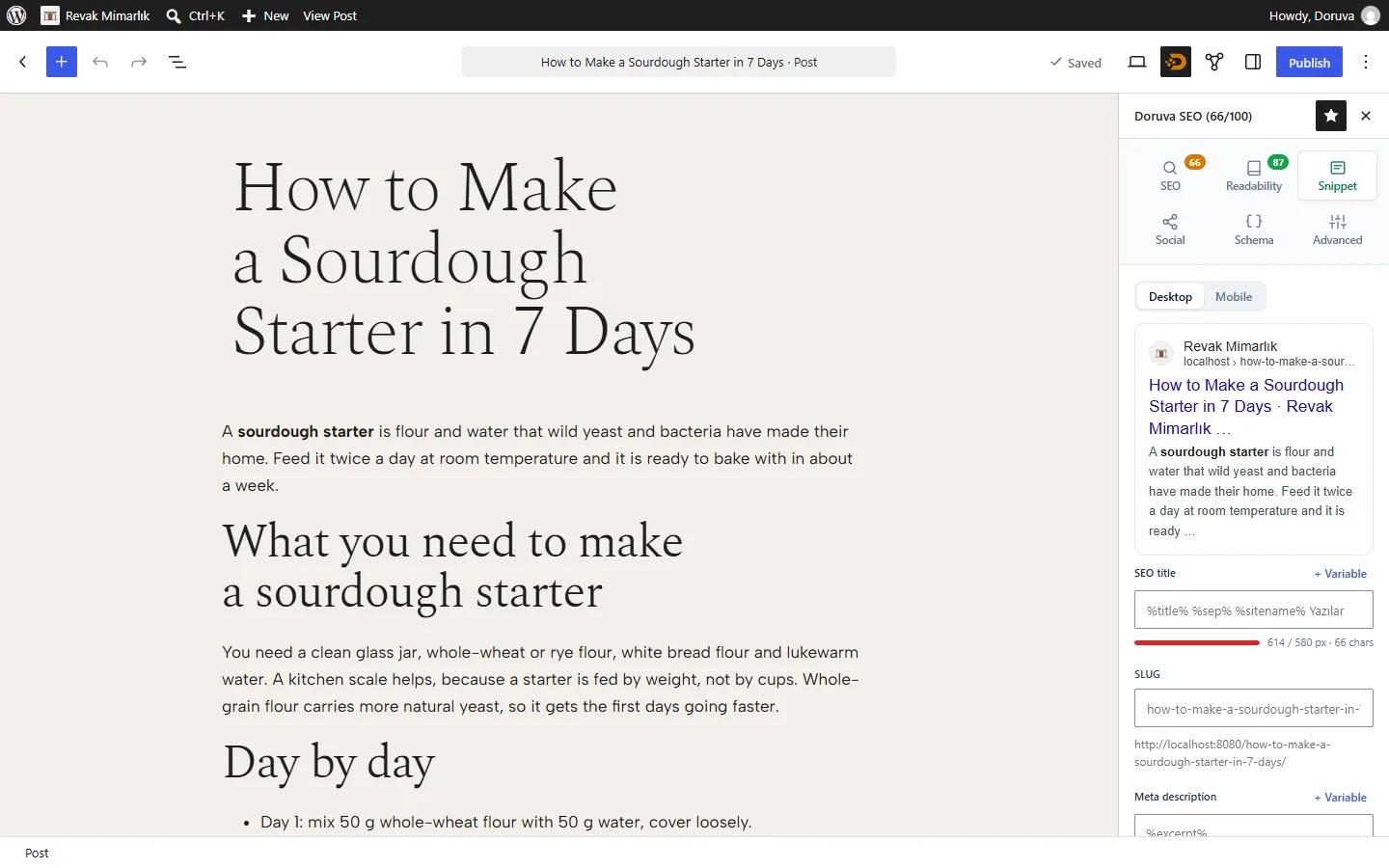
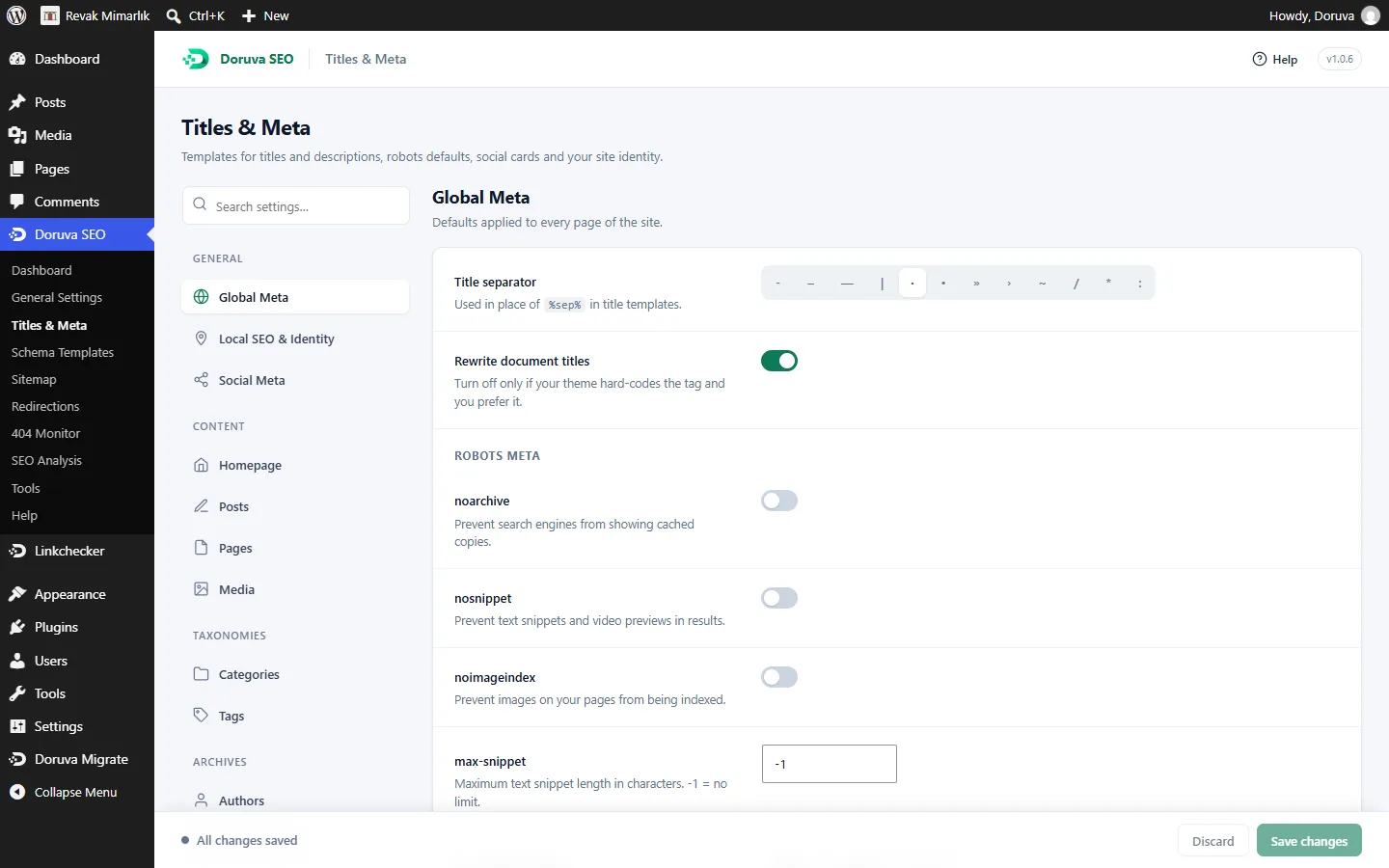
Title and description templates for every post type, taxonomy, archive, search and 404 page. Robots directives (noindex, nofollow, max-snippet…), canonical URLs and pagination links in one place. Desktop and mobile Google previews with pixel bars.
Open Graph and X (Twitter) card tags can be customised per post with their own image and text. Facebook and X previews show how a share will look before you publish.
Paginated, cached sitemaps with images are generated automatically. Exclude what you don't want listed; logged-in users see the sitemap as a readable table.
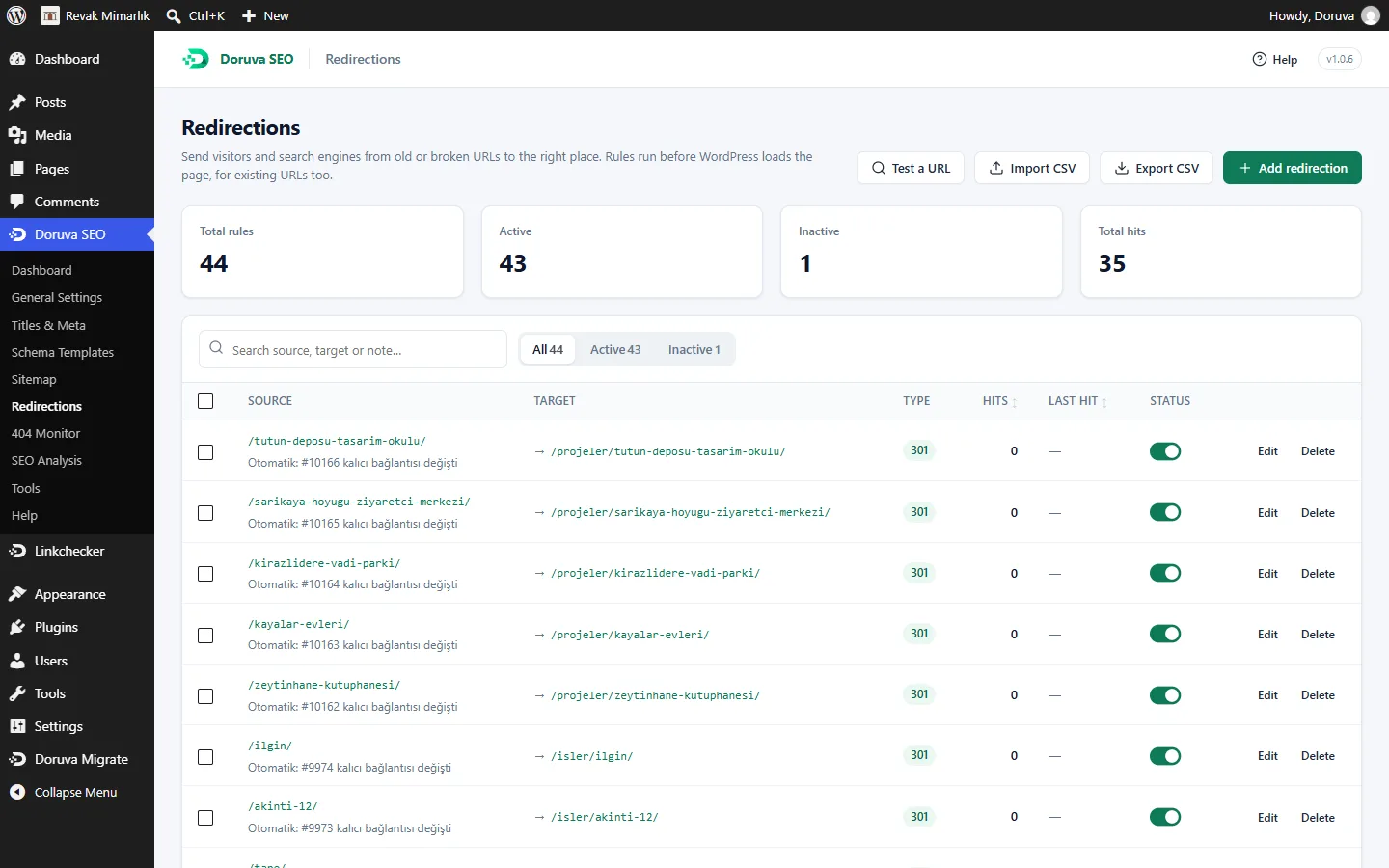
301, 302, 307, 410 and 451; regex, hit counters and CSV import/export. A redirect is created automatically when a slug changes. The 404 monitor logs broken URLs, and each one becomes a redirect in one click.
Add breadcrumbs with a block, a shortcode or a theme function. The visible breadcrumb and the BreadcrumbList schema always match.
Address, opening hours, coordinates and LocalBusiness subtypes are added to your knowledge graph: the right local business schema for a restaurant, shop, clinic, law firm or estate agent.
Titles, descriptions, focus keywords, robots, canonicals, social fields, primary category, general settings and Rank Math redirects are imported in batches. The importer only reads and never deletes the old data.
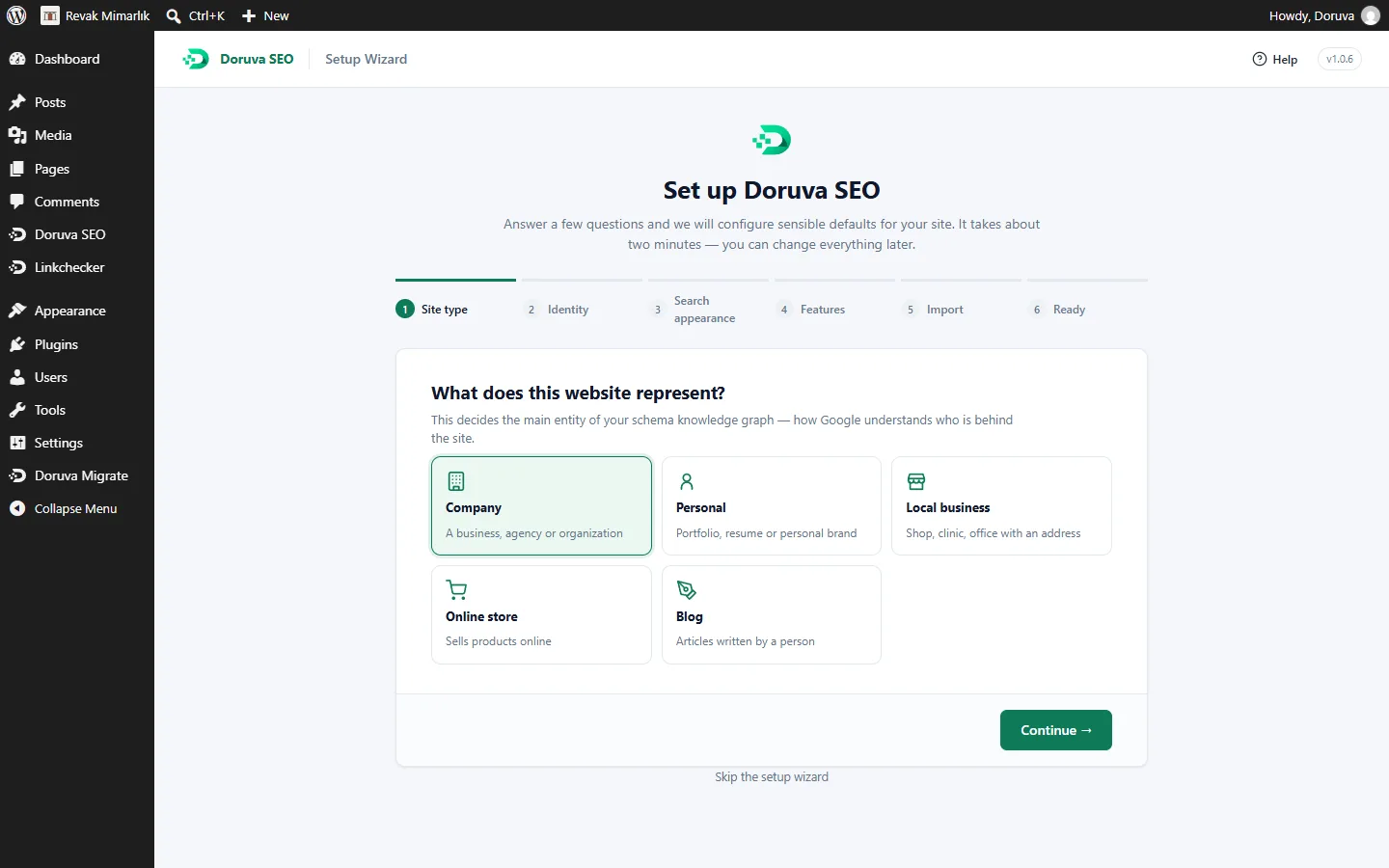
Opens once on activation and walks you through the basic settings. Export your settings and import them on other sites.
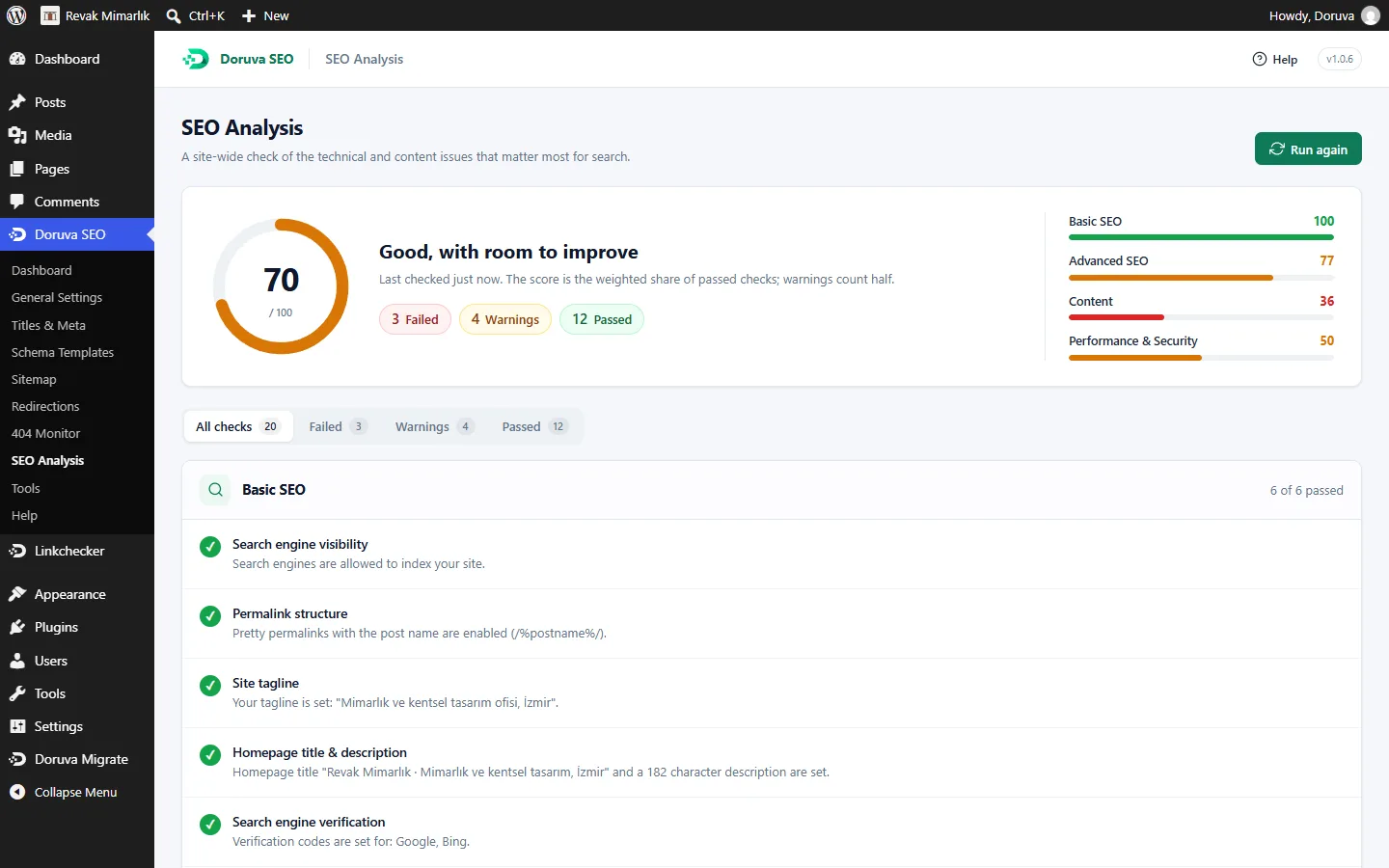
An audit tool that checks the most common site-wide technical SEO issues, so you see where to start on one screen.
Choose which user role can access which part of Doruva SEO. Give editors the content analysis and keep technical settings for administrators.
Manage settings, sitemaps, redirects and modules with wp doruva-seo …. For headless projects, /wp-json/doruva-seo/v1/head?url= returns a page's <head> HTML and its JSON form.
Doruva SEO does not track you and makes no outbound requests on its own. The only one is IndexNow, which is off by default and, when you turn it on, notifies only your public URLs.
Titles, social cards, schema, content analysis, sitemaps, redirects, 404 monitor, breadcrumbs, local SEO, image SEO, robots.txt, IndexNow, SEO analysis and the role manager are separate modules. A disabled module loads no code.
A robots.txt editor; Google, Bing, Yandex, Baidu and Pinterest verification; Image SEO that fills missing alt and title attributes; RSS additions; category base removal; a primary category and nearly 40 variables.
SCREENSHOTS
These captures were taken from the WordPress admin of Doruva SEO 1.0.x. Open any screen at full size.
COMPARISON
The free versions of the three plugins, side by side on the most asked-about features.
| Feature | Doruva SEO | Yoast SEO (free) | Rank Math (free) |
|---|---|---|---|
| Connected JSON-LD schema graph (@graph) | ✓ | ✓ | ✓ |
| Schema templates + display conditions | ✓ | ✗ | Partial (advanced conditions in the paid version) |
| Per-post schema customisation | ✓ | Partial (page/article type choice) | ✓ |
| Custom JSON-LD (validated) | ✓ | ✗ | ✗ (paid version) |
| FAQ / How-to blocks | ✓ | ✓ | ✓ |
| Healthcare schema (MedicalWebPage, Physician, Hospital) | ✓ | ✗ | Partial |
| Turkish suffix-aware keyword matching | ✓ | ✗ | ✗ |
| Ateşman readability formula for Turkish | ✓ | Partial (language support varies by version) | ✗ |
| In-editor keyword / sentence highlighting | ✓ | ✓ | ✗ |
| Multiple keywords | ✓ (1 + 4) | ✗ (paid version) | ✓ |
| XML sitemaps | ✓ | ✓ | ✓ |
| Redirects | ✓ | ✗ (paid version) | ✓ |
| 404 monitor | ✓ | ✗ | ✓ |
| Local SEO | ✓ | ✗ (paid add-on) | ✓ |
| Import from other SEO plugins | ✓ (Yoast, Rank Math) | ✓ | ✓ |
| Role manager | ✓ | ✗ | ✓ |
| WP-CLI commands | ✓ | ✓ | Partial |
| Headless REST endpoint | ✓ | ✓ | ✓ |
| Price | Completely free, no Pro version | Free + paid Premium | Free + paid Pro |
This comparison reflects the generally known features of the competitors' free versions; feature sets change between versions. Yoast SEO and Rank Math are established, successful products, and their paid versions offer some of the features marked ✗ here. Check each plugin's current feature list before you decide.
SETUP
Once the plugin is published on WordPress.org, search for Doruva SEO under Plugins → Add New in your WordPress dashboard and install it, or upload the doruva-seo folder to /wp-content/plugins/.
On activation the setup wizard opens once; enter your basic site details step by step.
On Doruva SEO → Dashboard, turn on the modules you need and switch off the rest.
If you use Yoast SEO or Rank Math, import from Doruva SEO → Tools, then deactivate the old plugin.
Add templates under Schema Templates, map their fields to variables and set the display conditions.
The plugin is being added to the WordPress.org plugin directory. Once it is published, the download link opens on this page and you can install it straight from your WordPress dashboard.
REQUIREMENTS
| Requirement | Value |
|---|---|
| WordPress | 6.4 or later |
| Tested up to | WordPress 7.1 |
| PHP | 7.4 or later |
| Database | MySQL / MariaDB or SQLite |
| Browser for the editor | Current modern browsers (Chrome, Edge, Firefox, Safari) |
| Licence | GPLv2 or later |
Current version: 1.0.6
GUIDES
Step-by-step WordPress guides from our blog, useful whether or not you use the plugin.
FAQ
Yes. There is no Pro version and no locked feature; everything is free. The plugin offers hooks for further development.
We don't recommend it. Deactivate the other plugin after importing your data; two SEO plugins running at once produce duplicate titles, canonicals and schema.
No. The importer only reads, and by default it fills only empty Doruva fields.
Titles, meta descriptions, focus keywords, robots settings, canonical URLs, social fields, primary category, general settings and Rank Math redirects.
The interface ships in English and with a complete Turkish translation. Content analysis understands Turkish suffixes, consonant mutation and the İ/ı mapping, using the Ateşman formula for Turkish readability and Flesch Reading Ease for English.
Yes. When the block editor is not in use, the same analysis runs in a meta box.
Create a Product template under Schema Templates, map its fields to variables such as %customfield(_price)% and add the condition "All singular items of a post type → Products".
No. All FAQ blocks and FAQ templates on a page are merged under a single FAQPage.
The template builder checks required and recommended fields against Google's rich result rules, validates date/duration/price formats and shows a live JSON-LD preview. Google Rich Results Test and the Schema.org validator open in one click.
Doruva SEO is modular; disabled modules load no code, so only the features you use run.
No. Doruva SEO does no tracking and makes no outbound requests on its own. The only exception is IndexNow, which is off by default and, if you turn it on, notifies api.indexnow.org of your public URLs.
Yes. The /wp-json/doruva-seo/v1/head?url= endpoint returns the requested page's <head> HTML and its JSON form. There are also wp doruva-seo WP-CLI commands.
Yes. With the role manager module you decide which Doruva SEO sections each user role can access.
READ MORE
Another Doruva plugin
Version 1.0.3 · Free
Back a site up into one .doruva file and move it to any server. No size limit; URLs, paths and the table prefix are adapted without breaking serialized data.
The team behind Doruva SEO also runs technical SEO, content and AI visibility work for brands. Let's look at where your site stands.