

What is JSON-LD?
Definition
JSON-LD (JSON for Linking Data) is a W3C standard for expressing linked data in JSON syntax. On websites it is mostly used inside a script element of type application/ld+json to add structured data based on the schema.org vocabulary. Keywords such as @context, @type, @id and @graph describe entities and the relationships between them without touching the page's visible HTML.
Also known as: JSON for Linking Data, application/ld+json, ld+json, JSON-LD markup
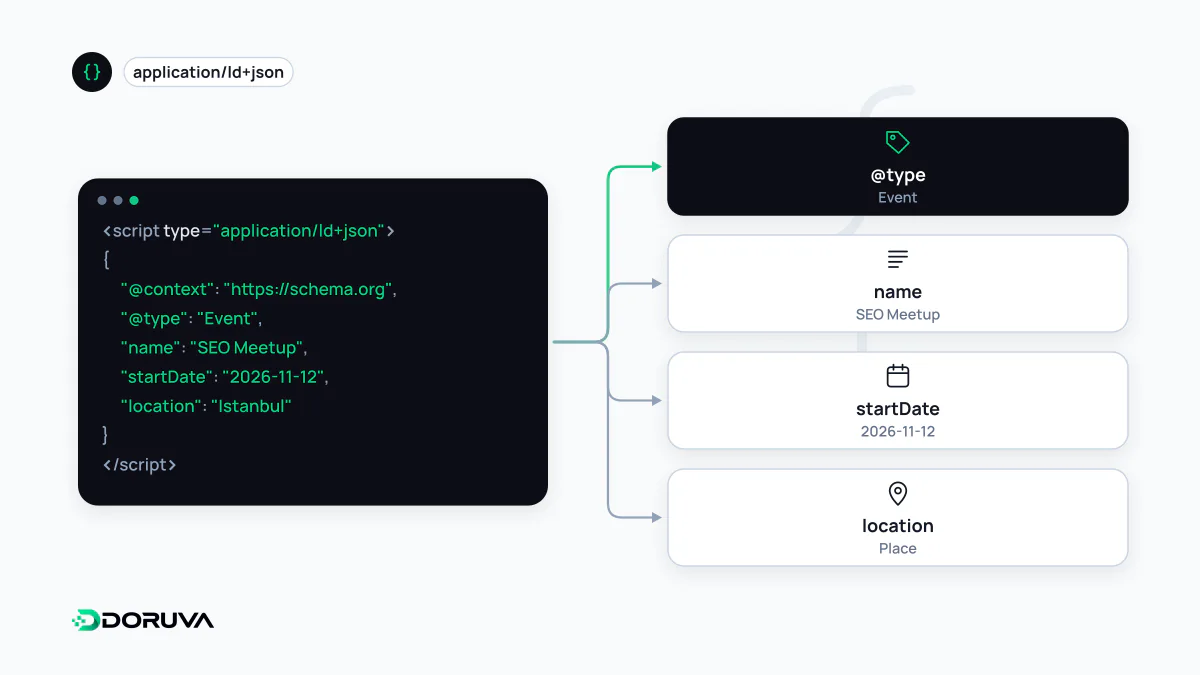
The building blocks of the syntax
JSON-LD turns an ordinary JSON object into linked data by adding a handful of reserved keywords. JSON-LD 1.1 became a W3C Recommendation on 16 July 2020. On the web, four keywords do most of the work:
| Keyword | What it does |
|---|---|
@context | Says which vocabulary the short property names belong to. With "@context": "https://schema.org", name really means https://schema.org/name. |
@type | Declares the node's type: Organization, Article, Product and so on. |
@id | Gives the node a stable identifier (an IRI) that other nodes can point to. |
@graph | Holds several top-level nodes as a list inside one document. |
Without @context the keys are just strings: a processor has no way to know that author means the schema.org author property. Every standalone JSON-LD block therefore needs a context. Which types and properties exist is decided by the Schema.org vocabulary, not by JSON-LD; JSON-LD is only the carrier.
Linking nodes with @id and @graph
A real page describes more than one thing: the website, the organisation behind it, the page itself and what the page is about. Declaring each as its own node and connecting them by reference is cleaner than repeating the same details everywhere:
<script type="application/ld+json">
{
  "@context": "https://schema.org",
  "@graph": [
    {
      "@type": "Organization",
      "@id": "https://example.com/#org",
      "name": "Example Software",
      "url": "https://example.com/"
    },
    {
      "@type": "WebSite",
      "@id": "https://example.com/#website",
      "url": "https://example.com/",
      "publisher": { "@id": "https://example.com/#org" }
    },
    {
      "@type": "WebPage",
      "@id": "https://example.com/about/#webpage",
      "url": "https://example.com/about/",
      "isPartOf": { "@id": "https://example.com/#website" },
      "about": { "@id": "https://example.com/#org" }
    }
  ]
}
</script>
The organisation is defined once; the website and page refer to it with a { "@id": … } object. Fragment IRIs such as #org are a common convention: they are anchored to a real URL but identify the entity described there rather than the document itself. Using the same @id for the same thing across the whole site produces one coherent graph instead of disconnected fragments.
Where the script goes
JSON-LD sits inside a script element with type="application/ld+json". Google accepts it in either the head or the body. Browsers don't execute it; they simply carry it as data. A page may contain more than one block.
Google also notes that JSON-LD can be injected dynamically, by JavaScript or by a CMS widget. In that case, reading it depends on the page being rendered, and tools or crawlers that don't run JavaScript won't see it at all. Writing it into server-generated HTML leaves fewer surprises.
One technical trap: if the string </script> appears inside the JSON, the browser ends the block there. When user input or CMS content flows into JSON-LD, escape < as \u003c.
Why Google recommends it
Google supports three formats: JSON-LD, Microdata and RDFa. It recommends JSON-LD as the easiest for site owners to implement and maintain at scale and the least prone to user error. Because the markup is separate from visible text, a redesign doesn't break it, and nested structures (the country of the address of the venue of an event, for instance) are far easier to express.
Separate doesn't mean independent. Google's guidelines require markup to reflect content visible to readers; putting a price or rating into JSON-LD that the page doesn't show is a policy violation.
Common JSON-LD errors
- Invalid JSON: a trailing comma, or a straight quote that the CMS turned into a curly one, makes the entire block unreadable.
- Missing
@contextor@type: the data parses, but nobody can tell which vocabulary or type it belongs to. - Conflicting
@ids: the same identifier declared as an Organization in one place and a Person in another. - Dangling references: pointing to an
@idthat no node defines. - Relative URLs: absolute URLs in
urland@idare the safest choice.
The SEO Checker flags invalid JSON-LD blocks, missing @context and @type, conflicting @ids and references to undefined nodes.