

What is DefinedTerm and DefinedTermSet?
Definition
DefinedTerm and DefinedTermSet are schema.org types: DefinedTerm represents a word, abbreviation or phrase with a formal definition, while DefinedTermSet represents the glossary, classification scheme or code list those terms belong to. A term links to its set through inDefinedTermSet, and the set lists its terms through hasDefinedTerm. Google has no rich result for these types; their purpose is to name concepts and definitions explicitly for machines.
Also known as: DefinedTerm, DefinedTermSet, glossary schema, glossary structured data
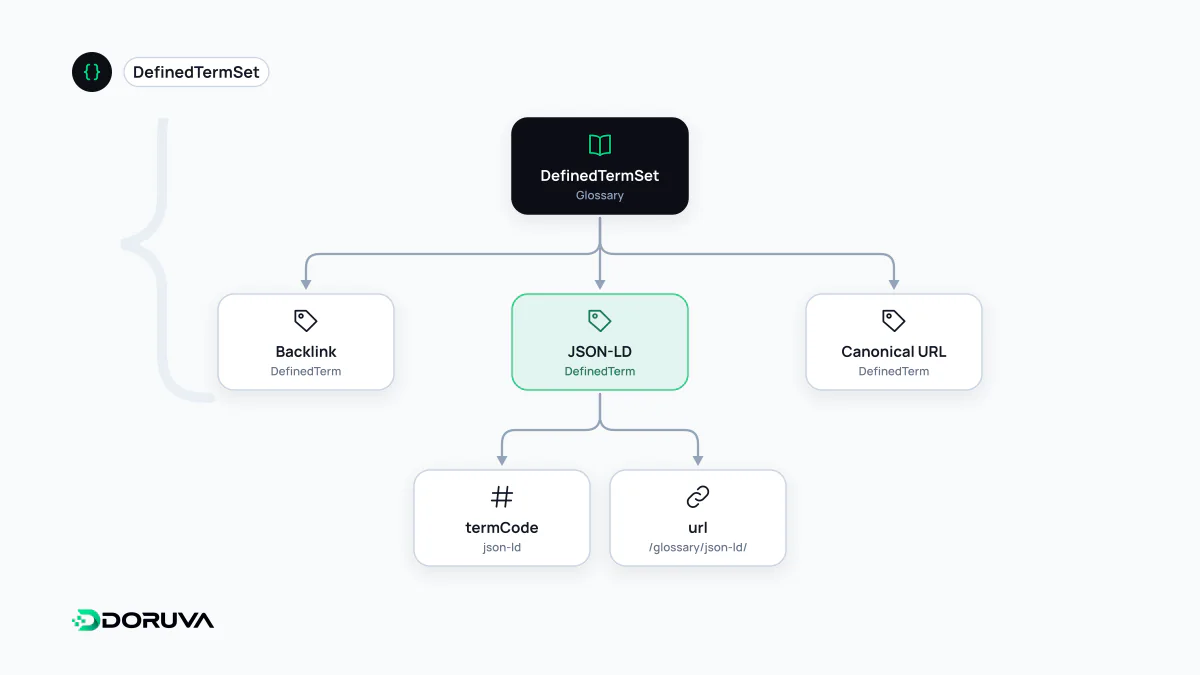
Two types, two roles
In Schema.org, DefinedTerm sits at Thing › Intangible › DefinedTerm and is described as a word, name, acronym or phrase with a formal definition, typically used in classifications, glossaries, dictionaries or product and content types. DefinedTermSet is a subtype of CreativeWork: a set of categories, a classification scheme, a glossary, a dictionary or an enumeration.
| Property | On | Meaning |
|---|---|---|
inDefinedTermSet | DefinedTerm | The set the term belongs to (a DefinedTermSet or a URL) |
termCode | DefinedTerm | A code identifying the term within its set |
hasDefinedTerm | DefinedTermSet | The terms the set contains |
General Thing properties such as name, description, alternateName and url do the rest. For code-based classifications there are two more specific subtypes: CategoryCode for a single code and CategoryCodeSet for the list of them.
How this glossary uses them
The glossary you are reading uses exactly this structure. Every term page outputs a DefinedTerm node as the page's main entity. A trimmed version for this page looks like this:
{
  "@type": "DefinedTerm",
  "@id": "https://doruva.com/en/glossary/definedterm/#term",
  "name": "DefinedTerm and DefinedTermSet",
  "alternateName": ["DefinedTerm", "DefinedTermSet", "glossary schema"],
  "description": "DefinedTerm and DefinedTermSet are schema.org types…",
  "url": "https://doruva.com/en/glossary/definedterm/",
  "inLanguage": "en",
  "inDefinedTermSet": { "@id": "https://doruva.com/en/glossary/#termset" },
  "mainEntityOfPage": { "@id": "https://doruva.com/en/glossary/definedterm/#page" }
}
A few design decisions are worth pointing out. The description is identical to the short definition shown to readers at the top of the page, so markup and visible text never diverge. alternateName carries the term's other names, stating outright that, say, "schema markup" and "structured data" are one concept. inDefinedTermSet references, by @id, the DefinedTermSet node declared on the glossary home page; that node lists the terms through hasDefinedTerm and points to the company's Organization node as publisher. The Turkish and English glossaries are separate sets, each in its own language.
When termCode matters
In a free-text glossary, a term's name and URL are enough to identify it. termCode becomes useful when terms are managed through a code system: a code in a disease classification, a customs tariff number, an internal product category code or a clause number in a standard. Two terms with the same name can then be told apart by their codes.
Setting the right expectations
Google's structured data gallery has no feature for DefinedTerm or DefinedTermSet, so this markup doesn't change how a result looks. Its value lies elsewhere: presenting a concept explicitly as an entity with its name, alternate names and definition, and making relationships machine-readable (which glossary a term belongs to, which term a page is about). That provides solid ground for entity disambiguation and answer extractability, although how AI systems treat these types isn't publicly documented.
According to schema.org's own usage figures, these types appear on between 10,000 and 100,000 domains: niche, but established. The key rule, as with all markup, is consistency: the definition in the JSON-LD should match the one on the page, alternate names should match the names the page uses, and term identifiers should stay the same across the site. The type's full details are on schema.org/DefinedTerm.