

What is Microdata?
Definition
Microdata is a way of embedding structured data directly into HTML elements using attributes such as itemscope, itemtype and itemprop, defined as part of the HTML standard. The visible text of the page becomes machine-readable data at the same time. Google supports Microdata alongside JSON-LD and RDFa, but recommends JSON-LD because it is easier to maintain.
Also known as: HTML microdata, itemprop, itemscope, Microdata vs RDFa
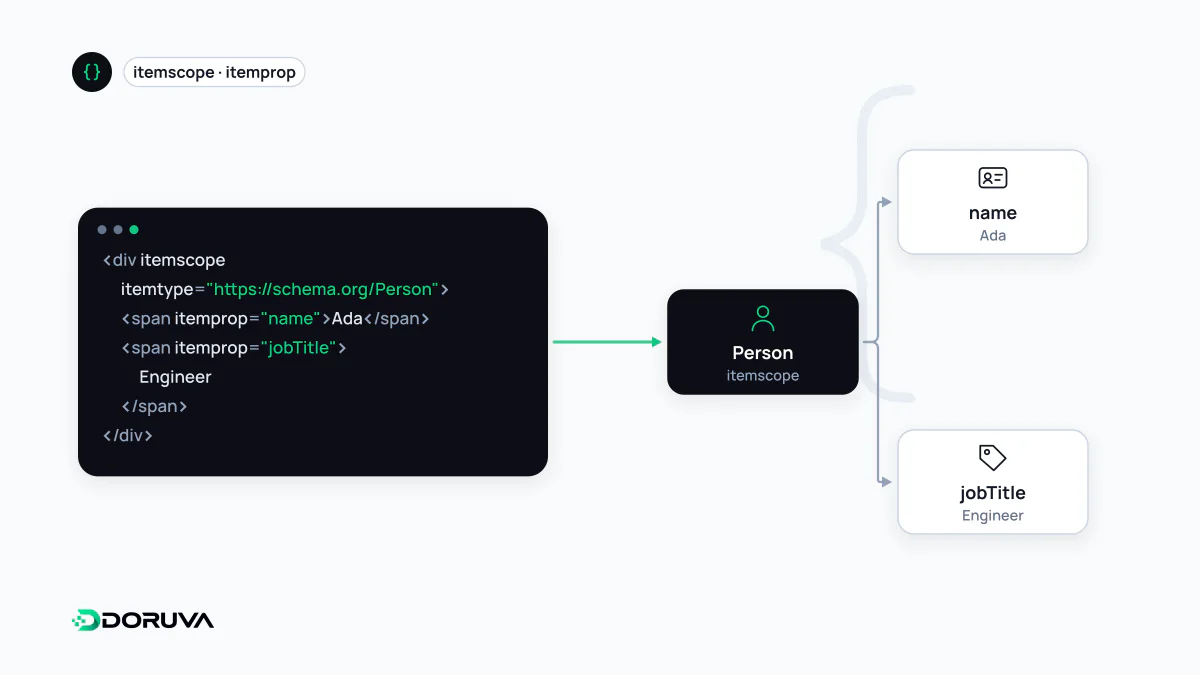
Five attributes, one nested tree
Microdata is specified in the WHATWG HTML Standard and uses the page's own elements to carry data. It relies on five attributes:
| Attribute | Purpose |
|---|---|
itemscope | Starts a new item; properties beneath it belong to that item. |
itemtype | Declares the item's type as an absolute URL, e.g. https://schema.org/Product. |
itemprop | Marks an element as a property of the item that contains it. |
itemid | Gives the item a global identifier, where the vocabulary supports one. |
itemref | Attaches elements that live elsewhere on the page to the item, by their id. |
Where a property's value comes from depends on the element. Most elements contribute their text content, but meta uses its content attribute, a and link use href, img uses src and time uses datetime. That rule is how you give machines a precise value without changing what readers see.
Marking up a product card
<div itemscope itemtype="https://schema.org/Product">
  <h1 itemprop="name">Steel Flask 500 ml</h1>
  <img itemprop="image" src="/img/flask.jpg" alt="Steel flask">
  <div itemprop="offers" itemscope itemtype="https://schema.org/Offer">
    <span>£24.90</span>
    <meta itemprop="price" content="24.90">
    <meta itemprop="priceCurrency" content="GBP">
    <link itemprop="availability" href="https://schema.org/InStock">
  </div>
</div>
The price appears twice: readers see "£24.90", machines read the clean value from the meta element. Because offers opens its own itemscope, the Offer becomes a separate item nested inside the Product. Nesting in the data has to follow nesting in the HTML, which is both Microdata's strength and its fragility.
Microdata, RDFa and JSON-LD side by side
All three structured data formats Google supports can carry the same Schema.org vocabulary. They differ in where the data lives.
| Microdata | RDFa | JSON-LD | |
|---|---|---|---|
| Lives in | Attributes on HTML elements | Attributes on HTML elements | A separate script block |
| Key attributes / keywords | itemscope, itemtype, itemprop | vocab, typeof, property | @context, @type, @id |
| Specified by | WHATWG HTML | W3C | W3C |
| Survives redesigns | Poorly | Poorly | Well |
RDFa is attribute-based like Microdata but comes from a more general linked-data model and allows several vocabularies to be mixed on one page. The same product name in RDFa looks like <div vocab="https://schema.org/" typeof="Product"><h1 property="name">…</h1></div>. In practice the two share most of the same pros and cons. JSON-LD keeps the data in its own block, untouched by template changes, which is why Google recommends it.
When Microdata still makes sense
- Legacy themes and shop templates: many off-the-shelf themes have emitted product and review data as Microdata for years. If it is correct and working, changing the format alone is not a must.
- Keeping data tied to what's visible: when the value is read straight from the visible element, it is harder for markup and page text to drift apart.
- Careful migrations: when moving to JSON-LD, describing the same entity in both formats for a while produces contradictory data if the values diverge. Migrating template by template and removing the old attributes is the safer route.
The most common Microdata failure is a redesign that moves or removes a wrapper div, leaving an itemprop under the wrong item. Re-validating with the Rich Results Test or the Schema Markup Validator after template changes is a good habit.