

What is Rendering?
Definition
Rendering is the process in which a browser or a search engine executes a page's HTML, CSS and JavaScript to produce a displayable page and its final DOM. Google renders pages in a separate step after crawling, using its Web Rendering Service (WRS) built on an up-to-date version of Chromium, and generally indexes the rendered result rather than only the raw HTML.
Also known as: page rendering, Web Rendering Service, WRS, render queue
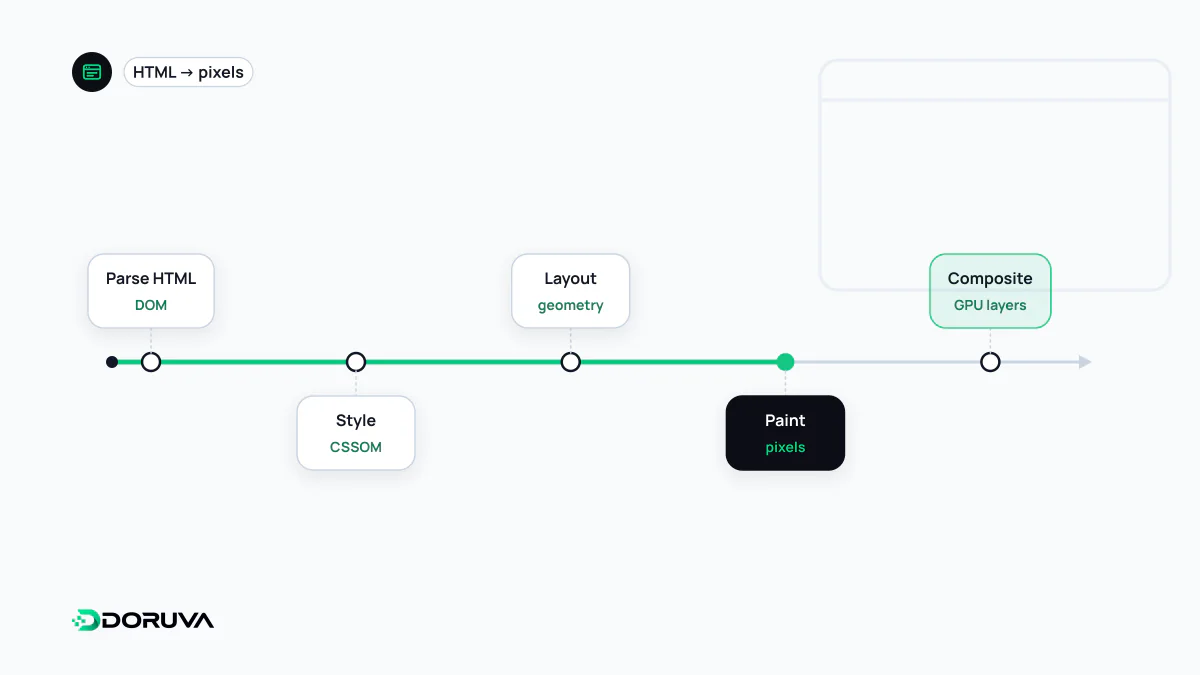
Rendering in the browser
A browser parses the HTML it receives into the DOM tree and builds style rules (the CSSOM) from the stylesheets. Combined, they determine which elements will be shown; the browser then calculates each element's size and position (layout), paints the pixels and composites the layers. JavaScript can change the DOM at any point along the way, adding content or removing it. The order of these steps, and what blocks what, is the subject of the critical rendering path. For the visitor, the outcome is how quickly and correctly the page appears.
Rendering on the search engine side
For Google, rendering is the stage between crawling and indexing. Googlebot first fetches the raw HTML and extracts the links it finds there. Pages that return a 200 status code then go into a render queue. Google's documentation says a page may sit there for a few seconds but that it can take longer. When its turn comes, the Web Rendering Service (WRS) opens the page with an evergreen version of Chromium, runs the JavaScript, and the resulting HTML is what gets used for indexing. If the initial HTML already contains noindex, Google may skip rendering altogether.
The WRS is not a real visitor
The WRS runs a real browser engine, but it behaves differently from a person in a few ways that matter:
- It is stateless. Cookies, Local Storage and Session Storage are cleared between page loads, so content that depends on an earlier visit or a saved preference will not show up.
- It declines permission prompts. Anything that needs location, notification or camera access stays hidden.
- It caches aggressively. Google may keep resources cached and ignore caching headers. Fingerprinted filenames such as
main.2bb85551.jsstop it from rendering with an outdated script. - It does not interact. No clicks, no scrolling. Use lazy loading that triggers when content enters the viewport, not on scroll events.
- It skips some connection types. Content delivered over WebSockets or WebRTC needs an HTTP fallback.
Google keeps the current list in its guide to fixing JavaScript problems in Search.
Comparing raw and rendered HTML
The single most useful check is to put the server's initial HTML next to the rendered DOM. URL Inspection in Search Console and the Rich Results Test both show the HTML Google rendered, the resources it loaded and any JavaScript console errors. These differences between the two versions are worth worrying about:
- The title, canonical or robots tag changes during rendering. Google now sees two conflicting signals, and which one wins becomes uncertain.
- Main text or internal links exist only after rendering, so the content depends entirely on the queue and on scripts running without errors.
- An API call fails during rendering. A request that succeeds in a user's browser can time out in the WRS and leave the page looking empty.
Not every bot renders
Google still describes server-side rendering or pre-rendering as a good idea, partly because not all bots can run JavaScript. Support among other search engines, social preview bots and AI crawlers varies and is often undocumented. Delivering the important content in the initial HTML removes that uncertainty. Which rendering strategy fits which situation is covered separately under JavaScript SEO and SSR.