

What is Critical Rendering Path?
Definition
The critical rendering path is the sequence of steps a browser goes through to turn HTML, CSS and JavaScript into the first pixels on screen: building the DOM from HTML and the CSSOM from CSS, combining them into a render tree, then computing layout and painting. Every resource that lengthens this chain delays the first render, so optimising it means reducing the number, size and ordering cost of critical resources.
Also known as: CRP, browser rendering pipeline
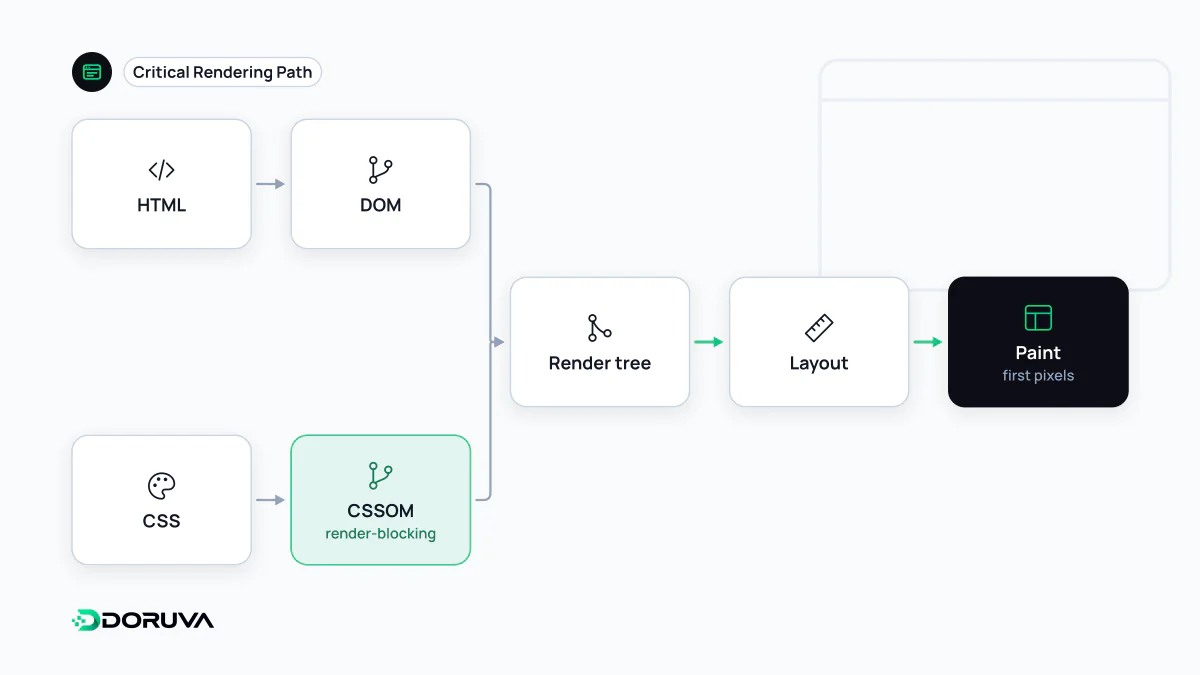
Five stages between bytes and pixels
A browser cannot paint the bytes it receives as they are. It has to run a series of transformations first, and nothing appears on screen until all of them have produced a result:
- DOM construction: HTML is tokenised and parsed into nodes that form the DOM tree. Parsing is incremental, so it starts before the whole document has arrived.
- CSSOM construction: external and inline styles are parsed into the CSS Object Model. Unlike the DOM, a half-built CSSOM is useless: a later rule may override an earlier one, so the browser waits for the complete stylesheet.
- Render tree: DOM and CSSOM are combined. Only visible nodes are included; elements with
display: noneand the contents ofheadare left out. - Layout: the size and position of every box are calculated for the current viewport width.
- Paint: boxes, text, borders and images are rasterised into pixels, typically on separate layers that are composited at the end.
The same machinery keeps running after the first frame. When JavaScript changes an element's width, layout and paint run again, which is why animating box-model properties is expensive.
What makes the path longer
Two default behaviours stretch the critical path. CSS is render-blocking: rather than flash unstyled content, the browser holds off painting until the CSSOM is ready. A stylesheet whose media attribute does not match, such as media="print", is still downloaded but no longer delays the first paint.
A script without async or defer is parser-blocking. The browser stops processing HTML until the script has been fetched and executed, and because the script may query styles, it also waits for any preceding CSS. CSS, JavaScript and DOM construction end up chained together. Finding and fixing the files that cause this is covered in the entry on render-blocking resources.
Three ways to measure the path
- Number of critical resources: files that must arrive before the first paint. Each one is a request and often a new connection.
- Critical bytes: the combined size of those files. A 300 KB CSS bundle is downloaded and parsed in full even if the first screen needs only 15 KB of it.
- Path length: the number of sequential round trips in which resources discover each other. HTML referencing CSS, which pulls in more CSS via
@import, which in turn requests a font, is a three-level chain.
A blocking head versus a lean one
<!-- Long chain -->
<link rel="stylesheet" href="/css/site.css">
<link rel="stylesheet" href="/css/print.css">
<script src="/js/app.js"></script>

<!-- Shorter chain -->
<style>/* the small rule set needed for the first screen */</style>
<link rel="stylesheet" href="/css/site.css">
<link rel="stylesheet" href="/css/print.css" media="print">
<script src="/js/app.js" defer></script>
In the second version the print stylesheet no longer holds up rendering, the script does not stop the parser, and the styles for the first screen arrive with the HTML itself. Inlining that minimal rule set is known as critical CSS. For files that are discovered late but needed early, such as a hero image or a web font, preload tells the browser to fetch them sooner.
Where it shows up in your metrics
A long critical path shows most directly in FCP, the moment the first content is painted. Because the main image or headline is drawn at the end of the same chain, LCP suffers too. The Performance panel in Chrome DevTools lays network requests, parsing, style calculation, layout and paint on a single timeline, so you can see exactly which file kept the page blank. Lighthouse also lists render-blocking requests separately. For the canonical description of each stage, MDN's critical rendering path guide is a solid reference.