

What is DOM (Document Object Model)?
Definition
The DOM (Document Object Model) is the tree structure a browser builds in memory after parsing an HTML document, representing elements, text and attributes as nested nodes. JavaScript reads and changes the page through this tree, and what you see on screen is drawn from the DOM's current state, not from the original HTML source. The DOM is defined as a living standard by WHATWG.
Also known as: DOM tree, rendered DOM, HTML DOM
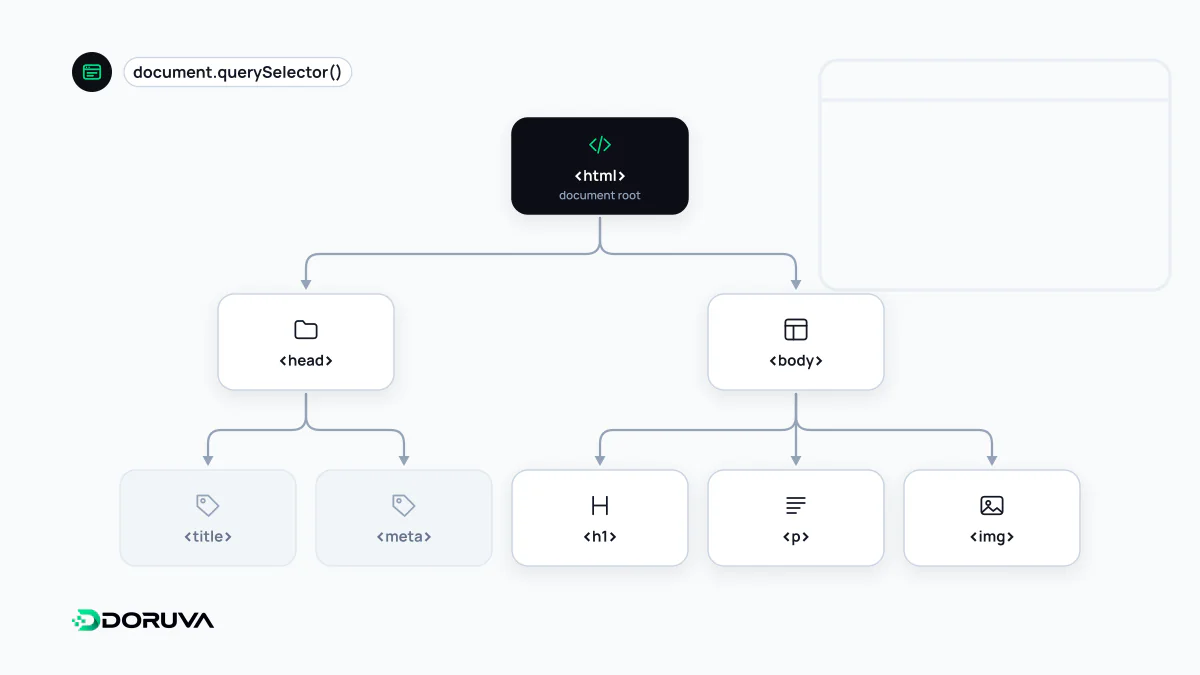
Source code is not the DOM
The HTML a server sends is just text. The browser parses it and places every tag, text run and comment into a tree as a node: document at the top, html below it, then head and body, branching from there. Along the way the parser repairs errors: it closes unclosed tags, inserts a missing tbody into tables and reorganises invalid nesting. Then JavaScript runs and can add, remove or modify nodes.
So there are really two versions of a page:
- Raw HTML: the text the server sent, shown by "View page source".
- Rendered DOM: the current state after parsing and JavaScript, shown in the Elements panel of developer tools.
In a fully client-rendered app, the raw HTML can be an almost empty shell while the DOM holds hundreds of elements.
How JavaScript works with the DOM
The DOM is the interface that makes a document programmable: an API provided by the browser. Typical operations look like this:
const heading = document.querySelector("h1");
heading.textContent = "Current offers";

const list = document.createElement("ul");
document.body.append(list);

document.querySelector("button")
  .addEventListener("click", () => { list.hidden = !list.hidden; });
Changing the DOM isn't free: after each change the browser may recalculate styles, update layout and repaint. A very large DOM increases memory use and slows these steps, which can make the page respond late to input and worsen INP. Lighthouse flags excessive DOM size for this reason.
Two related terms are often confused. The virtual DOM used by libraries like React is not part of the standard; it's an in-memory JavaScript copy of the UI used to minimise changes to the real DOM. The Shadow DOM is a standard feature that isolates a component's internal structure and styles from the rest of the page.
How search engines see the DOM
Google processes pages in three stages: crawling, rendering and indexing. Googlebot first fetches the raw HTML; the page is then rendered in an up-to-date Chromium-based browser, and the HTML produced from the DOM after JavaScript has run is used for indexing. Content added with JavaScript can therefore be seen by Google. But rendering is a separate step that can be delayed, and if a script fails or depends on a blocked resource, the content never appears. Not every crawler executes JavaScript, either.
That's why having the main content, internal links and meta tags in the raw HTML is the most robust approach. The JavaScript SEO and SSR entries go into more detail.
How to check it
To see whether something is in the raw HTML or only in the DOM, search the "View page source" output and compare it with the Elements panel. Search Console's URL Inspection tool shows the rendered HTML Google sees. Doruva's SEO Checker also compares the server response with the browser-rendered page and flags headings, links and content that only appear after JavaScript. For the interface itself, MDN's DOM reference is comprehensive.