

What is Indexing?
Definition
Indexing is the step in which a search engine analyses a crawled page and stores it in its index, the database from which search results are drawn. During indexing Google processes the text, headings, images and structured data, and picks a canonical version among near-duplicate pages. Only pages that are in the index can appear in organic results.
Also known as: search engine indexing, index, Google index
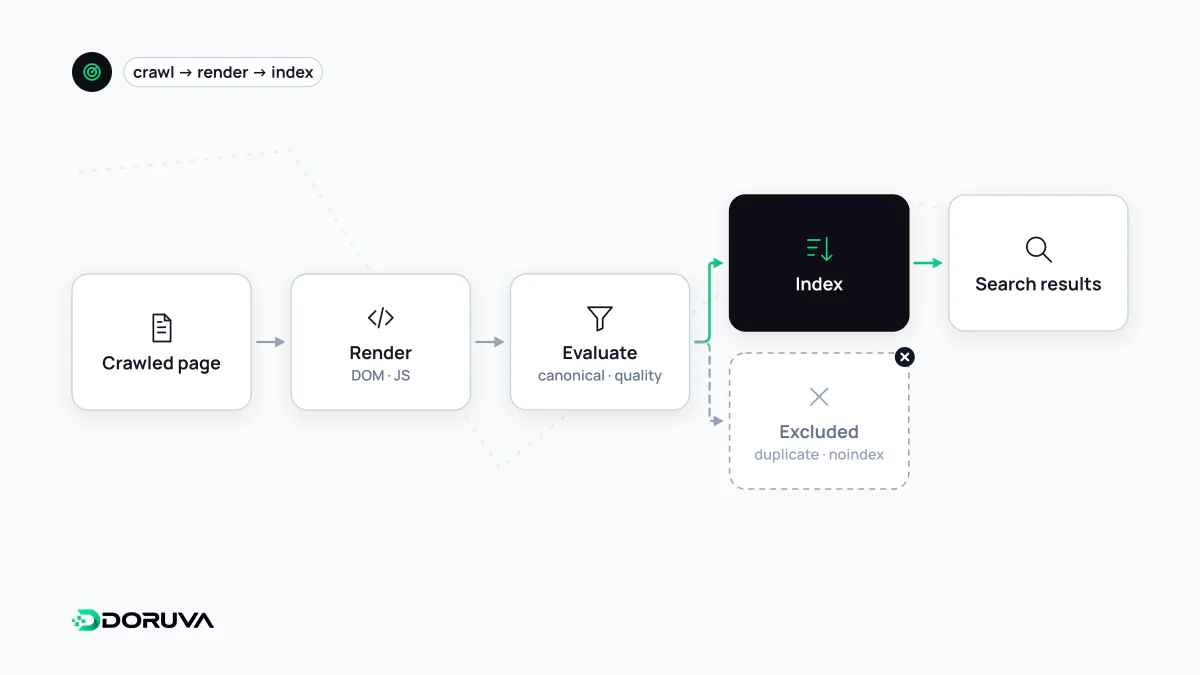
Index, indexability and indexing
These three terms are often used interchangeably, but they mean different things:
- Index: the huge database a search engine keeps about the pages it knows. Results for a query are selected from this index, not from the live web.
- Indexability: whether a page is eligible to be indexed. It must be crawlable, return status 200, carry no
noindex, and not declare another URL as its canonical. - Indexing: the act of analysing an eligible page and storing it in the index.
An indexable page is not automatically indexed. Google states that it does not guarantee indexing, even for pages that follow its guidelines.
How a page gets into the index
It starts with crawling. After fetching and rendering the page, Google analyses its text, title, headings, images, video and structured data. It groups pages with the same or very similar content and picks the most representative one as the canonical; this is the step that decides how duplicate content plays out in the index. Site owners can state a preference with a canonical URL, but Google makes the final choice.
Likely outcomes by signal
| Page state | Expected effect on indexing |
|---|---|
Returns 200, no noindex, self-referencing canonical | Candidate for indexing |
Has noindex | Dropped from, or never added to, the index once crawled |
| Canonical points to another URL | Usually the other URL is indexed |
| 301 redirect | The target URL is indexed |
| Returns 404 or 410 | Drops out of the index over time |
| Blocked by robots.txt | Content cannot be read; if linked, the bare URL may still appear without a description |
Status codes are covered in more detail under HTTP status code.
Removing a page from the index
The lasting solution is the noindex directive, set with a meta tag on HTML pages or an HTTP header for files such as PDFs:
<meta name="robots" content="noindex">

X-Robots-Tag: noindex
A frequent mistake: if the same page is also blocked in robots.txt, Google cannot crawl it and therefore never sees the noindex. For noindex to work, the page must stay crawlable. The Removals tool in Search Console only hides a URL temporarily; permanent removal still needs noindex, deleting the page, or password protection. Google's current guidance is in Block Search indexing with noindex.
Checking index status
- URL Inspection: shows whether a single URL is indexed, which canonical Google selected and when it was last crawled.
- Page indexing report: groups the site's non-indexed pages by reason. "Crawled – currently not indexed" and "Discovered – currently not indexed" are the most common; the first is usually about the content's value, the second more often about crawl priority.
- The
site:operator: gives a rough impression, but it is neither complete nor an exact count.