

What is Noindex?
Definition
Noindex is a robots rule that asks search engines not to include a page or file in their index. It is applied with a robots meta tag in the page head or with an X-Robots-Tag HTTP response header. Google obeys it, but only after crawling the URL and seeing the rule, so a noindexed page must not be blocked in robots.txt.
Also known as: noindex tag, meta robots noindex, X-Robots-Tag noindex, noindex directive
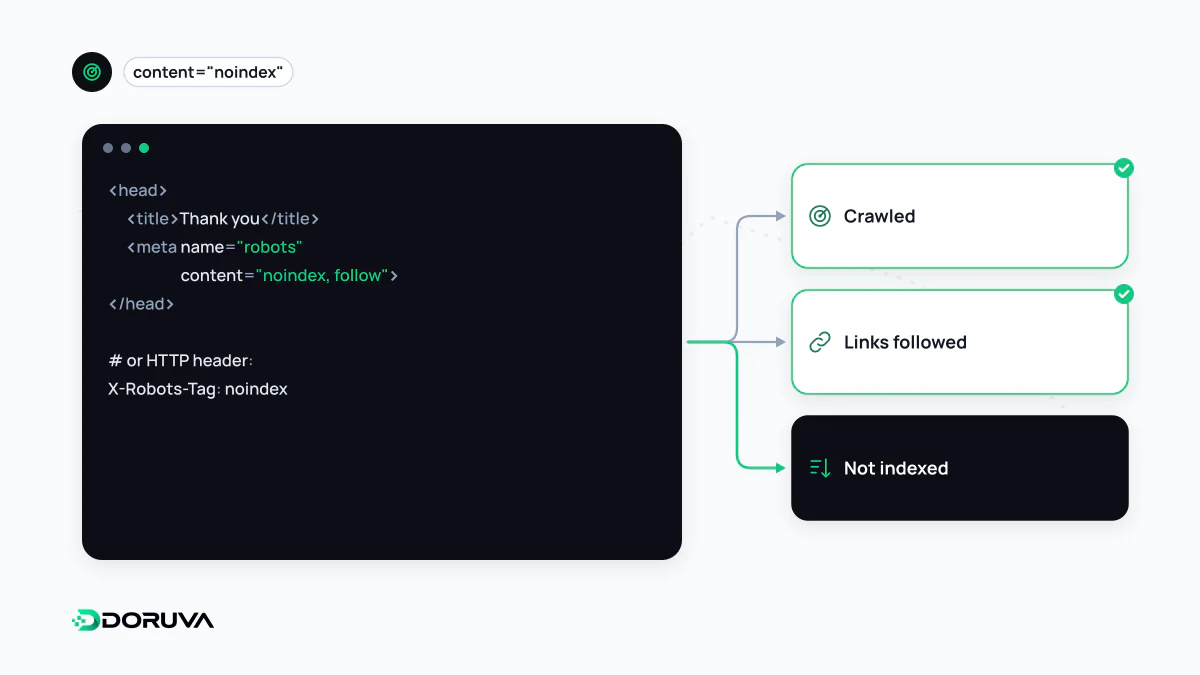
Two ways to apply it
On HTML pages, noindex is a meta tag in the <head>:
<meta name="robots" content="noindex">To target only Google's crawler, use name="googlebot" instead. Files such as PDFs or images cannot carry a meta tag, so the same rule goes in the HTTP response:
HTTP/1.1 200 OK
X-Robots-Tag: noindex
Not the same as robots.txt
Noindex and robots.txt answer different questions. Robots.txt says “don't crawl this URL”; noindex says “crawl it, but don't index it.” Combining them carelessly backfires: a URL blocked in robots.txt is never fetched, so Google never sees its noindex. If that URL has links pointing to it, the address can still appear in results without its content having been read.
A Noindex: line inside robots.txt is not supported by Google; it dropped that unofficial rule entirely in 2019.
| Goal | Right tool |
|---|---|
| Page stays reachable but out of search results | noindex |
| Bots should not fetch certain URLs at all | robots.txt |
| Duplicates should consolidate to a main URL | canonical URL or redirect |
| Nobody should see the content | Password or login protection |
Typical uses
- Internal site search result pages
- Thank-you pages after a form submission
- Account, cart and checkout steps
- Auto-generated tag or archive pages with very thin content
- Expired campaign pages that must stay reachable but have no search value
Mistakes that hurt
- Staging noindex left in production. A site-wide noindex added during development and forgotten at launch will start pulling the site out of results. Put it near the top of every launch checklist.
- Noindexed URLs in the sitemap. An XML sitemap says “please index this”; listing noindexed pages sends a contradiction that Search Console reports as an error.
- Noindex instead of canonical. Hiding duplicates with noindex does not consolidate signals to the main page, and Google advises against using noindex for canonicalization.
- Removing noindex with JavaScript. When Google sees noindex in the initial HTML it may skip rendering, so deleting the tag client-side won't work, a key point in JavaScript SEO.
- Confusing it with nofollow. Nofollow concerns links; it does not decide whether the page stays in the index.
When it takes effect
Noindex applies the next time Google crawls the page. The URL then drops out of the index over days or weeks; requesting a recrawl in Search Console's URL Inspection tool can speed this up. In an emergency, the Removals tool hides a URL temporarily, but the lasting fix is still noindex, a 404/410 or access control. The complete rules are in Google's noindex documentation.