

What is JavaScript SEO?
Definition
JavaScript SEO is the part of technical SEO that makes sure websites whose content, links or meta data are generated by JavaScript can be crawled, rendered and indexed correctly by search engines. Its core topics are the rendering approach (server-side rendering, static generation or client-side rendering), link markup, routing and status codes, and how much critical signals depend on JavaScript.
Also known as: JS SEO, SEO for JavaScript sites
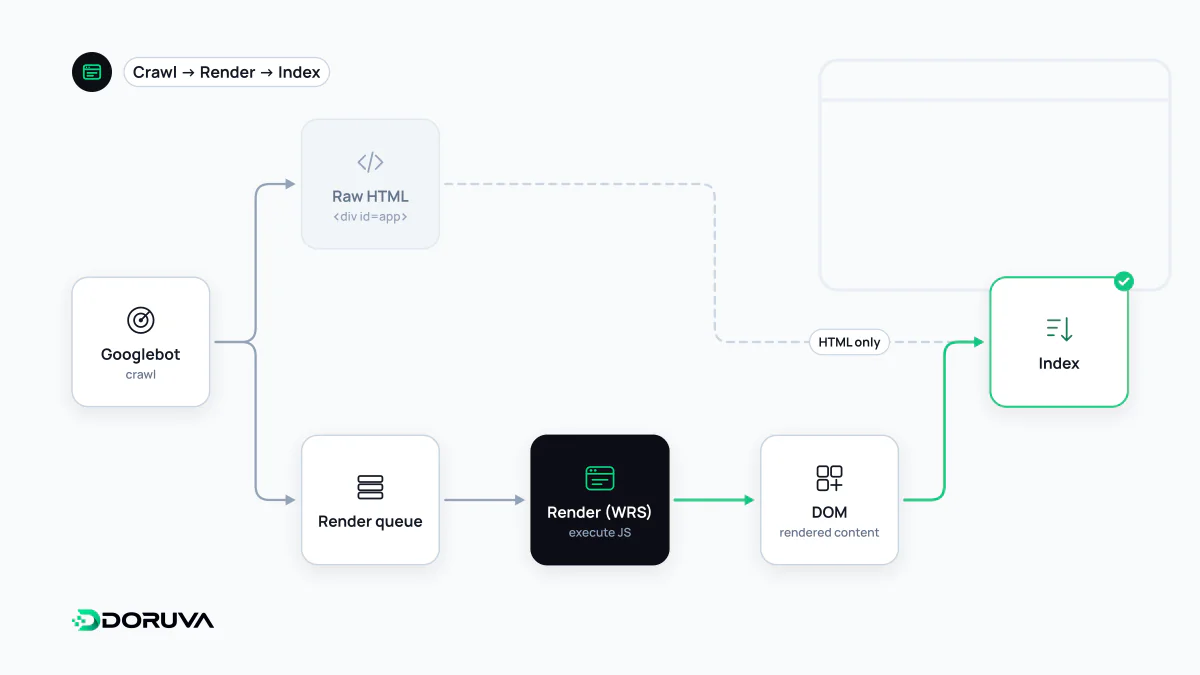
How Google processes JavaScript
Google handles JavaScript-heavy pages in three phases: crawling, rendering and indexing. Googlebot first fetches the HTML and extracts the links in it. The page then enters a render queue, where an evergreen version of Chromium executes the JavaScript and the resulting HTML is processed again. Google's documentation says a page may stay in this queue for a few seconds, but it can take longer.
So Google can run JavaScript; the question is how much you depend on it and how fragile that dependency is. Not every bot renders JavaScript either. Some AI crawlers and social preview bots may only read the initial HTML; behaviour varies by provider and is not always documented.
Rendering approaches and their SEO impact
| Approach | Content in initial HTML | For search |
|---|---|---|
| Server-side rendering (SSR) | Yes | Content and links arrive in the first response; lowest risk |
| Static generation (SSG) / prerendering | Yes | Same benefit as SSR with less server load |
| Client-side rendering (CSR) | Usually an empty shell | Content depends on rendering; higher risk of errors and delays |
Google still describes server-side rendering or prerendering as a great idea, because it is faster for users and crawlers and not all bots can run JavaScript. Dynamic rendering (serving bots a different version from users) is a workaround Google no longer recommends as a long-term solution. In modern frameworks, hydration makes server-rendered pages interactive in the browser, while the content is already in the HTML for crawlers.
Common problems
- Links that aren't links: Google reliably follows only
<a>elements with anhrefattribute. - Soft 404s: in single-page apps, a missing product shows "Not found" but returns status 200.
- Meta tags changed by JavaScript: if the initial HTML contains
noindex, Google may skip rendering, so removing it with JavaScript may not work. - Blocked resources: disallowing JavaScript or CSS files in robots.txt prevents correct rendering.
- Interaction-dependent content: content that only loads on scroll or click may be missed, because Googlebot does not perform those interactions.
- Fragment URLs: addresses like
/#/productsare not indexed as separate pages; use the History API.
<!-- Followed -->
<a href="/en/seo/">SEO services</a>

<!-- Not reliably followed -->
<span onclick="location.href='/en/seo/'">SEO services</span>
How to check what Google sees
- Use the URL Inspection tool in Search Console to view the rendered HTML and screenshot.
- Compare "View page source" (initial HTML) with the DevTools Elements panel (rendered DOM); if the main content exists only in the latter, the page depends on JavaScript.
- Load the page with JavaScript disabled and see whether headings, text and links remain.
Google's current guidance is in JavaScript SEO basics. The SEO Checker also flags JavaScript-dependent content and JavaScript-only links.