

What is Cloaking?
Definition
Cloaking is the practice of deliberately presenting different content to search engine crawlers and to human visitors in order to manipulate rankings and mislead users. It is usually done by a server that checks the requester's user agent or IP address and returns one page to Googlebot and another to people. Cloaking is explicitly prohibited by Google's spam policies.
Also known as: SEO cloaking, search engine cloaking, content cloaking
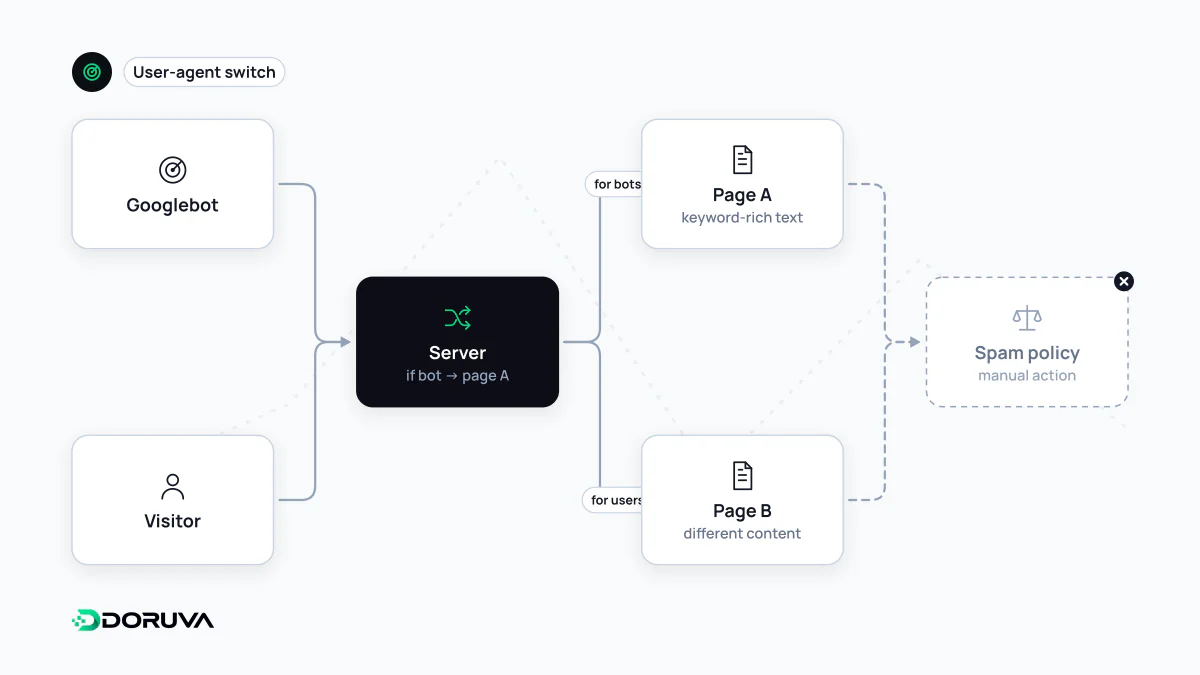
The mechanism: responses that depend on who asks
Every request carries clues about the client: the User-Agent header, the IP address, sometimes language or cookies. Cloaking uses those clues to send one version of a page to anything that looks like a crawler, such as Googlebot, and a different version to real visitors. The examples in Google's spam policies are typical: a travel page shown to the search engine while users get a pharmacy storefront, or keywords inserted into the text only when the request comes from a search engine.
What matters is intent and outcome. If the page a searcher expects from the title and snippet is not the page they land on, this is not a technical quirk but deception.
Varying content without cloaking
Serving different responses to different clients is not automatically a violation. The test is whether what Google receives is substantially what users receive:
- Paywalls: not cloaking, as long as Google can see the full content behind the paywall the way a subscriber would.
- Dynamic rendering: serving pre-rendered HTML to crawlers on JavaScript-heavy sites is not treated as cloaking if the content is similar. Google now describes it as a workaround rather than a long-term solution and recommends server-side or static rendering instead.
- Device-specific HTML: different markup for mobile and desktop on the same URL is fine when the content is equivalent; send a
Varyheader so caches keep the versions apart. - Location and language: showing local prices to visitors in a given country is fine, provided Googlebot crawling from that location sees the same.
HTTP/1.1 200 OK
Content-Type: text/html; charset=utf-8
Vary: User-Agent

<!-- Different templates per device, same headings, copy and links -->
For A/B tests Google is explicit: showing one set of URLs to Googlebot and another to people is cloaking, test or not. If variants need a redirect, use a temporary 302, and point variant pages to the original with a canonical.
Cloaking you did not put there
A large share of real-world cloaking is the work of attackers rather than site owners. Code injected into a compromised CMS shows normal pages to administrators and regular visitors while serving pharmacy, gambling or counterfeit-goods pages to search engines. The owner sees nothing unusual in a browser; the first symptom is often strange titles or foreign-language snippets in search results. This overlaps with the hacked content policy and may also surface in the Security Issues report in Search Console.
Checking what Googlebot gets
- Run a live test with the URL Inspection tool in Search Console and compare the fetched HTML and screenshot with what you see in a browser.
- Search
site:yourdomain.comfor titles you do not recognise or snippets in an unexpected language. - In server logs, compare response sizes for Googlebot requests with ordinary requests to the same URLs.
- Review CMS files, plugins and server rules such as
.htaccessfor unexpected branching on the user agent.
Deliberate cloaking can lead to a manual action titled "Cloaking and/or sneaky redirects". For the wider set of prohibited practices, see Google spam policies.