

What is Redirect?
Definition
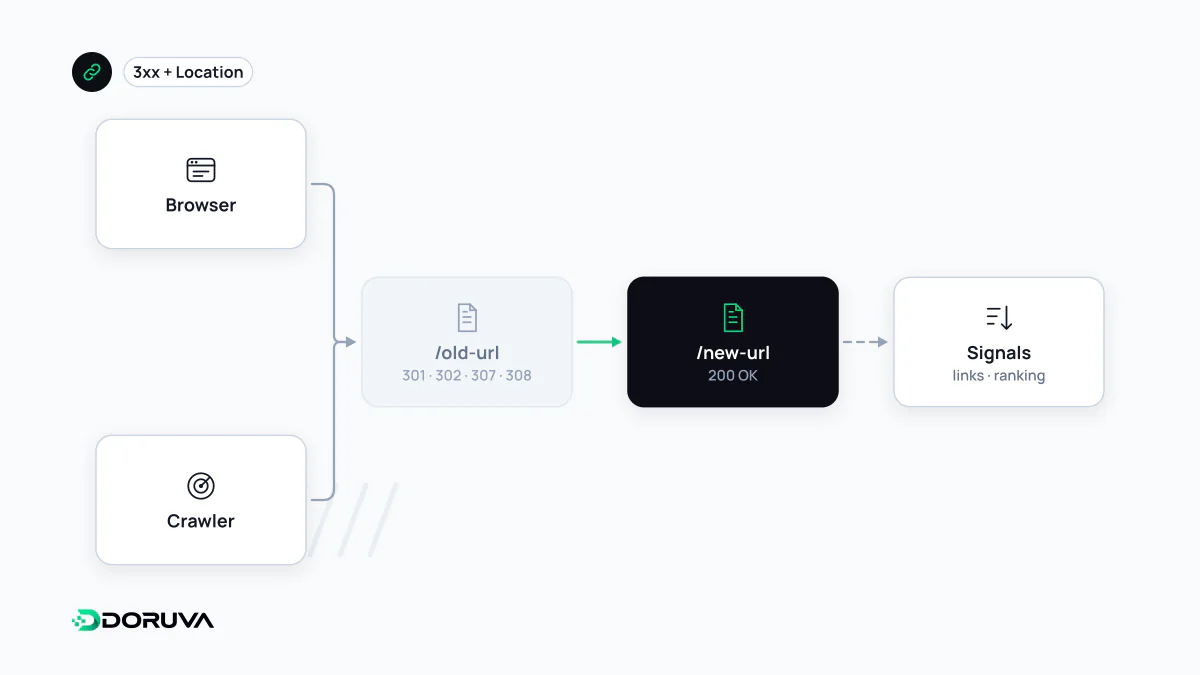
A redirect automatically sends users and search engine crawlers from one URL to another. 301 and 308 are permanent redirects; 302 and 307 are temporary. A permanent redirect strongly signals to search engines that the new address should become the canonical one, while with a temporary redirect the original URL may stay in the index.
Also known as: URL redirect, URL forwarding
When you need one
Redirects are used when a page's URL changes, when two pages are merged, when a site moves from HTTP to HTTPS or to a new domain, and when www and non-www versions are consolidated. A correct redirect gets visitors from old links to the right page and tells search engines to move signals to the new address.
The codes compared
| Code | Type | HTTP method preserved? | What it means to Google |
|---|---|---|---|
| 301 | Permanent | Not guaranteed (POST may become GET) | Strong signal that the target should be canonical |
| 308 | Permanent | Yes | Same as 301 |
| 302 | Temporary | Not guaranteed | Weak signal; the old URL may stay indexed |
| 307 | Temporary | Yes | Same as 302 |
307 and 308 matter for requests whose method must be kept, such as form submissions; for SEO they behave like 302 and 301 respectively. Note that browsers may display an HTTP-to-HTTPS upgrade on HSTS sites as a "307 Internal Redirect"; that is generated by the browser, not sent by the server.
Google considers server-side redirects the most reliable. An instant meta refresh counts as permanent and a delayed one as temporary; JavaScript redirects are recommended only when nothing else is possible, because they depend on rendering.
# Nginx: permanently redirect an old URL to its new home
location = /old-service/ {
    return 301 https://www.example.com/new-service/;
}
The cost of the wrong code
Using 302 for a permanent move is the most common mistake. Google may keep the old URL indexed and adopt the new one as canonical more slowly. Conversely, a 301 for a genuinely temporary situation can make the target replace the original page in search.
Chains and loops
A redirect chain is A to B to C. Each hop is another request: latency for users and extra crawling for search engines. Google's crawlers follow up to 10 hops, but even much shorter chains are wasteful. Chains typically build up when a site has been migrated several times and old rules stack on top of each other. Point every old URL straight to its final destination in one step and update internal links to the final URL.
A redirect loop is A to B and back to A; the page never loads and the browser reports "too many redirects". Loops usually come from conflicting rules across the server, CDN, CMS and application.
Migration best practice
- Map each old URL to the closest equivalent new URL; don't send everything to the homepage.
- Keep redirects in place for as long as possible, generally at least a year as Google suggests; valuable backlinks keep pointing at old addresses.
- List only final destination URLs in the XML sitemap.
- After the move, bulk-test the old URL list and confirm each reaches a 200 page in a single hop.
Redirect types and Google's interpretation are documented on Google Search Central. The SEO Checker reports chains, loops and temporary redirects.