

What is Crawl Budget?
Definition
Crawl budget is the set of URLs on a site that Google can and wants to crawl within a given period. It is shaped by the crawl capacity limit, which reflects how much load the server can handle, and crawl demand, which reflects how much Google wants to crawl the pages. Google says it mainly matters for very large or rapidly changing sites, not for most websites.
Also known as: Googlebot crawl budget
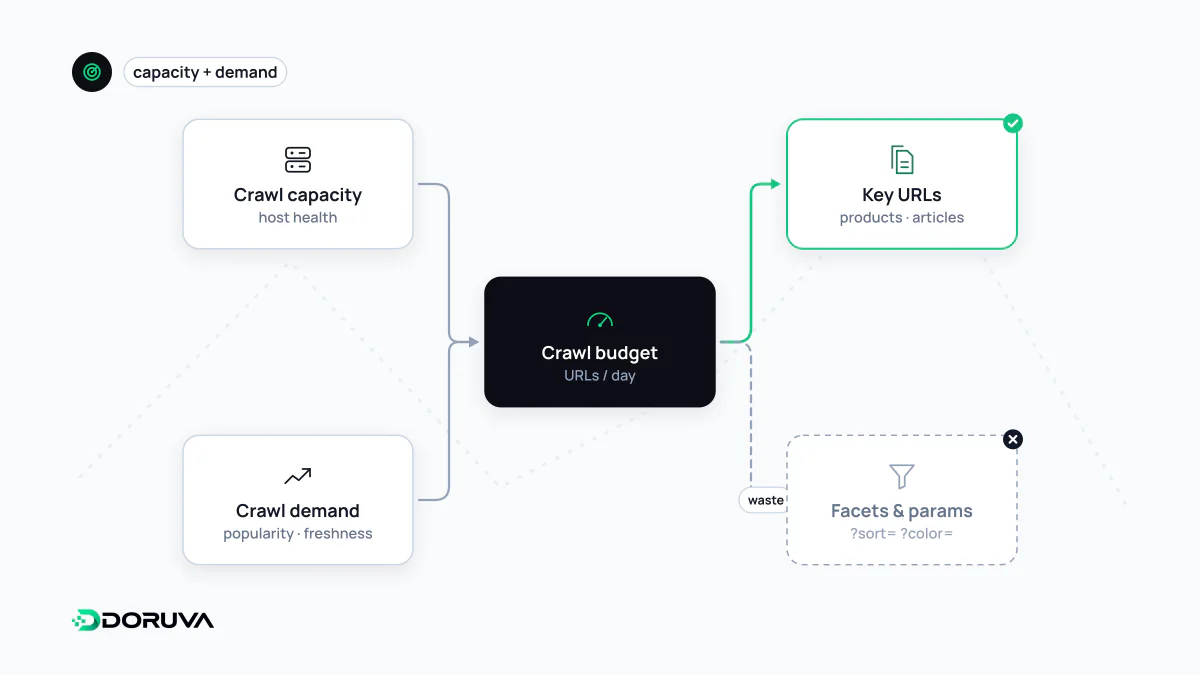
Two parts: capacity and demand
Googlebot's time and resources are finite, and it also tries not to overload your server. Google defines crawl budget as the combination of two things:
- Crawl capacity limit: how many parallel connections Googlebot can use and how long it waits between fetches without straining the server. Fast, healthy responses raise the limit; slowdowns, 5xx errors or
429responses lower it. - Crawl demand: how much Google wants to crawl the site, driven by the number of known URLs, their popularity and how often content changes. Big events such as site moves can raise demand temporarily.
Even with spare capacity, low demand means less crawling. Crawl budget is not something you can grow with server power alone.
Who should actually care
Google's guide for large sites spells out its audience:
| Site profile | Unique pages | How often content changes |
|---|---|---|
| Large sites | 1 million+ | Moderately (about weekly) |
| Medium or larger sites | 10,000+ | Very rapidly (daily) |
It also includes sites of any size where a large share of URLs sit in Search Console as “Discovered – currently not indexed”. The same guide says that if your pages are usually crawled the day they are published and you don't have many rapidly changing pages, you don't need to worry about it. For a company site, a service business or a store with a few hundred products, crawl budget is rarely a real bottleneck. Google also stresses that being crawled more does not by itself mean ranking better.
What wastes it
- Infinite URL spaces: filter combinations, sort parameters, session IDs, calendars that page forward forever.
- Duplicate URLs: many addresses for the same content, which may keep being crawled even when canonicalized.
- Soft 404s: “Product not found” pages that return
200. Removed pages should return a404or410status code. - Long redirect chains: Google notes that long redirect chains hurt crawling.
- A slow server: longer response times pull the capacity limit down.
What you can do
Blocking URL patterns you never want crawled with robots.txt is Google's primary recommendation:
User-agent: *
Disallow: /*?sort=
Disallow: /cart/
Noindex does not help here: Google still requests the page and only drops it after seeing the rule, so the fetch is spent anyway. To keep important pages fresh, maintain an accurate XML sitemap with correct <lastmod> values. Returning 503 or 429 during a temporary overload slows Googlebot down, but it is an emergency brake, not a long-term setting.
How to monitor it
Search Console's Crawl Stats report shows daily requests, average response time and a breakdown of responses by status code. For finer detail, analyze Googlebot requests in your server access logs. Everything above is covered in Google's guide to managing crawl budget; for the basics, see crawling.