

What is Robots.txt?
Definition
Robots.txt is a plain text file published at the root of a site (for example https://example.com/robots.txt) that tells crawlers which URL paths they may crawl. It implements the Robots Exclusion Protocol, standardised as RFC 9309. It controls crawling, not indexing: a blocked URL can still appear in search results without a description if other pages link to it.
Also known as: robots.txt file, Robots Exclusion Protocol, REP, robots exclusion standard
How the file works
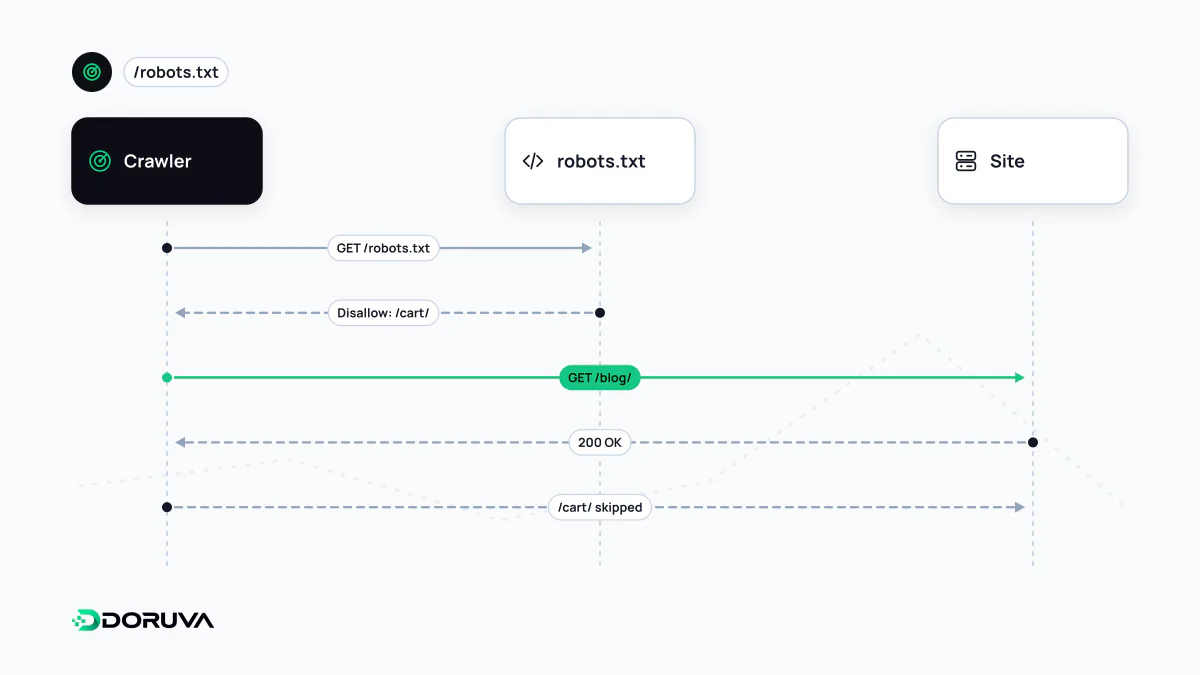
When a crawler arrives at a site it first requests /robots.txt. The file only applies to the protocol, host and port it is served from, so https://example.com/robots.txt does not cover https://blog.example.com. The file is made of groups: each group starts with one or more User-agent lines followed by the Disallow and Allow rules for those crawlers.
- Google recognises only four fields:
user-agent,allow,disallowandsitemap. Google does not supportcrawl-delay, although some other search engines may honour it. - When several rules match a URL, Google applies the most specific one, meaning the rule with the longest path. In a tie, the least restrictive rule (
Allow) wins. *matches any sequence of characters, and$at the end of a rule marks the end of the URL. Paths are case-sensitive.- Google processes the first 500 KiB of the file and generally caches it for up to 24 hours.
- If the file returns a 4xx error (other than 429), Google crawls as if there were no restrictions. A 5xx error initially makes Google stop crawling the site.
An example file
User-agent: *
Disallow: /admin/
Allow: /admin/help/
Disallow: /*?session=

User-agent: GPTBot
Disallow: /

Sitemap: https://example.com/sitemap.xml
Here every crawler is kept out of the admin area, except its public help section: Allow: /admin/help/ is the longer path, so it wins inside that folder. URLs carrying a session parameter are not crawled either. The second group blocks GPTBot from the whole site. The last line points to the XML sitemap and is not tied to any group.
Blocking crawling is not blocking indexing
In Google's own words, robots.txt is not a mechanism for keeping a page out of Google; it exists mainly to avoid overloading a site with requests. If a blocked page is linked from elsewhere, its URL and details such as anchor text can still show up in results without a description. To keep a page out of search, use noindex, and leave the page crawlable so the directive can be seen. Writing noindex inside robots.txt does not help either; Google stopped supporting that unofficial rule in 2019. For the bigger picture, see crawling.
Common mistakes
- Shipping a staging
Disallow: /to the live site. - Blocking CSS and JavaScript files that are needed to render the page.
- Treating robots.txt as security: the file is public, and listing paths you want hidden makes them easier to find. Private content needs a password or authentication.
- Forgetting how groups work: a crawler that finds a group naming it specifically ignores the
User-agent: *group entirely.
AI crawlers and robots.txt
Bots run by AI companies also follow user-agent groups in robots.txt, which lets site owners decide which AI crawlers to allow. OpenAI's GPTBot, used for model training, can for instance be blocked under its own name. Google-Extended is different: it is not a separate crawler but a control token for whether content Google crawls may be used for Gemini models, and it does not affect visibility in Google Search. The formal rules are defined in RFC 9309, and Google's interpretation is documented in How Google interprets robots.txt.