

What is Duplicate Content?
Definition
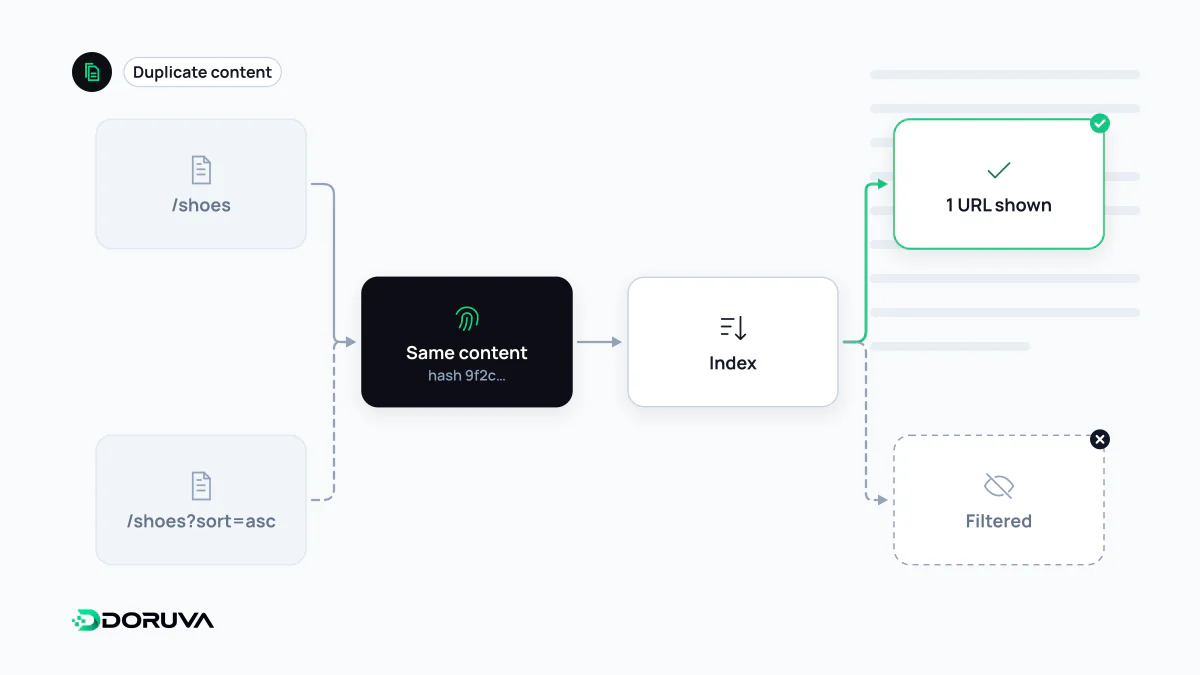
Duplicate content is identical or substantially similar content that is accessible at more than one URL. It usually arises from technical causes such as URL parameters, www and HTTPS variants, or sorting and filter pages. Google picks one version as canonical; duplicate content within a site is not in itself a penalty or a reason for a manual action.
Also known as: duplicate pages, duplicated content, near-duplicate content, content duplication
The penalty myth first
The "duplicate content penalty" is one of SEO's most persistent myths. Google's SEO Starter Guide is explicit: content accessible under multiple URLs is inefficient, but it is not something that will cause a manual action. Copying other people's content is a different matter and may fall under scraped content in Google's spam policies.
No penalty does not mean no problem. Duplicates can lead to:
- Google choosing and showing a URL you didn't prefer,
- links and other signals being split across several URLs,
- crawlers fetching the same content repeatedly, wasting crawl budget on large sites,
- one page's performance being scattered across multiple addresses in reports.
Where duplicates come from
Most duplicate content is technical variation that nobody created on purpose:
http/httpsandwww/non-wwwversions,- trailing slash differences:
/servicesvs/services/, - tracking parameters such as
?utm_source=..., - e-commerce sorting, filter and colour or size variant URLs,
- products reachable through several category paths,
- print versions, paginated archives, and staging environments left open to indexing.
Translations into other languages are not duplicates; near-identical versions of the same language for different countries should be connected with hreflang.
Canonicalization: telling Google your preference
Google selects one URL from each duplicate cluster as canonical. You can state your preference with several signals, which are stronger together:
| Method | When | Signal strength |
|---|---|---|
| 301 redirect | Users don't need the duplicate version | Strong |
rel="canonical" | The variant must stay accessible (filters, parameters) | Strong |
| Listing only canonical URLs in the sitemap | Always, as support | Weak |
<!-- on https://www.example.com/shoes/?sort=price -->
<link rel="canonical" href="https://www.example.com/shoes/">
These are signals, not directives: if the canonical tag, internal links and sitemap contradict each other, Google may choose a different URL. That is why internal links should always point to the canonical address.
Common mistakes
- Blocking duplicates in robots.txt: if Google cannot crawl a page, it cannot see its canonical tag or consolidate signals.
- Pointing every page's canonical at the homepage.
- Adding
noindexto a page that is also declared canonical, sending contradictory signals. - Generating templated pages (city pages, for example) that differ only by a place name; that is a content quality issue rather than a technical duplicate.
How to find it
The URL Inspection tool in Search Console shows the user-declared and the Google-selected canonical side by side, and the Page indexing report lists states such as "Duplicate, Google chose different canonical than user". Google's approach is documented in consolidating duplicate URLs, and the SEO Checker flags repeated titles, descriptions and content.