

What is Canonical URL?
Definition
A canonical URL is the address a site marks as the preferred version of a page when the same or very similar content is reachable at several URLs. It is usually declared with a rel=canonical link element in the page head, an HTTP Link header, a permanent redirect or sitemap inclusion. Google treats the declaration as a strong signal, not a binding directive.
Also known as: rel=canonical, canonical tag, canonical link element, preferred URL
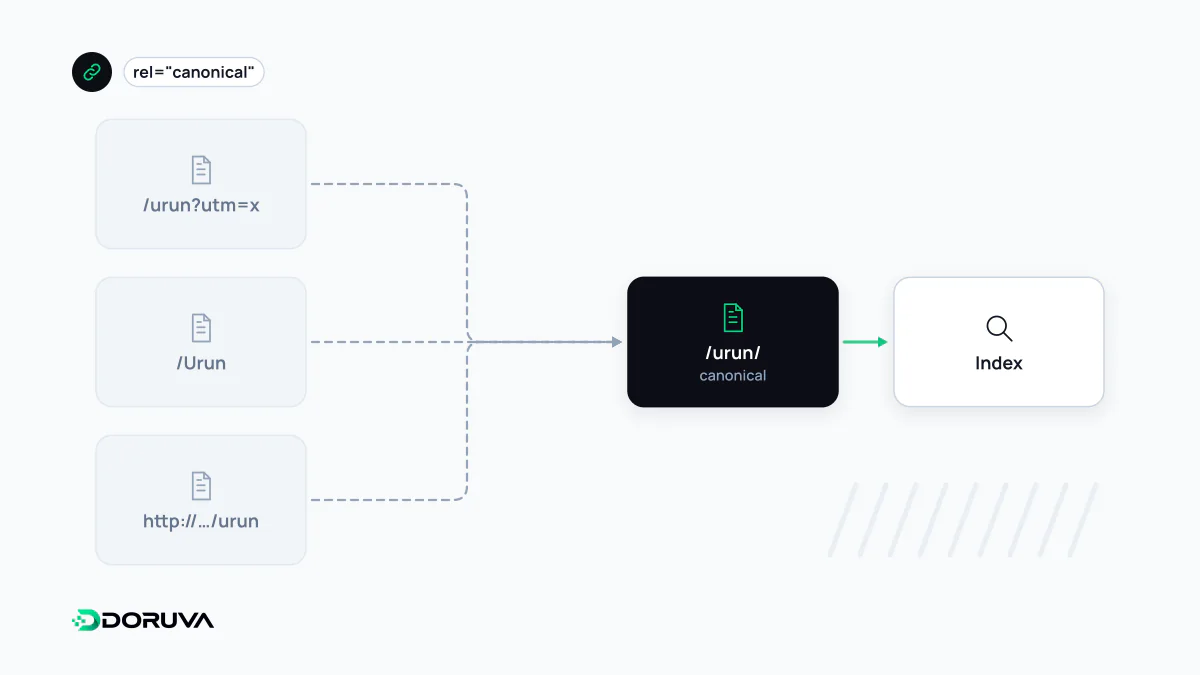
One page, many addresses
Pages end up with multiple URLs far more often than site owners expect. Tracking parameters (?utm_source=...), filter and sort options, http versus https, www versus non-www, trailing slashes, printer-friendly views: a visitor sees one page, a search engine sees several distinct addresses.
Google groups these duplicates and chooses one URL to represent the group. That representative is crawled regularly and shown in results; the alternates are crawled less often. A canonical declaration is how you tell Google which address you prefer. Without one, Google still picks, but its choice may not be the URL you report on, share or want links pointing to. It is the technical side of the broader duplicate content question.
Ways to declare it
Google documents several methods, and they do not carry equal weight:
| Method | Best suited for | Signal strength |
|---|---|---|
| Permanent redirect (301/308) | Retiring the old URL entirely | Strong |
rel="canonical" link element | HTML pages | Strong |
Link HTTP header | Non-HTML files such as PDFs | Strong |
| Listing only the preferred URL in a sitemap | Supporting signal on large sites | Weak |
If the duplicate should disappear for users too, a redirect is the cleaner tool. When both URLs must stay accessible, as with a filtered listing, use the link element:
<!-- https://www.example.com/shoes/?color=black&sort=price -->
<link rel="canonical" href="https://www.example.com/shoes/" />
For a file without an HTML head, send the same hint in the response:
Link: <https://www.example.com/catalog.pdf>; rel="canonical"Combining methods strengthens the signal, provided they all agree. If your XML sitemap, internal links and canonical tags point at different versions, you are sending mixed messages.
A hint, not a command
Unlike noindex, a canonical tag is not a rule Google must obey. Google weighs it alongside redirects, internal linking, HTTPS, sitemap entries and content similarity, and may select another URL. Search Console's URL Inspection tool lists the user-declared canonical and the Google-selected canonical separately; when they differ, one of your signals is contradicting the other.
Common mistakes
- Pointing every paginated page to page one. Page 2 and page 3 list different items, so each should normally be self-canonical.
- Relative URLs. Use the full address including protocol and host to avoid ambiguity.
- Several conflicting canonical tags. Themes and plugins sometimes each print one; Google may then ignore them.
- Placing the tag outside the head.
rel="canonical"is only honored inside<head>. - Blocking duplicates in robots.txt. Google advises against using robots.txt or noindex for canonicalization; a blocked page's canonical tag cannot even be read.
- Canonicalizing translations to each other. Language versions are not duplicates. Each should be self-canonical and connected with hreflang.
How to check it
Inspect the <head> in the page source, or the response headers for files. URL Inspection in Search Console shows which URL Google actually chose. To find missing, duplicated or redirecting canonical tags across a sample of your pages, you can run the site through the SEO Checker. Google's full rules are in its guide to consolidating duplicate URLs.