

What is 301 Redirect?
Definition
A 301 redirect is a server response with the status code 301 Moved Permanently and a Location header, telling clients that a URL has moved to a new address for good. Browsers and crawlers follow it automatically, and Google treats it as a strong signal that the target URL should become canonical. Its sibling, 308 Permanent Redirect, means the same but guarantees the request method is kept.
Also known as: Moved Permanently, permanent redirect, HTTP 301, 301 Moved Permanently
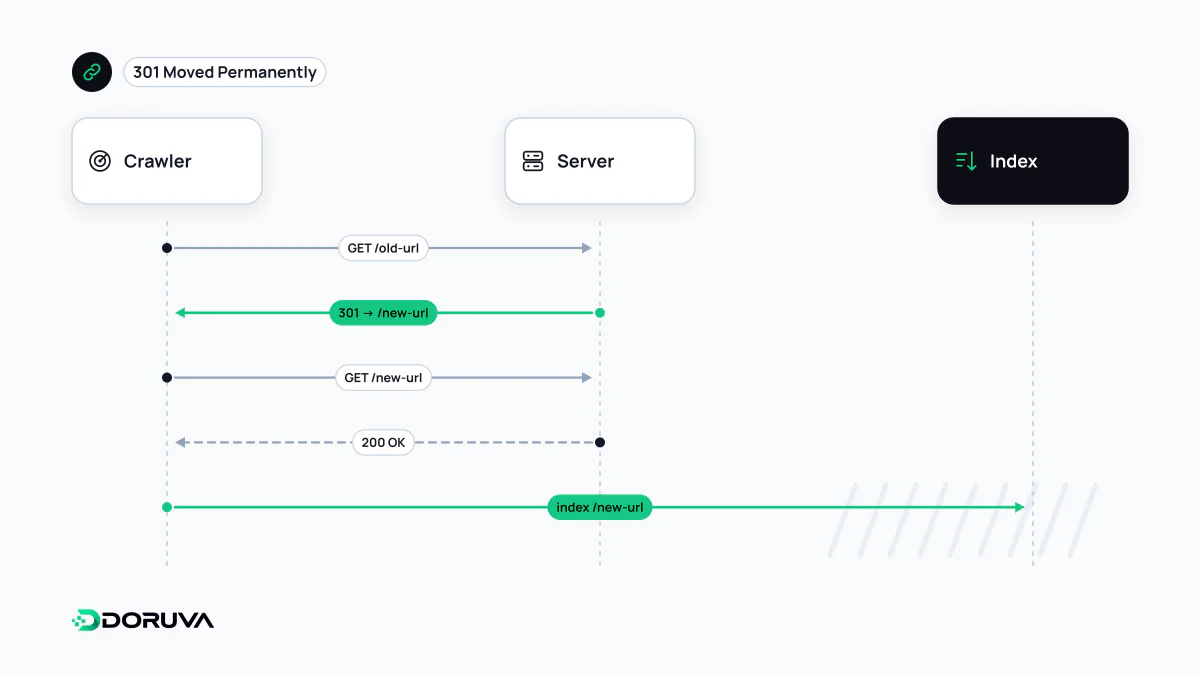
What a 301 response actually contains
A 301 is a status line plus a Location header that carries the new address. The browser reads the header and replays the request against the new URL on its own; all the visitor notices is a different address in the bar.
$ curl -sI https://example.com/services/seo-consulting/
HTTP/2 301
location: https://example.com/seo/
cache-control: max-age=3600
RFC 9110 defines 301 as "the target resource has been assigned a new permanent URI", with future references expected to use the new one. Google's handling matches that intent: Googlebot follows the redirect and the indexing pipeline uses it as a strong signal that the target should be canonical. The old URL is not simply forgotten. Google keeps track of both source and target, and may still surface the old address as an "alternate name" for queries where users seem to trust it more. For the side-by-side comparison of 301 and 302, see the redirect overview; this page covers what is specific to the permanent kind.
301 versus 308: only the method differs
301 carries a historical quirk. The specification allows a user agent to turn a POST into a GET when it follows the redirect. For ordinary page navigation that never matters, because pages are fetched with GET anyway. Redirect a form submission or an API call, though, and the body is dropped on the way. 308 Permanent Redirect exists to close that gap: the same permanence, but the client must not change the HTTP method.
Google treats 308 exactly like 301, so there is no SEO decision to make between them. In practice you often meet 308 because of your framework. In Next.js, for example, redirects declared in next.config.js with permanent: true answer with 308. That is correct behaviour, and an audit tool complaining that it "expected a 301" is the one that is wrong.
Browser caching makes mistakes sticky
Unless told otherwise, caches may store a 301. Browsers can remember a permanent redirect for a long time and jump straight to the target on later visits without contacting the server. If a wrong 301 goes live and you remove it, people who already hit it may keep being sent to the old target for a while. Try new rules on staging first, and give the redirect response a modest Cache-Control: max-age while rolling it out. The browser cache entry explains the mechanics in more depth.
Setting one up on the server
# Nginx: move a single page
location = /services/seo-consulting/ {
    return 301 https://example.com/seo/;
}

# Apache (.htaccess, mod_alias)
Redirect permanent "/old-product/" "https://example.com/products/new-product/"
Always point at the final address, the one that answers 200. If the target itself redirects again, you have quietly built a redirect chain. The same rule holds when consolidating protocol, host and www variants: every legacy variant should reach the final URL in one hop.
How long should it stay?
After a site migration, Google recommends keeping redirects in place for as long as possible, generally at least a year. That gives Google time to recrawl the old URLs and reassign links from other sites to the new ones. From a visitor's point of view, keeping permanent redirects indefinitely is usually the safest choice: links in old newsletters, PDFs and forum posts keep getting clicked for years.
A redirect helps the link equity earned by the old address reach the new one, but there is no reason to route links you control through it. Update internal links, the XML sitemap and canonical tags to point straight at the new URL. Google's current description of each redirect type lives on Google Search Central.