

What is Browser Cache?
Definition
The browser cache is the private HTTP cache in which a web browser stores responses it has already downloaded, such as CSS, JavaScript, images, fonts and sometimes HTML, so it can reuse them on later requests. Headers like Cache-Control, ETag and Last-Modified decide how long a stored response counts as fresh and when it must be revalidated with the server. Configured well, it sharply reduces network traffic and load time on repeat visits.
Also known as: HTTP cache, web browser cache, memory cache, disk cache
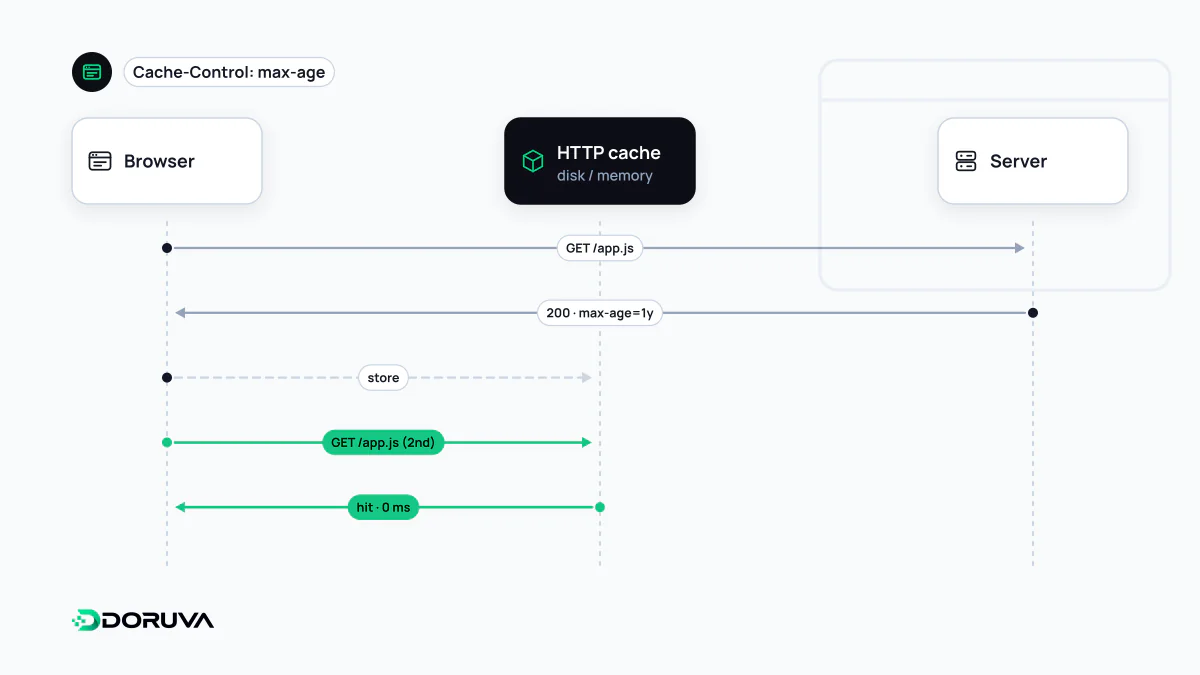
Fresh, stale and revalidated
When the browser downloads a file, it reads the response headers to decide whether to store it and how long to trust it. The next time the same URL is requested, one of three things happens:
- Fresh copy: if
max-agehas not run out, the stored file is used without touching the network. This is the fastest case. - Stale copy, unchanged content: once the lifetime has passed, the browser sends a conditional request carrying the ETag in
If-None-Matchor a date inIf-Modified-Since. If nothing changed, the server replies with an empty 304 Not Modified and the copy becomes fresh again. - Stale copy, changed content: the server sends the new file with a 200 and the cache entry is replaced.
Even without any Cache-Control header, the browser may still store and reuse a response. For this heuristic caching, the HTTP specification suggests a freshness lifetime of roughly 10% of the time since Last-Modified: a file last changed a year ago could be reused for about five weeks without asking the server. Setting explicit headers removes the guesswork.
Memory cache and disk cache
In the Size column of the Network panel in Chrome DevTools, cached requests are labelled “memory cache” or “disk cache”. The memory cache lives in RAM, is extremely fast and is cleared when the browser closes; images and scripts reused within the same page typically come from here. The disk cache survives restarts and is what helps on a visit days later. The browser decides which one a file goes into using its own heuristics; a site cannot choose via headers, it can only control whether a response is stored and how long it stays fresh.
Neither layer should be confused with the back/forward cache (bfcache), which keeps a live snapshot of a whole page rather than individual files. The Cache Storage used by service workers is also separate from the HTTP cache: a store that your own code manages.
What reload actually does
- Normal reload: the browser revalidates the main document even if it is still fresh; whether subresources are revalidated as well differs between browsers. “It worked after I refreshed” therefore says little about what real visitors experience.
- Hard reload (Ctrl+Shift+R): requests go out with
Cache-Control: no-cache, bypassing the cache and downloading everything again. - “Disable cache” in DevTools: switches the cache off entirely while DevTools is open, emulating a first visit.
To observe genuine repeat-visit behaviour, navigate to the page again through a link or by typing the URL instead of pressing reload.
Cache partitioning ended the shared-library shortcut
Loading a popular library from a public CDN URL used to be justified on the grounds that visitors might already have it cached from another site. That benefit is gone. Since Chrome 86 the HTTP cache is keyed not only by the resource URL but also by the top-level site and the frame's site; Firefox has partitioned network state by default since version 85, and Safari separates its cache by top-level site as well. The goal is privacy: the time it takes to load a cached file must not reveal which other sites a user has visited. A file loaded from a third-party URL is now downloaded separately for every site that uses it.
Header choices by file type
| Resource | Suggested policy | Why |
|---|---|---|
CSS/JS with a content hash in the name (app.3f9a1c.js) | max-age=31536000, immutable | If the content changes, so does the file name |
| HTML documents | no-cache plus an ETag | Cheaply revalidated on every visit, so releases show up at once |
| Unversioned images | max-age of a few days to a few weeks | They change rarely, and instant propagation is not critical |
| Responses with personal data | private, no-store | Never written to disk, even on a shared computer |
How the browser cache fits together with server, CDN and application caches, and how to invalidate them, is covered in the general cache entry. The browser's Network panel shows which headers your static files return, and the SEO checker lists the Cache-Control value of the page response itself among its response headers.