

What is Cache-Control?
Definition
Cache-Control is the HTTP header that tells caches such as browsers and CDNs whether a response may be stored, how long it stays fresh and what must happen once it goes stale. Its value is a comma-separated list of directives like max-age, s-maxage, no-cache, no-store, private, immutable and stale-while-revalidate. Requests can carry it too, but caching policy is defined mainly by the response header.
Also known as: Cache-Control header, cache headers, max-age, s-maxage, stale-while-revalidate, no-cache vs no-store
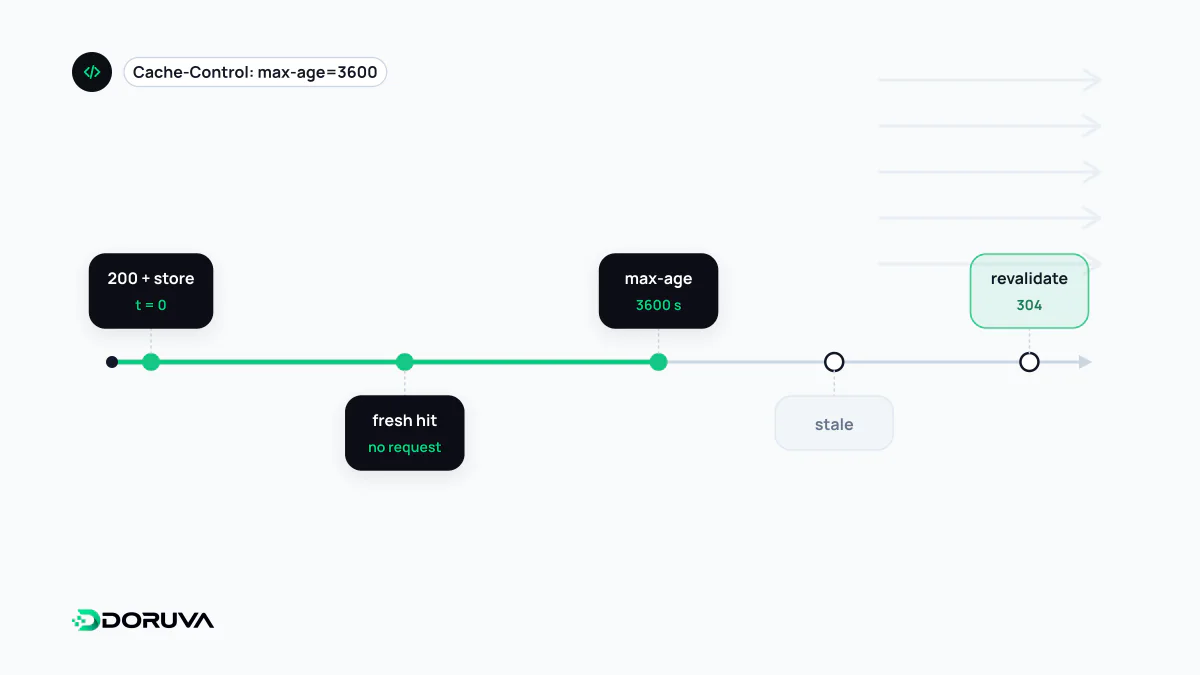
One header, several caches
On its way to the user a response may pass through two kinds of cache: the private cache inside the user's browser, and shared caches that serve many users, such as a CDN or a reverse proxy. Cache-Control instructs all of them at once. Some directives apply everywhere; others only matter to shared caches.
Directives are comma-separated and order does not matter. When they conflict, the most restrictive one wins, so no-store overrides everything else. One subtlety catches people out: max-age counts from when the origin generated the response, not from when the browser received it. A response that sat in a CDN for five minutes arrives with age: 300, and with max-age=600 it stays fresh in the browser for only another 300 seconds.
Response directives at a glance
| Directive | Meaning |
|---|---|
max-age=N | Reuse for N seconds without contacting the server. |
s-maxage=N | Lifetime for shared caches only; overrides max-age there and is ignored by browsers. |
no-cache | May be stored, but must be revalidated with the origin before every reuse. |
no-store | No cache may store the response at all. |
private | Only the browser may store it; CDNs may not. |
public | Shared caches may store it, which matters most for responses to requests carrying an Authorization header. |
must-revalidate | Once stale, it cannot be reused without revalidation; if the origin is unreachable the cache returns 504 rather than the old copy. |
immutable | The body will not change while fresh, so even a reload need not revalidate it. |
stale-while-revalidate=N | For N seconds after expiry, serve the stale copy immediately and refresh it in the background. |
stale-if-error=N | If the origin answers 500, 502, 503 or 504, the stale copy may be served for up to N seconds. |
no-cache is not "don't cache"
The name misleads almost everyone at first. no-cache means "store it, but check before using it". The browser sends its stored ETag, and if nothing changed the server replies with a bodyless 304 Not Modified. That makes it a good default for HTML that can change at any time. When nothing should be kept anywhere, such as payment confirmations, personal documents or one-time tokens, the directive you want is no-store. If you have to accommodate very old HTTP/1.0 caches, max-age=0, must-revalidate achieves the same as no-cache. Note that neither directive guarantees revalidation on Back navigation, because the back/forward cache keeps the whole page in memory.
Different lifetimes for the CDN and the browser
Splitting freshness between shared caches and the browser is where Cache-Control earns its keep:
# Product listing API: 1 min in the browser, 5 min on the CDN, then
# serve the old copy for up to 1 min while refreshing in the background
Cache-Control: public, max-age=60, s-maxage=300, stale-while-revalidate=60

# Signed-in user's account page
Cache-Control: private, no-cache

# Tolerate a day-old copy if the origin goes down
Cache-Control: max-age=600, stale-if-error=86400

# Response containing a one-time verification code
Cache-Control: no-store
"Serve stale, refresh behind the scenes" is also the idea behind ISR in Next.js. Some CDNs additionally honour headers addressed only to them; CDN-Cache-Control is the standardised example (RFC 9213). Defaults vary a great deal between providers, so check your CDN's own documentation for which directives it respects.
Browser support quirks
stale-while-revalidateworks in the browser cache since Chrome 75, Firefox 68 and Safari 14.immutableis supported by Firefox and Safari but not implemented in Chrome. Chrome does not revalidate fresh subresources on a normal reload anyway, so the practical gap is small.- The request directives
max-staleandmin-freshare not supported by major browsers. A hard reload (Ctrl+Shift+R) addsCache-Control: no-cacheto its requests.
The Network panel in your browser shows the Cache-Control value of every response. For how stored responses are reused day to day, see the browser cache entry; MDN documents every directive. The SEO Checker also lists the Cache-Control header of the page response.