

What is ISR (Incremental Static Regeneration)?
Definition
ISR (incremental static regeneration) is a Next.js technique that regenerates individual statically generated pages in the background, either after a set interval or when explicitly triggered, without rebuilding the whole site. Visitors get the cached page instantly, and the new version replaces it once it has been generated successfully. The Next.js documentation also refers to this process as revalidation.
Also known as: incremental static regeneration, revalidation, on-demand ISR
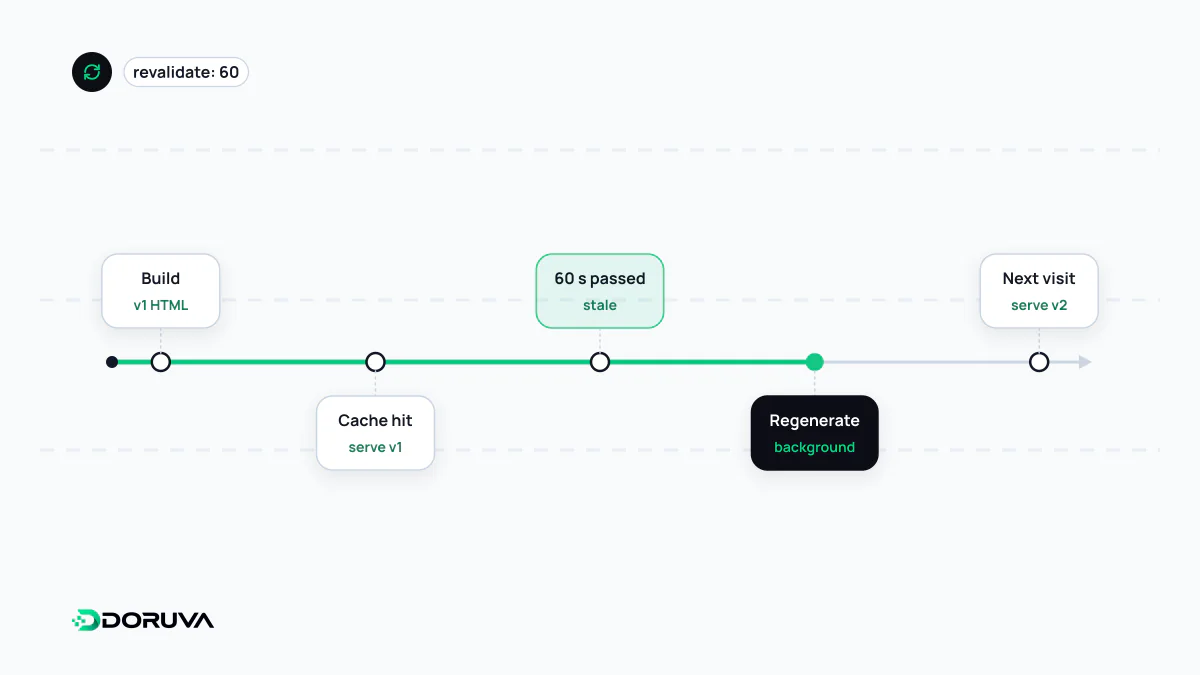
Serve the stale page, rebuild behind it
The core idea mirrors HTTP's stale-while-revalidate: expired content is served immediately while a fresh version is prepared in the background. For a time-based ISR page in Next.js, the lifecycle runs like this:
- The page is generated at build time and cached; requests are answered from that copy instantly.
- The first request after the interval (say 60 seconds) has elapsed still receives the old page.
- That request also triggers regeneration of the page in the background.
- If regeneration succeeds, the cached copy is replaced and later visitors see the updated page.
- If it fails, the last successful version keeps being served and the next request retries.
When someone requests a path that wasn't generated at build time, the page is rendered on that first request and added to the cache. On a catalogue with hundreds of thousands of products, you can prerender only the most-visited pages and let the rest fill in as traffic arrives.
Ways to configure it in Next.js 16
In the classic App Router setup, a page exports a revalidate interval and lists the paths to prerender with generateStaticParams:
// app/products/[slug]/page.tsx
export const revalidate = 3600; // regenerate at most once an hour

export async function generateStaticParams() {
  const products = await getPopularProducts();
  return products.map((p) => ({ slug: p.slug }));
}
Projects with cacheComponents enabled reach the same goal with different primitives: functions or components are marked with the 'use cache' directive, their lifetime is set with preset profiles such as cacheLife('days'), and data is labelled with cacheTag. Since Next.js 16.3, paths that weren't part of the build are first served a URL-independent App Shell and then completed in the background. In the Pages Router, ISR still works through the revalidate value returned from getStaticProps; that is where the feature first became stable, in Next.js 9.5.
Time-based or event-driven?
With a timer, content can stay stale until the interval runs out. The Next.js docs recommend a generous value, an hour rather than a second, and on-demand revalidation when you need precision. On-demand revalidation calls revalidatePath('/blog') or the tag-based revalidateTag from a Server Action or Route Handler. A typical setup is a CMS firing a webhook on publish that invalidates the affected page. For read-your-own-writes cases, where users must see their own change immediately, Cache Components provides updateTag, usable only inside Server Actions, which waits for fresh data instead of serving stale content.
Running it on your own servers
- ISR requires the Node.js runtime and isn't supported in a static export (
output: 'export'). For a fully static site the right concept is SSG. - With multiple instances, the default file-system cache is per instance, and on-demand revalidation only updates the instance that receives the call. Without a shared cache handler, users may see different versions depending on which instance answers.
- If a CDN sits in front, its cache lifetime matters too: if it holds pages longer than the ISR interval, regenerated content reaches users late. Check the Cache-Control headers Next.js sends.
- The
x-nextjs-cacheresponse header reportsHIT,STALE,MISSorREVALIDATED, telling you whether a page came from cache or is being regenerated. It's the first thing to check when debugging.
Current APIs and caveats are documented in the Next.js ISR guide. The name "ISR" is specific to Next.js; other tools offer similar behaviour under different names or at the CDN layer.