

What is Next.js?
Definition
Next.js is an open-source React framework developed by Vercel for building full-stack web applications. It adds what React leaves open: file-system routing, Server Components, rendering at build time or request time, data caching, and image and font optimization, with bundlers and compilers configured for you. Because one app can mix prerendered static pages with pages rendered on the server for each request, it is widely used for both marketing sites and complex web apps.
Also known as: NextJS, Next, Next.js App Router
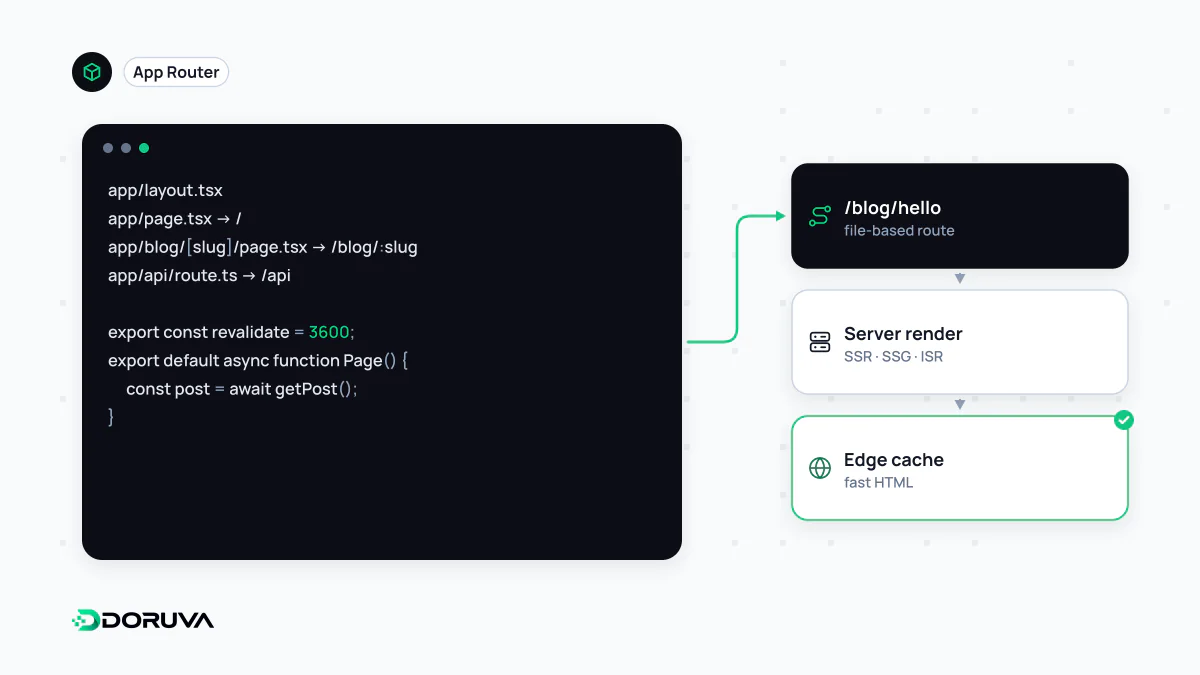
What Next.js adds to React
React tells you how to build components. It does not decide how URLs map to screens, whether HTML is produced on the server or in the browser, or how code gets bundled for production. Next.js is a framework that makes those decisions for you: routing, rendering strategies, data fetching and caching, metadata, image and font optimization, plus the underlying build tooling. As of version 16, Turbopack is the default bundler; projects that still need Webpack opt in with the --webpack flag.
There are two routers. The App Router, introduced in version 13 and built on React Server Components, is the recommended one. The original Pages Router is still supported, but new capabilities land in the App Router first.
Folders become routes
Inside the app directory, each folder is a route segment. A segment becomes publicly reachable only when it contains a page.tsx, while layout.tsx defines UI shared by child pages that stays mounted during navigation.
app/
  layout.tsx             → root layout for every page
  page.tsx               → /
  (marketing)/about/page.tsx → /about (a route group, not part of the URL)
  blog/[slug]/page.tsx   → /blog/first-post, /blog/second-post …
  api/contact/route.ts   → a Route Handler for raw HTTP requests
proxy.ts                 → runs before a request is completed
Square brackets mark a dynamic segment; in current versions the params prop is a Promise you await. Route Handlers in route.ts work with the standard Web Request and Response objects. The file once called middleware was deprecated and renamed proxy in Next.js 16 — a good example of why tutorials older than a release or two need checking against the current docs.
Server Components by default
Every component in the App Router is a Server Component unless you say otherwise. It runs on the server, can query a database or API directly, and ships no JavaScript of its own to the browser. Components that need state, effects, event handlers or browser APIs start with the "use client" directive. Those Client Components are still rendered to HTML on the first request and then become interactive through hydration. Mutations such as form submissions go through Server Functions marked with "use server".
The design consequence: keep the "use client" boundary as low in the tree as possible. Marking a whole page layout as client code throws away most of the bundle savings.
Rendering and caching modes
| Mode | When it happens | Typical trigger |
|---|---|---|
| Prerendering (static) | At build time or during revalidation | Default for components that use no request-time data |
| Dynamic rendering | On every request | Using cookies(), headers() or searchParams |
| Revalidation (ISR) | In the background, on a timer or on demand | Cached content that must update without a full rebuild |
| Cache Components | Mixed within one route | "use cache" with cacheLife() once cacheComponents is enabled |
Prerendering is the familiar static generation model and ISR keeps it fresh. With Cache Components, a static HTML shell is sent immediately and the dynamic parts stream in as they resolve, so a single page no longer has to be entirely static or entirely dynamic.
Next.js and search engines
Server-rendered HTML means the main content is readable without executing JavaScript, which removes a whole class of crawling problems seen in purely client-rendered apps. Titles, descriptions and Open Graph tags are defined with the metadata export or generateMetadata in Server Components. None of that guarantees good SEO, though: a wrong canonical, thin internal linking or an oversized client bundle are just as possible in Next.js as anywhere else.
When it is more than you need
For a small brochure site that rarely changes, the flexibility comes with a maintenance cost: APIs move quickly between major versions and each upgrade needs a plan. Hosting matters too. Every feature works on a Node.js server or in a Docker container, while a static export (output: 'export') drops anything that needs a server at request time.