

What is Cache?
Definition
A cache is a storage layer that keeps temporary copies of frequently requested or expensive-to-produce data closer to where it is needed, so later requests can be served without going back to the original source, such as a database or origin server. On the web, caches exist in browsers, CDNs, servers and application code. Used well, caching cuts response times and server load; used carelessly, it serves stale data.
Also known as: caching, HTTP cache, web cache
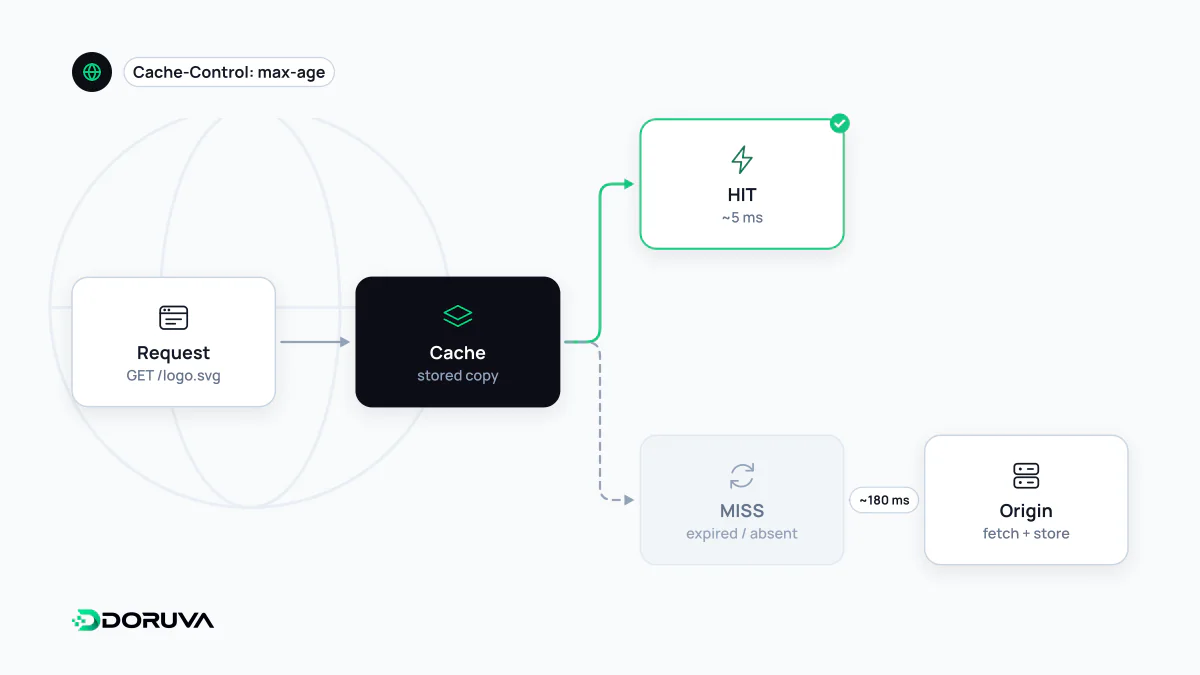
Where caches live
On its way from server to user, the same piece of data can be cached at several points:
| Layer | Location | Typically stores |
|---|---|---|
| Browser cache | The user's device | CSS, JavaScript, images, fonts, sometimes HTML |
| CDN cache | Edge servers close to the user | Static files and cacheable pages |
| Server / reverse proxy cache | Nginx, Varnish or similar in front of the app | Ready-made HTTP responses |
| Application cache | Between the app and its database | Query results, computed values, session data |
The first three are controlled through HTTP, i.e. response headers. The application cache is managed explicitly in code: check the cache first, and on a miss read from the database and store the result for a set time. This is the cache-aside pattern, and in-memory data stores such as Redis, which keep data in RAM, are a common choice for it.
Cache-Control in practice
# Static file with a content hash in its name, e.g. app.3f9a1c.js
Cache-Control: public, max-age=31536000, immutable

# HTML page that may change at any time
Cache-Control: no-cache
ETag: "a7c3-5f1"

# Response containing personal data
Cache-Control: private, no-storemax-age: how many seconds the response may be reused without asking the server.no-cache: the response may be stored but must be revalidated with the server before each use. Despite the name, it does not mean “don't cache”.no-store: the response must not be stored by any cache.private: only the user's browser may store it; shared caches such as CDNs may not.
To revalidate, the browser sends its stored ETag in an If-None-Match header. If nothing changed, the server answers with a bodyless 304 Not Modified status code and the file is not downloaded again. MDN's Cache-Control reference covers every directive in detail.
The hard part: invalidation
Putting data into a cache is easy; retiring the old copy at the right moment when the source changes is the difficult part. The usual strategies:
- Time-based (TTL): each entry expires after a fixed time. Simple, as long as you accept that stale data may be shown until then.
- Versioned file names: when the content changes, so does the name (
app.3f9a1c.jsbecomesapp.8b20de.js). The old file can sit in caches indefinitely because the HTML now points to the new name. Modern build tools do this automatically. - Event-based purging: when data is updated, the matching cache key is deleted or a purge request is sent to the CDN.
Performance impact and common mistakes
A well-designed cache lowers server load and makes repeat visits much faster. Because CDN and server caching shorten the server's initial response time, they can also help loading metrics such as LCP. Typical mistakes:
- Giving HTML a long
max-age, so a shipped fix takes days to reach users. - Letting a shared cache store a page personalised for a logged-in user, which can expose one user's data to another.
- Treating the cache as a database: cached entries can disappear at any time, and the app must still work correctly with an empty cache.
- Caching everything: storing data that is never read again only consumes memory.
To see which caching headers a response carries, open the Network tab in your browser's developer tools or run curl -I https://example.com/ from the command line.