

What is Service Worker?
Definition
A service worker is an event-driven JavaScript file that the browser runs on a separate thread, independent of any page, and that can intercept network requests made by pages within its scope. Because it can answer from Cache Storage, from the network or a combination of both, it underpins offline support, push notifications and background sync. Service workers only run over HTTPS (or localhost during development) and have no access to the DOM.
Also known as: SW, sw.js, Service Worker API
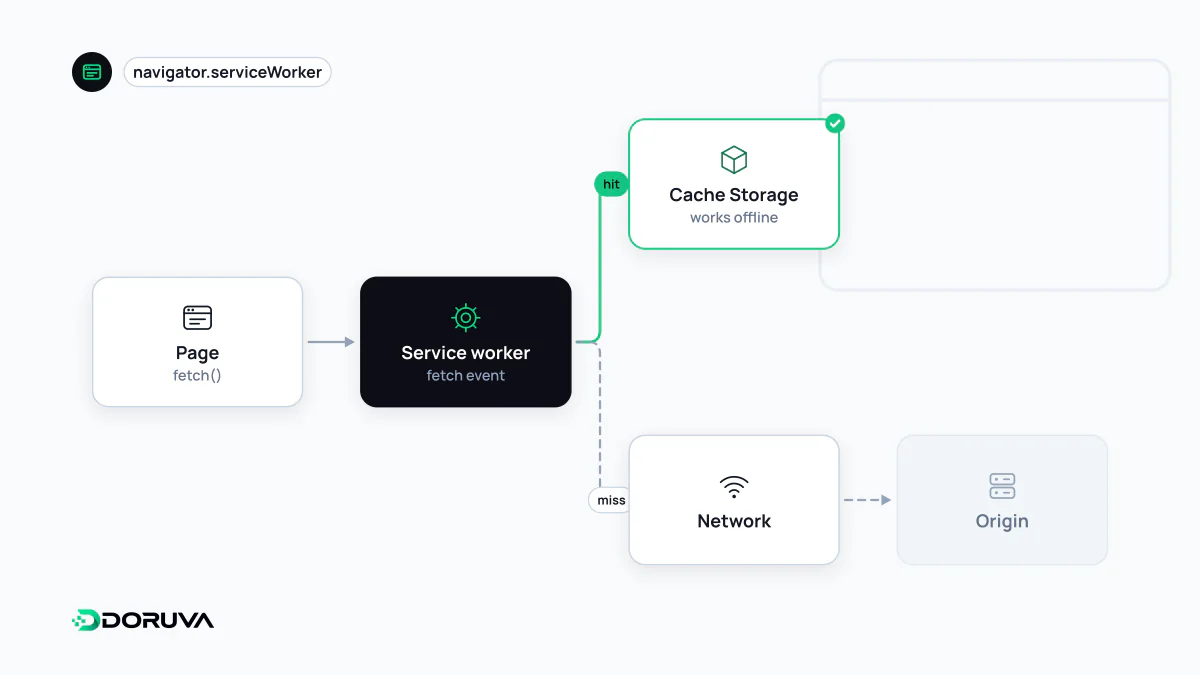
A programmable layer between page and network
Once a service worker is registered, every request from pages in its scope, whether HTML, CSS, images or API calls, passes through its fetch event first. The code can forward the request untouched, answer from a cache or construct a brand-new response. In effect it is a small proxy server that you write and the browser hosts.
It runs on its own thread, so it does not compete with the page's main thread, but it has no access to the DOM, the window object or localStorage; it talks to pages through postMessage. Because it can intercept and rewrite traffic, browsers only allow service workers in secure contexts, which means HTTPS, with localhost exempted for development.
// Registration from the page
if ("serviceWorker" in navigator) {
  navigator.serviceWorker.register("/sw.js");
}
The feature check matters: where service workers are unsupported, the site simply carries on working, and the worker is added purely as an enhancement on top.
Lifecycle: install, waiting, activate
- install fires once when a new worker has been downloaded. This is where files needed offline are usually cached.
- waiting: if an older version still controls open tabs, the new one waits. It does not take over until every tab controlled by the old version is closed, which prevents two tabs of the same site running two different versions of your code.
- activate fires when the new version takes control, making it the right place to delete outdated caches.
The browser checks the worker script on navigation and at least once every 24 hours; if even one byte differs, it installs it as a new version. self.skipWaiting() skips the waiting phase and clients.claim() takes control of open pages immediately. Used together they can create mismatches, such as a page loaded with old HTML receiving assets from a newer worker.
Cache Storage and caching strategies
The Cache Storage that service workers use is separate from the browser cache and is not cleaned up according to HTTP headers. Your code decides what is stored, when it is refreshed and when it is deleted.
const VERSION = "static-v3";

self.addEventListener("install", (event) => {
  event.waitUntil(
    caches.open(VERSION).then((c) => c.addAll(["/offline.html", "/css/site.css"]))
  );
});

self.addEventListener("activate", (event) => {
  event.waitUntil(
    caches.keys().then((names) =>
      Promise.all(names.filter((n) => n !== VERSION).map((n) => caches.delete(n)))
    )
  );
});

self.addEventListener("fetch", (event) => {
  if (event.request.mode !== "navigate") return;
  event.respondWith(
    fetch(event.request).catch(() => caches.match("/offline.html"))
  );
});
Here page navigations try the network first and fall back to a pre-cached offline page when there is no connection. The usual strategies are cache first for versioned static assets, network first for HTML and API responses where freshness matters, and stale-while-revalidate, which serves the cached copy instantly while fetching an update in the background.
How scope works
By default a service worker controls only the directory its file lives in and everything below it. A worker at /js/sw.js manages pages under /js/ but not the home page. Widening the scope requires the server to send a Service-Worker-Allowed header; the simpler fix is to serve the file from the site root. Scope is also bound to the origin, so a worker cannot be registered from another domain.
Mistakes that strand users on old code
- Serving HTML cache-first: after a release, visitors keep seeing the old page until the updated worker has installed and activated.
- Long-lived caching of the worker file itself: browsers largely bypass the HTTP cache when checking for updates, but sending short-lived or
no-cacheheaders forsw.jsremains a sensible habit. - No exit plan: deleting the file is not enough to retire a service worker; you need to ship a version that unregisters existing installations.
In Chrome, the Service workers section of the Application panel shows registrations, their state and the contents of Cache Storage. The application model that combines offline support with installability is described under PWA, and MDN's service worker guide covers the lifecycle in full detail.