

What is PWA (Progressive Web App)?
Definition
A PWA (progressive web app) is a web application built with standard web technologies that can also be installed on a device, open in its own window and gain app-like capabilities such as offline use through a service worker. The basic requirements for installability are being served over HTTPS and providing a web app manifest. Its main advantage is a single codebase that runs both in the browser and from the home screen or desktop.
Also known as: progressive web app, progressive web application, installable web app
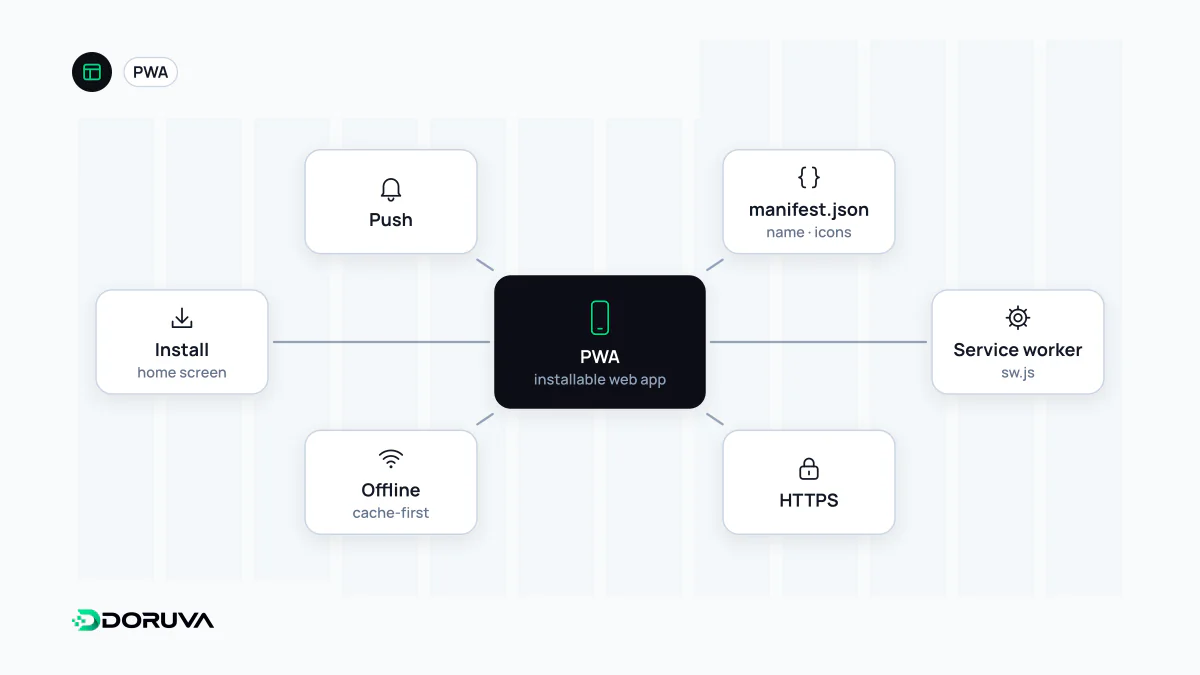
The building blocks
A PWA isn't a separate technology but a combination of existing web standards. There are three pieces:
- A web app manifest: a JSON file describing the app's name, icons, start URL and how it should be displayed.
- A service worker: a script that sits between the page and the network, intercepts requests and can answer them from a cache. Offline support and background work build on it.
- HTTPS: installation and powerful APIs such as service workers only work in a secure context (HTTPS, or
localhostduring development).
<link rel="manifest" href="/manifest.webmanifest">

{
  "name": "Example Field App",
  "short_name": "Field",
  "start_url": "/?source=pwa",
  "display": "standalone",
  "background_color": "#ffffff",
  "theme_color": "#0f172a",
  "icons": [
    { "src": "/icon-192.png", "sizes": "192x192", "type": "image/png" },
    { "src": "/icon-512.png", "sizes": "512x512", "type": "image/png" }
  ]
}
Install criteria and browser support
Chromium-based browsers such as Chrome, Edge and Samsung Internet require a manifest with name or short_name, 192px and 512px icons, a start_url, and a suitable display value (fullscreen, standalone, minimal-ui or window-controls-overlay), and prefer_related_applications must be absent or false. Chrome also waits until the user has clicked or tapped on the page at least once and spent at least 30 seconds on it. MDN notes that a service worker is not required for installability, although most PWAs use one for offline support.
| Platform | Status (per MDN, October 2026) |
|---|---|
| Desktop Chromium browsers | Install PWAs with a manifest on all supported operating systems |
| Safari on macOS | "Add to Dock" from Safari 17 (macOS Sonoma), for any web app with or without a manifest |
| Desktop Firefox | Does not support installing PWAs from a manifest |
| Android | Only Chrome on devices with Google Mobile Services and Samsung Internet on Samsung devices install PWAs as WebAPKs |
| iOS / iPadOS | From iOS 16.4, via the Share menu in Safari, Chrome, Edge, Firefox and Orion |
Support shifts over time, so check MDN's current overview before you ship.
Offline support and caching strategies
A service worker lets you pick a strategy per resource type. Cache-first suits versioned JavaScript, CSS and font files. HTML pages usually work best network-first, falling back to the cache when offline. For data that changes often but can tolerate a few minutes' delay, serving from cache while updating in the background is a good balance. You should also provide an offline page for when there's no connection at all.
The classic mistake is caching HTML aggressively, so users don't see a deployed fix for days. Service workers also have their own update lifecycle: a new version can sit waiting until every tab using the old one is closed. This layer is separate from the browser's own HTTP cache (the browser cache), and the two need to be planned together.
PWA or app-store app?
PWAs win on a single codebase, instant updates without store review, and the fact that every screen has a shareable URL search engines can find. They lose on API support that varies by platform, no presence in app-store search, and more limited access to some device hardware. Which platforms your users mostly use, and which device capabilities the app really needs, usually settle the question.
What it means for SEO
Being a PWA, or being installable, is not a ranking advantage in itself. A PWA is still a website and the same rules apply: content must be in crawlable HTML, pages must work well on small screens (responsive design) and they must load quickly. If the app shell renders only on the client, every risk that applies to a non-installable SPA applies here too.