

What is Favicon?
Definition
A favicon is the small icon that represents a website in browser tabs, bookmarks, history and next to the site name in Google search results. It is usually declared with a link rel="icon" element in the page head. To appear in Google, it must be square, at least 8×8 pixels, and both the icon file and the home page must be crawlable.
Also known as: site icon, tab icon, favicon.ico, apple-touch-icon, shortcut icon
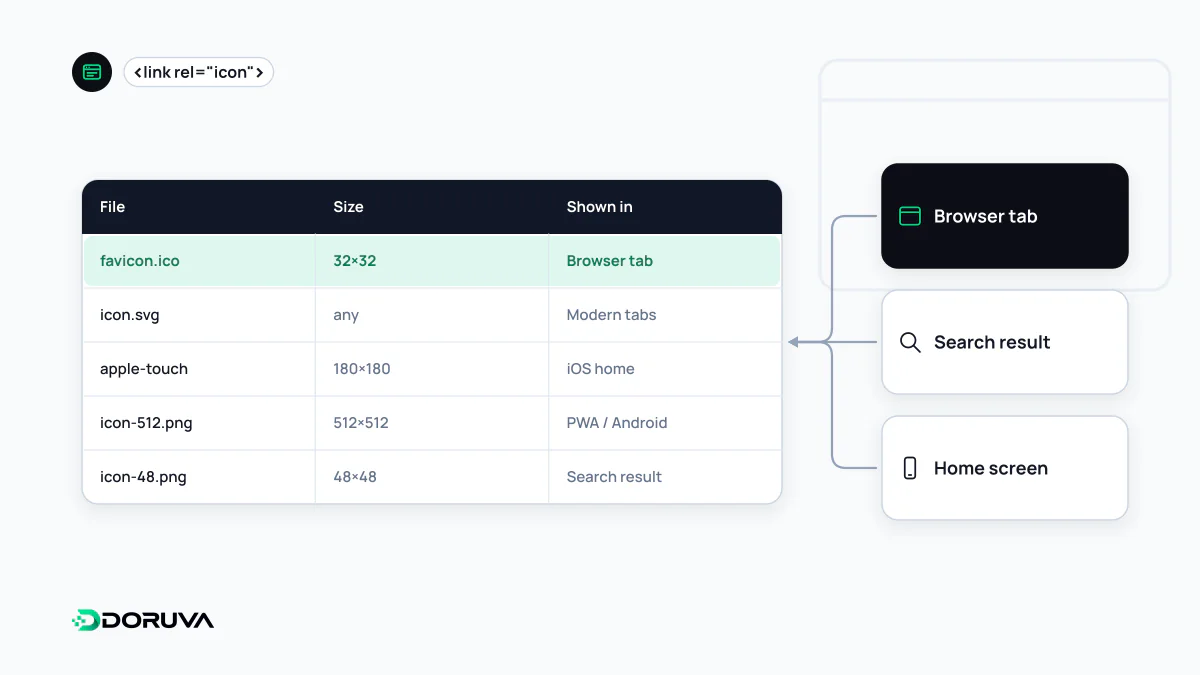
A tiny asset with a lot of exposure
Favicons started out as tab and bookmark icons. They now show up in many more places: home screen shortcuts, app switchers, link previews and Google's search results, where the icon sits next to the site name. People scanning ten results often spot a brand they trust by its icon first, so the favicon is a small but real part of how a site looks on the SERP.
What Google requires
Google Search Central lists these conditions for showing a favicon in results:
- The home page must contain a
<link>element in its<head>with one of the rel valuesicon,shortcut icon,apple-touch-iconorapple-touch-icon-precomposed. - The icon must be square (1:1) and at least 8×8 pixels; Google recommends going larger than 48×48 so it looks sharp across surfaces.
- Supported formats are BMP, GIF, ICO, PNG, JPEG, PPM and TIFF.
- Googlebot-Image must be able to crawl the icon and Googlebot must be able to crawl the home page; neither may be blocked in robots.txt.
- The favicon URL should be stable, though it can be hosted on a CDN.
- The icon should visually represent the brand. Google won't show icons it considers inappropriate.
Google supports one favicon per hostname. A subdomain such as help.example.com can have its own icon; a subfolder such as example.com/help/ cannot.
A sensible set of tags
<link rel="icon" href="/favicon.ico" sizes="32x32">
<link rel="icon" href="/icon-96.png" type="image/png" sizes="96x96">
<link rel="icon" href="/icon.svg" type="image/svg+xml">
<link rel="apple-touch-icon" href="/apple-touch-icon.png">
<link rel="manifest" href="/site.webmanifest">
Each client picks the file that suits it. An SVG icon stays crisp at any size in browsers that support it, but SVG is not on Google's list of favicon formats, so keep a square PNG or ICO larger than 48 pixels for search results. If the site is installable as a progressive web app, the web app manifest lists its app icons separately.
Why a favicon doesn't show
- The tag is only on inner pages. Google reads favicon information from the home page.
- Crawl blocks. Disallowing an assets or images folder in robots.txt can take the favicon with it.
- A non-square file. Dropping a wide logo in as the favicon breaks the aspect ratio rule.
- Timing. The home page has to be recrawled first, which Google says can take from several days to several weeks. You can request indexing of the home page with the URL Inspection tool in Search Console.
Designing for 16 pixels
A detailed logo turns into a smudge at tab size. Good favicons use the most recognizable piece of the brand, such as a letter or symbol, avoid hairline strokes and keep enough contrast in both light and dark browser themes. Check how a transparent icon looks on a dark tab bar before launch rather than swapping it later, since Google asks for the favicon URL to stay stable.