

What is HTTPS?
Definition
HTTPS (Hypertext Transfer Protocol Secure) is HTTP carried over a connection encrypted with TLS. It prevents third parties from reading or altering the data exchanged between browser and server, and the site's certificate lets the browser confirm it is talking to the genuine domain. Browsers now label plain HTTP pages as not secure, and Google prefers the HTTPS version of a page as canonical.
Also known as: Hypertext Transfer Protocol Secure, HTTP Secure, HTTP over TLS, secure HTTP
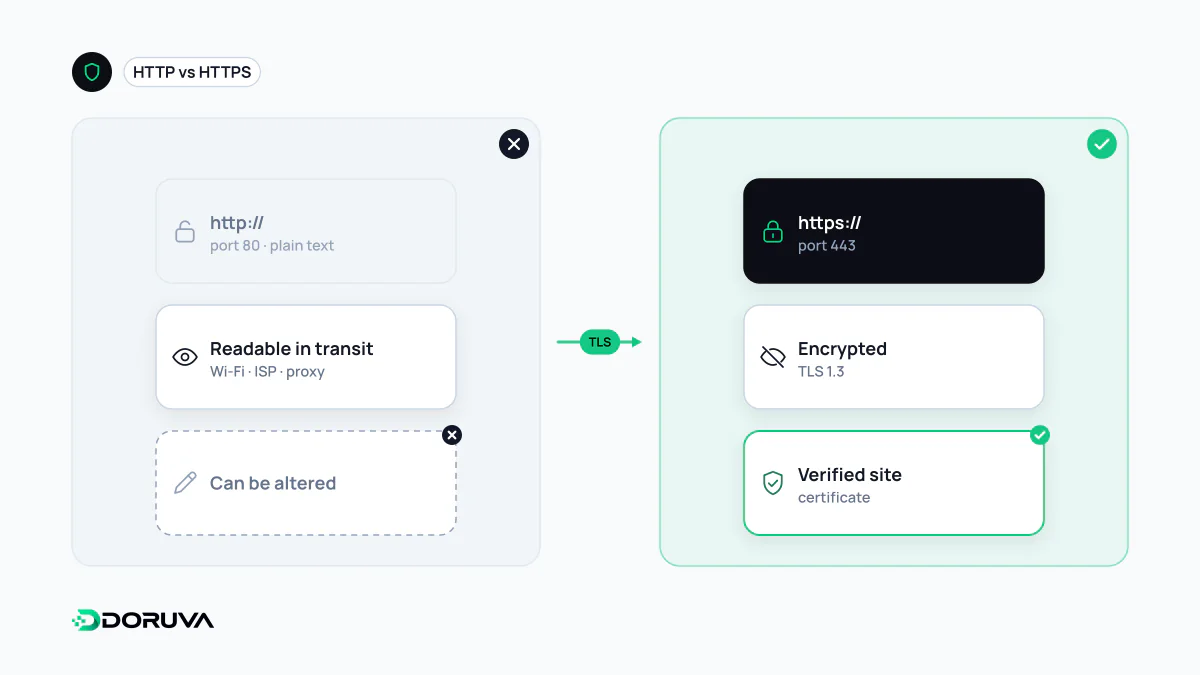
HTTP inside an encrypted tunnel
HTTPS is not a separate application protocol. It is ordinary HTTP running over a connection protected by TLS. Requests and responses look exactly the same; what changes is how they travel across the network. Plain HTTP defaults to port 80 and HTTPS to port 443. When the connection opens, the server presents an SSL/TLS certificate, the browser validates it, and only then do the actual HTTP messages flow through the encrypted channel.
That gives you three properties:
- Confidentiality: someone on the same café Wi-Fi, or a device along the route, cannot read form submissions, cookies or the path of the page being requested.
- Integrity: nobody in the middle can inject ads, scripts or anything else into the response without the browser noticing.
- Authentication: the browser checks that the server holds a valid certificate for the domain in the address bar.
It is just as important to know the limits. The domain name and IP address you connect to are still visible at the network level. And the padlock says the connection is secure, not that the site behind it is honest; phishing sites use HTTPS too.
What Google has said about HTTPS
In 2014 Google announced it was starting to use HTTPS as a ranking signal and called it a very lightweight one at the time. Google's current page experience documentation includes "Are your pages served in a secure fashion?" among its self-assessment questions, while stating that page experience aspects beyond Core Web Vitals do not directly help a site rank higher, though they align with what its ranking systems seek to reward. So switching to HTTPS is not a ranking boost to bank on. A more concrete effect lies in canonicalization: when both HTTP and HTTPS versions of a page exist, Google prefers the HTTPS one as canonical by default. In practice, browsers also only use faster protocols such as HTTP/2 and HTTP/3 over encrypted connections.
Moving a site from HTTP to HTTPS
- Install a valid certificate covering every hostname you serve: the apex domain, www and any subdomains in use.
- Send each HTTP URL to its exact HTTPS equivalent with a single 301 redirect; do not dump everything on the homepage.
- Update canonical tags, hreflang annotations, XML sitemaps and internal links to the HTTPS addresses.
- Fix images, scripts and stylesheets still requested over HTTP, or browsers will raise mixed content warnings and block some of them.
- Once everything is stable, enable HSTS with a short max-age and raise it gradually.
- Make sure the HTTPS property is verified in Search Console and keep an eye on its HTTPS report.
Where migrations usually go wrong
- Redirect chains: paths like
http://wwwtohttps://wwwtohttps://add a wasted round trip. Go straight to the final URL. - Canonicals contradicting redirects: if the page redirects to HTTPS but its canonical tag still points to HTTP, Google receives mixed signals.
- Expired certificates: without automated renewal, the site greets visitors one morning with a full-page browser warning.
- Old embeds: legacy map or video embed codes often still use HTTP.
The SEO Checker reports HTTPS usage, HTTP-to-HTTPS redirects, HSTS and mixed content in one place.