

What is Site Migration?
Definition
A site migration is any change to a fundamental part of a website: its domain, URL structure, protocol, platform (CMS) or hosting. When URLs change, every old address is mapped to its closest new equivalent with a permanent redirect. The goal is to carry users and accumulated search signals over to the new setup without loss, although rankings can fluctuate for a while even after a well-run move.
Also known as: website migration, site move, domain migration, SEO migration
Not every migration carries the same risk
"We're migrating the site" can mean very different projects. The question that decides how risky it is: do URLs change? If only the server changes, search engines see the same addresses as before. If the domain or URL structure changes, signals have to be transferred page by page to new addresses.
| Type of move | Example | URLs change? | Change of Address tool |
|---|---|---|---|
| Hosting change | Shared hosting to a VPS | No | Not needed |
| Protocol change | HTTP to HTTPS | Yes | Not used |
| URL restructure | /product.php?id=12 becomes /products/leather-bag/ | Yes | Not used |
| Platform (CMS) change | Off-the-shelf CMS to custom software | Usually | Not used if the domain stays |
| Domain change | example.com becomes example.co.uk | Yes | Used |
For hosting moves without URL changes, Google suggests lowering the DNS TTL to a few hours at least a week beforehand. A temporary dip in Googlebot's crawl rate right after the switch, followed by a steady increase over the next few days, is normal.
The redirect map is the real work
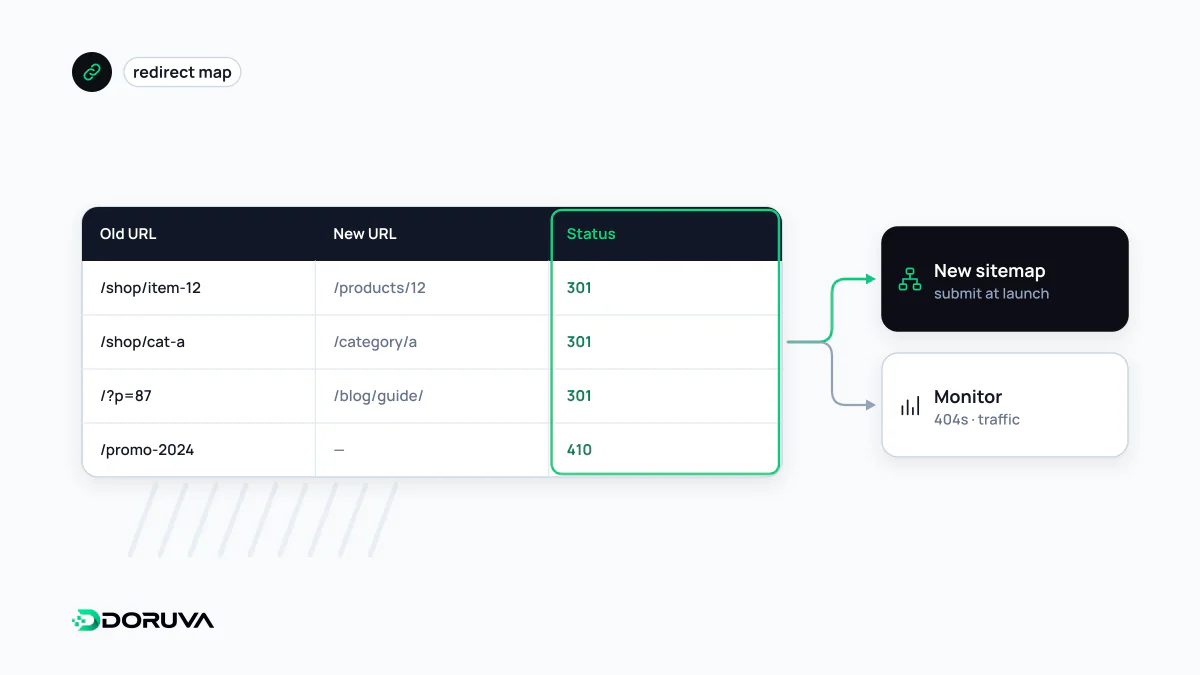
A redirect map is the table that says where each old URL goes. An incomplete map is the most common cause of traffic loss after a move. Pulling URLs from one source is not enough: combine the XML sitemap, server logs, analytics, Search Console reports and the pages that earn backlinks. Log file analysis is the most dependable way to find addresses that are missing from the sitemap but still get visits or crawls.
Once the map exists, implement it on the server as permanent redirects. Google recommends 301 or 308; see 301 redirect for the details. In Nginx, a lookup table scales better than hundreds of individual rules:
# Nginx: look up old paths and redirect in a single hop
map $request_uri $new_location {
    /services/web-design.html   /web-design/;
    /product.php?id=12          /products/leather-bag/;
}
server {
    if ($new_location) {
        return 301 $new_location;
    }
}
If the site has been migrated before, merge the old rules with the new ones or you will create redirect chains. Googlebot follows up to 10 hops, but Google advises redirecting straight to the final destination.
Change of Address in Search Console
The Change of Address tool in Google Search Console is only for moving from one domain or subdomain to another. You don't need it for HTTP to HTTPS, for switching between www and non-www, or for moving paths within the same domain. Both properties must be verified as owner under the same Google account, and the old homepage must 301 to the new homepage.
One detail catches people out: the tool does not move subdomains below the domain you specify, www included. Submit a request for every verified variant of the old domain. Search Console shows the move notification for 180 days, while Google's general advice is to keep redirects for at least a year, and from a user's point of view indefinitely. Google also recommends keeping the old domain registered for at least a year so nobody else can buy it and misuse it. The full checklist is in Google's site move documentation.
Launch day and the weeks after
- Each new page carries a self-referencing canonical; hreflang annotations and internal links point at the new URLs.
- Submit a new XML sitemap. At first the old sitemap shows many indexed pages and the new one almost none; that flips over time.
- Remove any
noindexor robots.txt blocks left over from staging. - Bulk-test the old URL list and confirm each one reaches a 200 page in one hop.
Google says a medium-sized site can take a few weeks or more before new URLs replace the old ones in results, and rankings may fluctuate in the meantime. That is also why Google advises changing one thing at a time: move the domain first, then change the layout. If domain, CMS and design all change on the same day, you cannot tell which one caused a problem.
Where migrations usually go wrong
- Redirecting everything to the homepage. Bulk-redirecting pages with no real equivalent is often treated as a soft 404. For content that is genuinely gone, a 404 or 410 is the honest answer.
- Forgetting images and PDFs. Files that earn image search traffic or external links belong in the map too.
- Temporary redirects for a permanent move. A 302 can keep old URLs in the index longer than necessary.
- Stopping monitoring too early. Indexing and crawl errors in Search Console need regular checks for weeks after launch.
To catch chains, wrong status codes and canonical mismatches on sample pages after launch, run them through the SEO Checker.