

What is Open Redirect?
Definition
An open redirect is a vulnerability where a site redirects visitors to a destination taken from a URL parameter without validating it. Because the link starts with a trusted domain, users, email filters and search engines treat it as belonging to that site, while the visitor actually lands on a phishing or spam page. In login and OAuth flows, an open redirect can also help leak authorization codes or tokens.
Also known as: unvalidated redirect, open redirection, unvalidated redirects and forwards
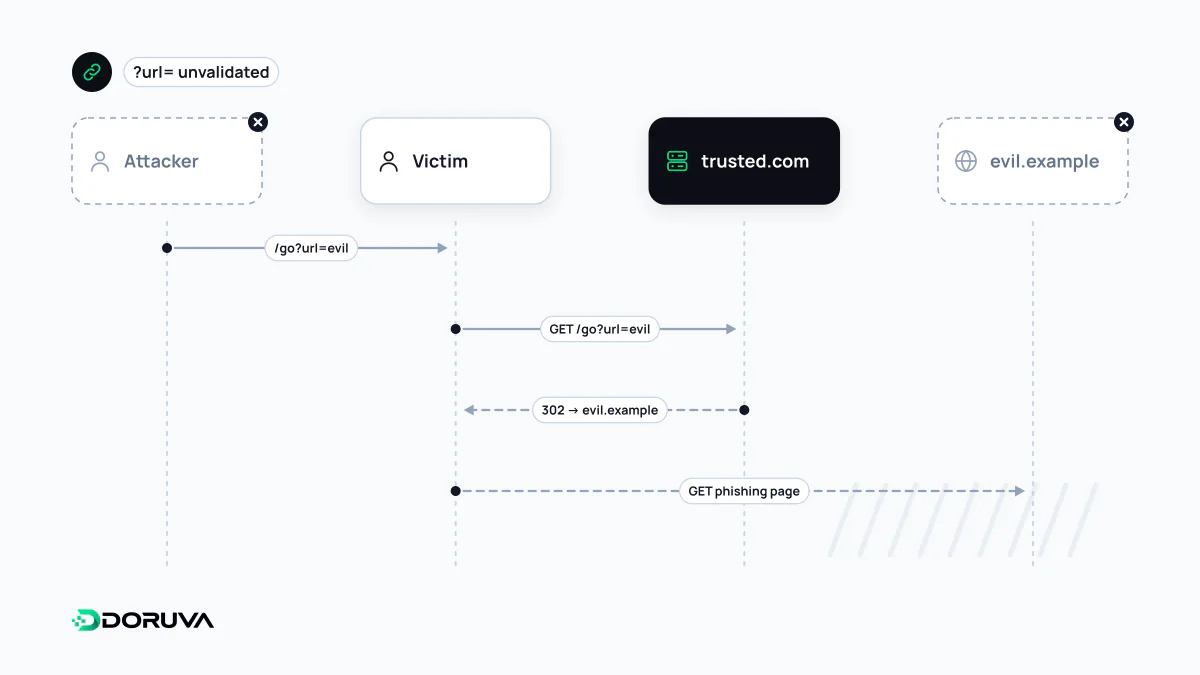
Borrowing a trusted domain
Plenty of sites have parameters that send the user somewhere after an action: ?next= to return to a page after login, ?url= for an outbound click counter, ?redirect= in campaign tracking. If the server copies that value straight into the Location header, anyone can mint a link that starts with your domain and ends wherever they like.
To a person, that link looks legitimate. They hover over it in an email, see their bank's or a familiar brand's domain, click, and arrive on a fake login page. OWASP describes unvalidated redirects in exactly these terms: the server name in the link is the real one, so phishing attempts look more trustworthy. The flaw does not leak your data directly; it lends your reputation to someone else's attack.
The SEO and reputation angle
Google's search team wrote about this years ago: spammers paste a site's redirect URLs into emails, forums and comment spam instead of their own addresses, so the link appears to point at a reputable site but delivers visitors to theirs. The knock-on effects are practical:
- Your domain starts appearing alongside spam and phishing links, and mail filters or security services may begin treating it with more suspicion.
- Abused redirect URLs can end up indexed. Unfamiliar results in a
site:search, particularly ones matching commercial or adult terms your site never uses, are a warning sign. - If it escalates to visitors seeing security warnings, the brand pays the price.
This is different from the “sneaky redirects” described in Google's spam policies, where the site itself deliberately sends visitors somewhere other than what search engines saw. With an open redirect the intent belongs to a third party exploiting the site. A legitimate redirect has a destination fixed on the server; an open redirect lets the incoming URL choose.
Where the stakes rise: login and OAuth
When the redirect is part of an authentication flow, the damage goes beyond a fake page. In OAuth, the authorization server returns the user to the client's redirect_uri with an authorization code or token. If redirect URIs are matched loosely, or an allowed page contains its own open redirect, the code or access token can be carried off to the wrong place. Register redirect URIs as exact matches and avoid wildcards.
Designing redirects that cannot be hijacked
- Question the need. If a user-controlled redirect is not essential, remove it. For downloads, link to the file directly instead of routing through a redirect script.
- Pass an identifier, not a URL. Carry a short key such as
?to=pricingand map it to an approved destination on the server. - Parse relative paths properly. String checks like “starts with a slash” or “contains our domain” are fragile. Resolve the value with a real URL parser against your own origin and compare origins.
- Allowlist external targets, and consider an interstitial. If off-site redirects are a genuine feature, allow only known hosts, or show a “you are leaving this site” page that displays the destination clearly.
// Risky
res.redirect(req.query.next);

// Safer: only allow paths on our own origin
const base = "https://example.com";
const target = new URL(String(req.query.next ?? "/"), base);
res.redirect(target.origin === base ? target.pathname + target.search : "/");