

What is Access Token?
Definition
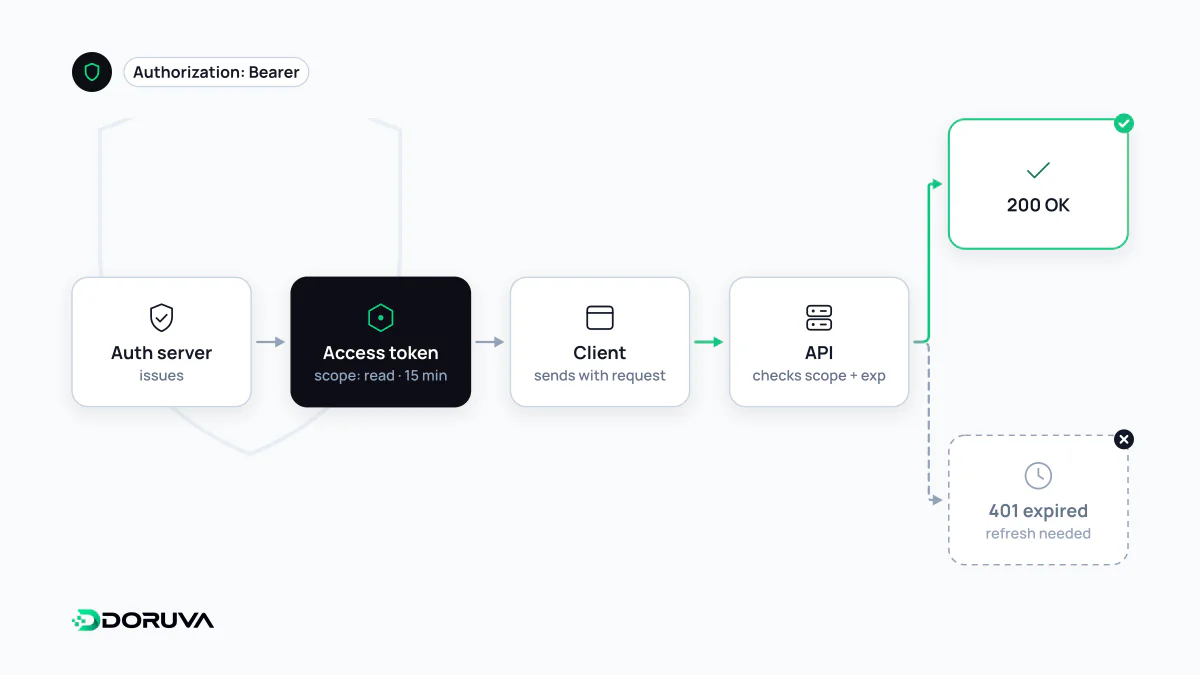
An access token is a credential showing that a client may call a protected API with specific permissions for a limited time. In OAuth 2.0 it is issued by the authorization server and usually sent in an Authorization: Bearer header. Access tokens are kept short-lived to limit the damage if one is stolen; when one expires, a longer-lived refresh token lets the client obtain a new one without making the user sign in again.
Also known as: bearer token, OAuth access token, refresh token, API access token
Whoever holds it can use it
Most access tokens are bearer tokens. RFC 6750 defines a bearer token as one that any party in possession of it can use exactly as its legitimate owner could, with no further proof required. Treat a bearer token with the same care as a password. The standard way to present it is a header:
GET /v1/invoices?status=open HTTP/1.1
Host: api.example.com
Authorization: Bearer eyJhbGciOiJFUzI1NiIsImtpZCI6ImsxIn0.eyJzdWIiOiJ1XzQyIn0.c2lnbmF0dXJl
Putting the token in a query parameter leaks it into logs and history, and the OAuth security best practice, RFC 9700, says clients must not do so. An API answers an invalid or expired token with 401 and WWW-Authenticate: Bearer error="invalid_token", and a token lacking the needed permissions with 403 and insufficient_scope.
Opaque tokens and JWTs
An opaque token is a random string with no readable content. The API learns who it belongs to and what it permits by asking the authorization server (token introspection, RFC 7662) or by looking it up in a shared store. Revocation takes effect immediately, at the cost of a lookup per request.
A JWT access token carries its claims inside, signed. The API verifies the signature locally and decides without a round trip, but the token is hard to revoke before it expires. Whichever format you use, the token is addressed to the API: the client application should not parse it or make decisions based on its contents. If the client needs to know who the user is, that is what the ID token from OpenID Connect is for.
Why lifetimes are short
A leaked access token works until it expires. Limiting lifetimes to minutes, or about an hour at most, narrows the window in which a stolen token is useful. No standard mandates a number; the right value depends on how sensitive the data is and how quickly your revocation works. Narrow the scope as well as the lifetime: RFC 9700 recommends restricting tokens to the minimum privileges needed and to a specific resource server (audience restriction).
Refresh tokens: long-lived, narrowly used
So that short-lived tokens do not force constant logins, the authorization server can also issue a refresh token. It is never sent to an API. It goes only to the authorization server's token endpoint, to request a new access token:
POST /oauth/token HTTP/1.1
Host: auth.example.com
Content-Type: application/x-www-form-urlencoded

grant_type=refresh_token&refresh_token=8xLOxBtZp8&client_id=billing-app
Because it lives longer, a refresh token deserves more protection, not less:
- Rotation: each use returns a new refresh token and invalidates the old one. If an old token shows up again, someone has a copy, and the server can revoke the whole token family. RFC 9700 requires refresh tokens for public clients, which cannot keep a secret, to be either rotated or sender-constrained.
- Sender-constraining: with DPoP (RFC 9449) or mutual TLS, a token only works for the client holding a particular private key.
- Two expiry limits: an idle limit that drops unused refresh tokens, plus an absolute limit after which the user must sign in again.
- Revocation on sign-out: when a user signs out or changes their password, revoke their refresh tokens on the server (token revocation, RFC 7009).
Where tokens belong in a browser app
Storing tokens in localStorage is common and risky: any script running on the page, including code injected through an XSS flaw, can read and exfiltrate them, and OWASP advises against keeping tokens in localStorage or sessionStorage. A growing pattern is the backend-for-frontend: a server-side layer holds the tokens, the browser only sees an HttpOnly session cookie, and API calls are made server-side. On mobile, the platform's secure storage (iOS Keychain, Android Keystore) is the right home.