

What is Session (Web)?
Definition
A web session is the mechanism that ties a user's successive requests together on top of stateless HTTP. In the classic design the server generates an unguessable session ID when the user signs in, keeps the associated data on its side and hands the ID to the browser in a cookie, which the browser sends back with every later request. The alternative keeps the state in a signed token held by the client.
Also known as: web session, user session, session ID, server-side session, session management
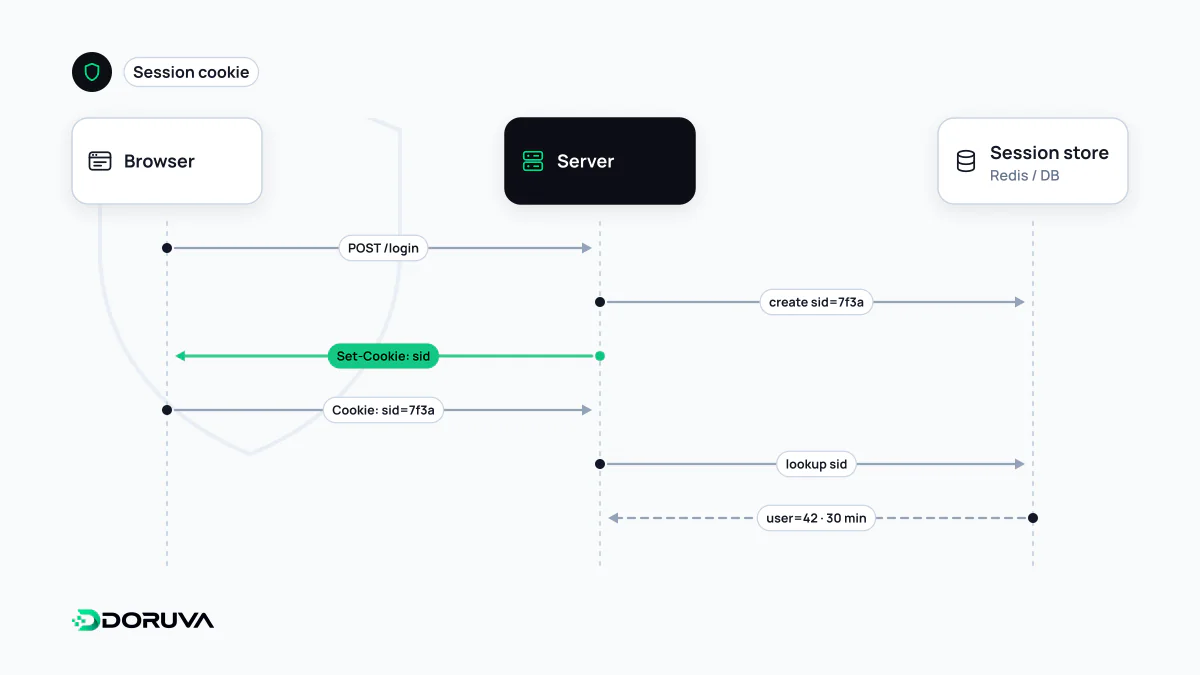
Continuity on a stateless protocol
HTTP treats every request in isolation. Nothing in the protocol tells the server that the request arriving now comes from the person who signed in a minute ago. Shopping carts, admin dashboards and multi-step forms all need that continuity, and the session supplies it. Authentication proves who the user is once; the session carries that proof forward to every subsequent request.
A server-side session from start to finish
- The user submits their email and password, and the server verifies them.
- The server generates a session ID with a cryptographically secure random generator and stores a record against it: user ID, roles, creation time.
- The ID goes to the browser in a cookie:
Set-Cookie: __Host-sid=q8N3vT0x...; Path=/; Secure; HttpOnly; SameSite=Lax - The browser attaches
Cookie: __Host-sid=...to each following request, and the server looks up the record. - On sign-out the server deletes the record, and the cookie becomes meaningless.
The ID should carry no meaning of its own: no username, email or role encoded in it. OWASP recommends at least 64 bits of entropy so it cannot be guessed. A single-server app can keep records in memory or in its database; once several instances need to see the same sessions, a shared fast store such as Redis is the usual choice.
Server-side sessions versus tokens
| Server-side session | Self-contained token (e.g. JWT) | |
|---|---|---|
| Where state lives | In the server's store; the client holds only an ID | Inside the token, protected by a signature |
| Revoking access now | Easy: delete the record | Hard: valid until expiry unless you add a denylist |
| Cost per request | A lookup in the session store | Local signature verification |
| Typical home | Browser-based web applications | APIs, service-to-service calls, mobile clients |
Real systems often combine them: the browser holds an ordinary session cookie while the backend talks to other services using access tokens. Swapping a session cookie for a JWT in a browser app tends to create more problems than it solves, particularly when you need instant sign-out or immediate removal of permissions.
Session security essentials
- Issue a fresh ID on sign-in. Regenerate the session ID whenever privileges change, above all at login. Otherwise an ID planted on the victim beforehand stays valid after they authenticate, which is known as session fixation.
- Set the right cookie attributes. Combine
Secure, HttpOnly to keep scripts away from the cookie, and SameSite to limit cross-site sending. - Enforce two timeouts. An idle timeout and an absolute lifetime solve different problems. OWASP cites 15–30 minutes of inactivity for low-risk applications and an absolute limit of roughly 4–8 hours; high-value applications such as banking go much shorter.
- Sign out on the server. Deleting the cookie in the browser does not end the session. Invalidate the server-side record.
- Keep IDs out of URLs and localStorage. IDs in URLs leak through logs and the Referer header; anything in localStorage is readable by every script on the page.
The OWASP Session Management Cheat Sheet has the full checklist.
Other things called a session
The word turns up in unrelated places. In Google Analytics 4, a session is a group of interactions during one visit, ending by default after 30 minutes of inactivity; it has nothing to do with sign-in. sessionStorage in the browser is storage that lives only as long as the tab. And a “session cookie” is any cookie without an expiry date, meant to be discarded when the browser session ends, whether or not it carries a login.