

What is HTTP Cookie?
Definition
An HTTP cookie is a small name-value pair that a web server asks the browser to store using the Set-Cookie response header. The browser keeps it and sends it back in the Cookie header on later requests that match its scope. Cookies keep users signed in, remember carts and language choices, and support analytics; attributes such as Domain, Path, Expires, Max-Age and Secure control where a cookie is sent and how long it lives.
Also known as: cookie, web cookie, browser cookie, Secure cookie, Set-Cookie
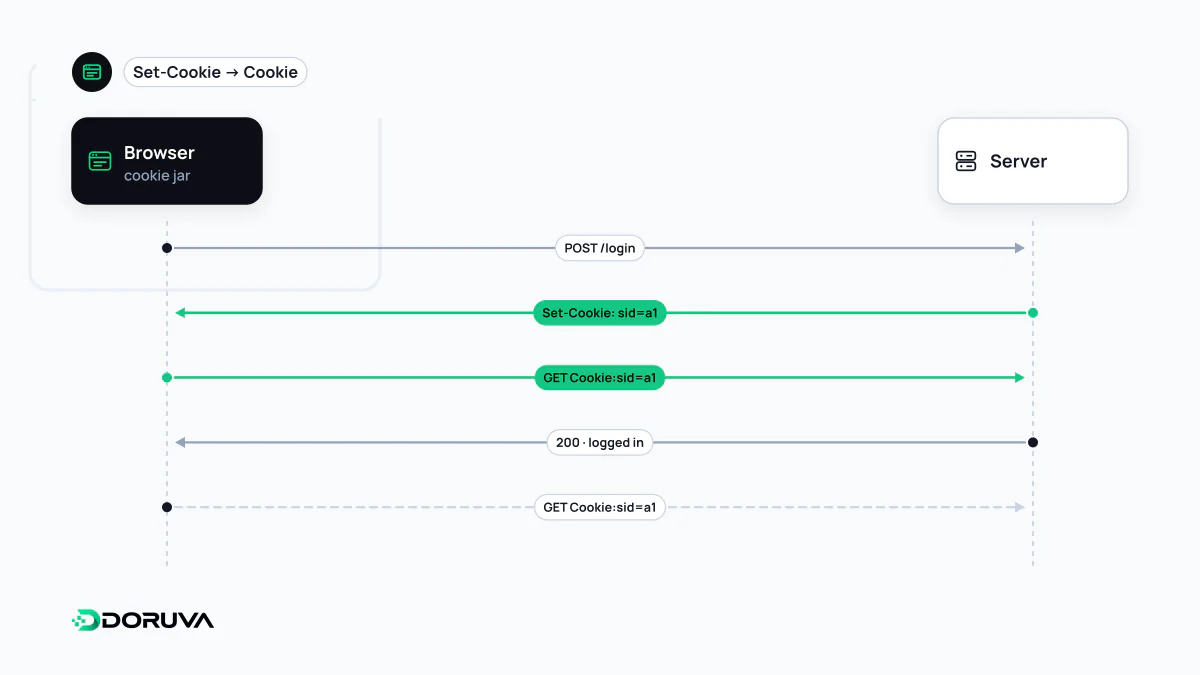
Written by Set-Cookie, returned in Cookie
A cookie starts life as a single response header. When a visitor picks a currency in a shop, for instance, the server might reply with:
HTTP/1.1 200 OK
Set-Cookie: currency=EUR; Path=/; Max-Age=31536000; Secure; SameSite=Lax
From then on, the browser adds Cookie: currency=EUR to matching requests to that site. Only the name and value travel back. The server cannot read which attributes a cookie was stored with or when it will expire, which surprises people debugging cookie problems. The headers involved are covered under HTTP header.
Cookies are meant to be small. Browsers typically cap each cookie at around 4 KB and limit how many a domain may set. More importantly, every request in scope, including images and stylesheets, carries all matching cookies again, so bloated cookies add bytes to every single request.
Scope: Domain and Path
- No Domain attribute makes the cookie host-only: a cookie set by
www.example.comis not sent toshop.example.com. This is the narrowest and usually the safest option. Domain=example.comsends the cookie to that domain and every subdomain. A server can only set this to its own domain or a parent of it; it cannot plant cookies for unrelated sites.Pathdefaults to the directory of the URL that set the cookie.Path=/accountlimits sending to requests under that path. RFC 6265 is explicit that Path cannot be relied on for security, since other pages on the same host can still get at the cookie.
Lifetime: Expires and Max-Age
A cookie with neither attribute is a session cookie, discarded when the browser session ends, which on browsers that restore tabs can be much later than expected. Expires takes an absolute date; Max-Age takes a number of seconds. Because a date is interpreted against the user's clock, Max-Age is less error-prone and wins when both are present. It is also how you delete a cookie: send the same name, Domain and Path with Max-Age=0.
The Secure attribute and cookie prefixes
A cookie marked Secure is only sent over HTTPS, so someone watching an unencrypted HTTP connection on the same network cannot pick it up. Pages served over http: cannot set Secure cookies at all, with browsers generally exempting localhost for development (Safari does not). Be clear about what Secure does not do: it does not encrypt the value, and it does not hide the cookie from JavaScript on the page. Blocking script access is the job of HttpOnly, and limiting cross-site sending is the job of SameSite.
Name prefixes make the browser enforce extra rules. A cookie whose name starts with __Secure- is only accepted if it is Secure and set from an HTTPS page. __Host- additionally forbids a Domain attribute and requires Path=/, which stops a subdomain from overwriting it. For session cookies, a __Host- name is a strong default.
Whose cookie, and with what consent?
Cookies set by the site in the address bar are first-party cookies; those set by another domain embedded in the page are third-party cookies. The mechanism is identical, but the privacy and legal consequences are not. Strictly necessary cookies are treated differently from analytics and advertising cookies, and the disclosure and consent questions under GDPR and Turkey's KVKK are covered under cookie consent.
What goes into a cookie is also a design decision. Anything that would cause harm if edited, such as a role or an order total, should not sit in a cookie in plain form. Store an opaque identifier and keep the real data on the server.