

What is Deindexing?
Definition
Deindexing is the removal of a previously indexed page or site from a search engine's index, so that it no longer appears in search results. It can be deliberate, done by the site owner with noindex, a 404 or 410 response or access control, or unintended, caused by misconfiguration, quality assessments, a hacked site or a manual action.
Also known as: deindexed, de-indexing, dropped from the index, removing a page from Google
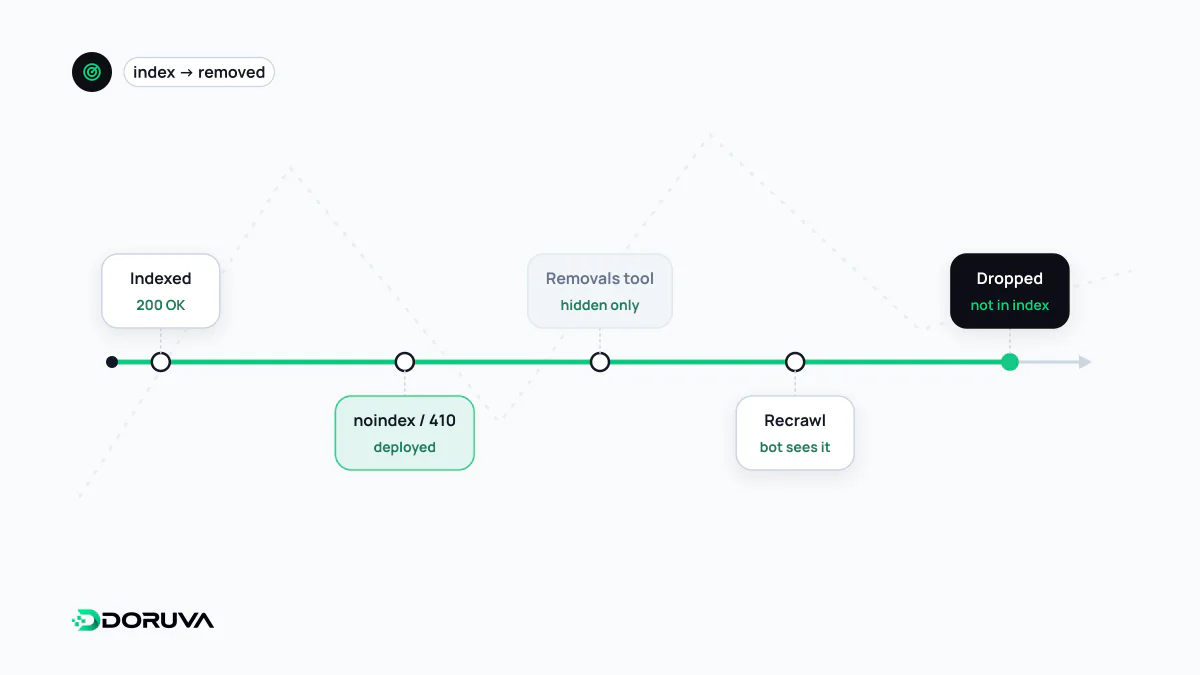
Two very different situations
People talk about deindexing in two contexts. In the first, the site owner wants a page gone from search: an expired campaign, a document published by mistake, content merged into another URL. In the second, nobody asked for anything, yet pages or even the entire site vanish from results. The first is about picking the right tool; the second is a fault to diagnose.
Removing on purpose: lasting fixes and temporary hiding
| Method | Effect | Note |
|---|---|---|
| noindex | Page stays reachable but leaves the index | Takes effect at the next crawl |
| 404 or 410 | Page is gone and drops out over time | If the content moved, redirect instead |
| Password or login | Bots cannot reach the content | The safest option for private material |
| Search Console Removals tool | URL is hidden from results, typically within a day | Lasts about six months; not permanent |
Think of the Removals tool as an emergency brake. When the period ends, a page that is still live and lacks noindex can come back, so pair the temporary block with one of the permanent methods above. The tool can also hide every URL that starts with a given prefix, which helps when an entire directory has to disappear quickly. Robots.txt is not a removal method: a blocked page cannot be crawled and may therefore stay indexed. Google summarises the options in its guide to removing information from Google.
Why pages drop out unexpectedly
- Staging settings shipped to production. A site-wide noindex, or an X-Robots-Tag header set in server config, makes it to the live site. A header rule never appears in the page source, so it can go unnoticed for weeks.
- Template bugs. A theme update points every page's canonical at the homepage, and Google drops the rest as duplicates.
- Persistent server errors. Pages that keep returning 5xx, or that look like soft 404s, can fall out of the index.
- Migration gaps. Old URLs left unmapped after a site migration end in 404s.
- Security and spam. A hacked site or a manual action. Google says that when a site has a manual action, some or all of it will not be shown in search results.
- Quality assessment. Pages moving to "Crawled - currently not indexed" with no technical barrier in sight say something about the value of the content.
Diagnosing a drop, in order
- Open the Manual actions and Security issues reports in Google Search Console. An entry there outranks every other explanation.
- In the Page indexing report, find the reason where the lost pages pile up and when the change began; match that date against recent deploys and configuration changes.
- Run live tests on sample URLs with URL Inspection: can Google fetch the page, and which canonical does it choose?
- Check the response headers directly:
curl -sI https://example.com/services/ | grep -iE "^(HTTP|x-robots-tag|link)"Once the cause is fixed, you can request indexing for key URLs; for a manual action, submit a reconsideration request describing the fixes. Recovery time is not guaranteed, because the pages have to be recrawled and re-evaluated.