

What is ARIA (WAI-ARIA)?
Definition
ARIA (WAI-ARIA, Accessible Rich Internet Applications) is a W3C specification of roles, states and properties that can be added to HTML elements to tell assistive technologies such as screen readers what an element is and what condition it is in. ARIA changes semantics only; it adds no behaviour. WAI-ARIA 1.2 is the current W3C Recommendation, and the guiding rule is not to use ARIA where native HTML already does the job.
Also known as: WAI-ARIA, Accessible Rich Internet Applications, ARIA attributes, ARIA roles, aria-label
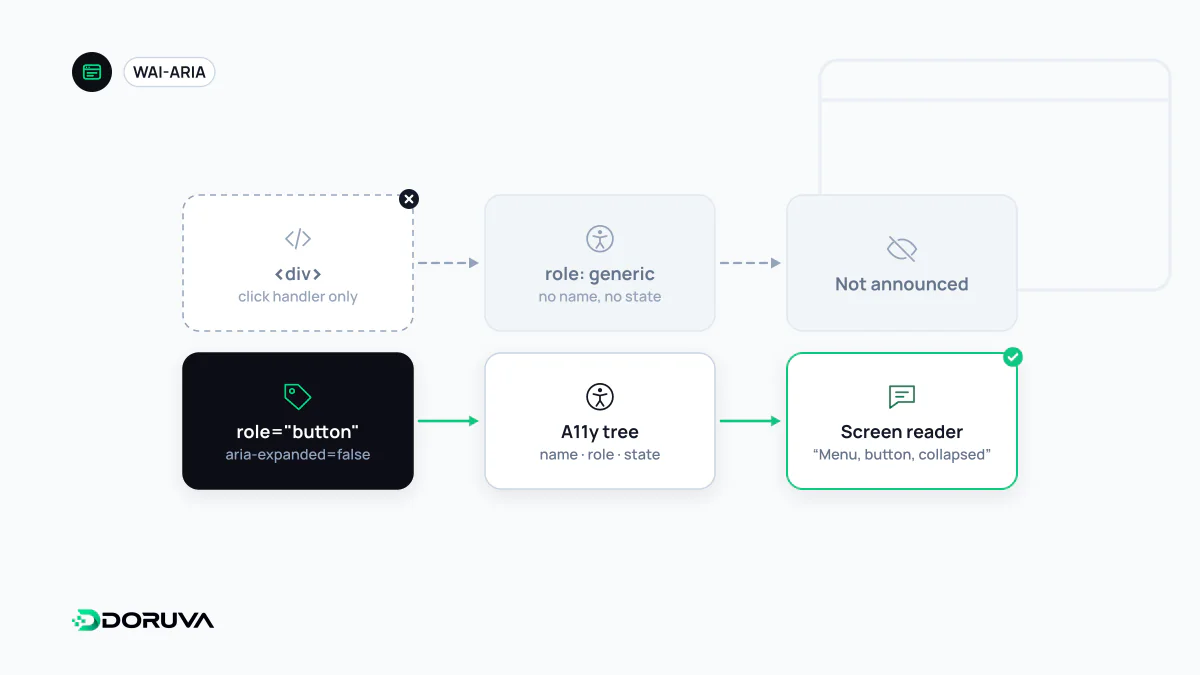
Roles, states and properties
Browsers build an accessibility tree alongside the DOM, recording each element's role, name and state, and screen readers read from that tree. Most HTML elements populate it automatically: a <button> has the button role, and a checkbox reports whether it is checked. ARIA is how you supply that information by hand when HTML cannot. WAI-ARIA 1.2 has been a W3C Recommendation since June 2023.
| Kind | What it conveys | Examples |
|---|---|---|
| Role | What the element is | role="tablist", role="dialog", role="alert" |
| State | Something that changes as the user interacts | aria-expanded="true", aria-checked, aria-selected |
| Property | More stable characteristics and relationships | aria-label, aria-describedby, aria-controls |
The specification further groups roles into widget roles (tabs, sliders), document structure roles, landmark roles (navigation, main content) and live region roles for announcements.
The first rule of ARIA use
If you can use a native HTML element or attribute with the semantics and behavior you require already built in, instead of re-purposing an element and adding an ARIA role, state or property to make it accessible, then do so.
The rule comes from the W3C document "Using ARIA", which was moved to Discontinued Draft status in February 2026; its four rules are kept for reference only. The principle itself has not gone anywhere. "ARIA in HTML", a W3C Recommendation, advises against restating implicit semantics and restricts overriding the roles of interactive elements, and the W3C points to the ARIA Authoring Practices Guide for pattern-level guidance. In practice, the first step is always semantic HTML.
ARIA does not add behaviour
The most common misunderstanding is that adding a role makes an element work. The first snippet below is announced as a button, yet it cannot receive keyboard focus and ignores Enter and Space:
<!-- Semantics only: no keyboard support -->
<div role="button" onclick="save()">Save</div>

<!-- Correct: focus, keyboard handling and role come for free -->
<button type="button" onclick="save()">Save</button>
Rescuing the first version takes tabindex="0", key handlers in JavaScript and disabled-state management: a re-implementation of everything <button> already provides.
Where ARIA is genuinely needed
ARIA earns its place in components that have no native equivalent, or whose state HTML cannot express. A disclosure menu button is the classic case:
<button type="button" aria-expanded="false" aria-controls="menu">
  Services
</button>
<ul id="menu" hidden>…</ul>
When the menu opens, the script must both remove hidden and set aria-expanded to true. A state attribute that is never updated is worse than none, because it tells screen reader users something false. Live regions (aria-live) belong here too: they announce changes that would otherwise go unnoticed, such as "Message sent" after a form submission.
Misuse patterns to look for
- Redundant roles:
<nav role="navigation">or<button role="button">add noise and nothing else. - Hiding focusable content: if a link inside an
aria-hidden="true"container can still be reached with Tab, keyboard users land on something that has no announced name. - Labels that contradict the visible text: giving a button that reads "Send" an
aria-label="Submit form"breaks voice control for anyone who says "click Send". - Labels on generic elements:
aria-labelon a plain<div>or<span>with no role is ignored by much assistive technology. - Trusting automated checks alone: tools catch invalid attributes, but only testing with a keyboard and a screen reader shows whether the interaction logic is right. The wider picture is in web accessibility.