

What is Preload?
Definition
Preload is a declaration, made with a link element using rel="preload", that tells the browser to fetch a resource the current page will definitely need (a font, image, stylesheet or script) early and at high priority. The resource is downloaded and cached but not executed. It is meant for critical files the browser would otherwise discover late; unnecessary preloads compete with other requests for bandwidth.
Also known as: rel=preload, link rel preload, resource preloading
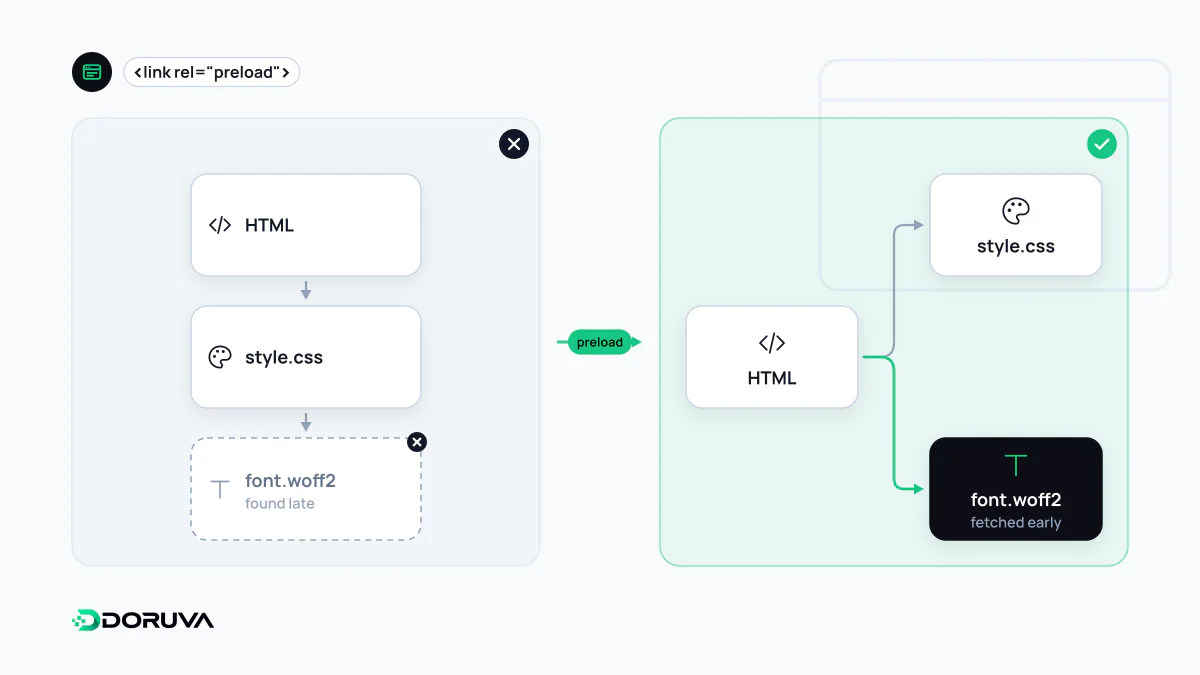
The late-discovery problem
The browser's parser spots <img>, <script> and stylesheet links in the HTML almost immediately. Trouble starts with resources that aren't in the HTML at all: a web font declared inside a stylesheet, a hero image set as a CSS background, a module imported by another script. The browser only learns about these after the CSS or JavaScript that references them has downloaded and been parsed, so a critical file may be requested hundreds of milliseconds later than it could be.
Preload short-circuits that chain by announcing the resource up front. Note that it is not a gentle hint: a preload is a mandatory fetch, and the browser downloads every file you preload.
Getting the markup right
<!-- variable font referenced only from CSS -->
<link rel="preload" href="/fonts/inter-var.woff2"
      as="font" type="font/woff2" crossorigin>

<!-- LCP image delivered as a CSS background -->
<link rel="preload" href="/img/hero-1200.avif"
as="image" type="image/avif" fetchpriority="high">asis required. It sets the request priority, theAcceptheader, the Content Security Policy check and how the cached response is matched later. Get it wrong and the preloaded copy may go unused while the browser fetches the file again.- Fonts always need
crossorigin, even from your own domain, because fonts are fetched in CORS mode. Without it the preload doesn't match and the font downloads twice. typelets browsers skip formats they can't decode, such as AVIF on older engines.- For responsive images,
imagesrcsetandimagesizespick the right candidate;mediahandles art-directed backgrounds.
Servers can send the same instruction as a header: Link: </fonts/inter-var.woff2>; rel=preload; as=font; crossorigin. MDN documents every attribute.
Preload or fetchpriority?
They fix different problems: preload fixes discovery, fetchpriority fixes priority. If the LCP image is already an <img> in the HTML, the browser has found it and simply doesn't know it matters, so fetchpriority="high" on that element is usually enough. If the image arrives through CSS or JavaScript, preload is the right tool. fetchpriority is supported in current Chrome, Edge, Firefox and Safari; older browsers just ignore it.
When preloading hurts
- Preloading everything. Each high-priority request shares bandwidth with the HTML and CSS that really are critical. If everything is urgent, nothing is.
- Unused preloads. A file the page never uses is pure waste, and Chrome flags it with a console warning.
- Next-page assets. Resources for a future navigation belong in a low-priority prefetch, not a preload.
- Every font weight. One or two web font files used above the fold are usually all that deserve it.
When the resource lives on another origin and its exact URL isn't known in advance, warming up the connection with preconnect is the better fit.