

What is Web Font?
Definition
A web font is a font file that a page downloads from a server through the CSS @font-face rule, so it does not need to be installed on the visitor's device; WOFF2 is the standard format today. Web fonts give consistent, on-brand typography, but each one is an extra download: a late font can leave text invisible for a while (FOIT) or cause a visible swap and layout shift (FOUT). font-display, preload and subsetting manage that cost.
Also known as: webfont, @font-face, WOFF2, custom font
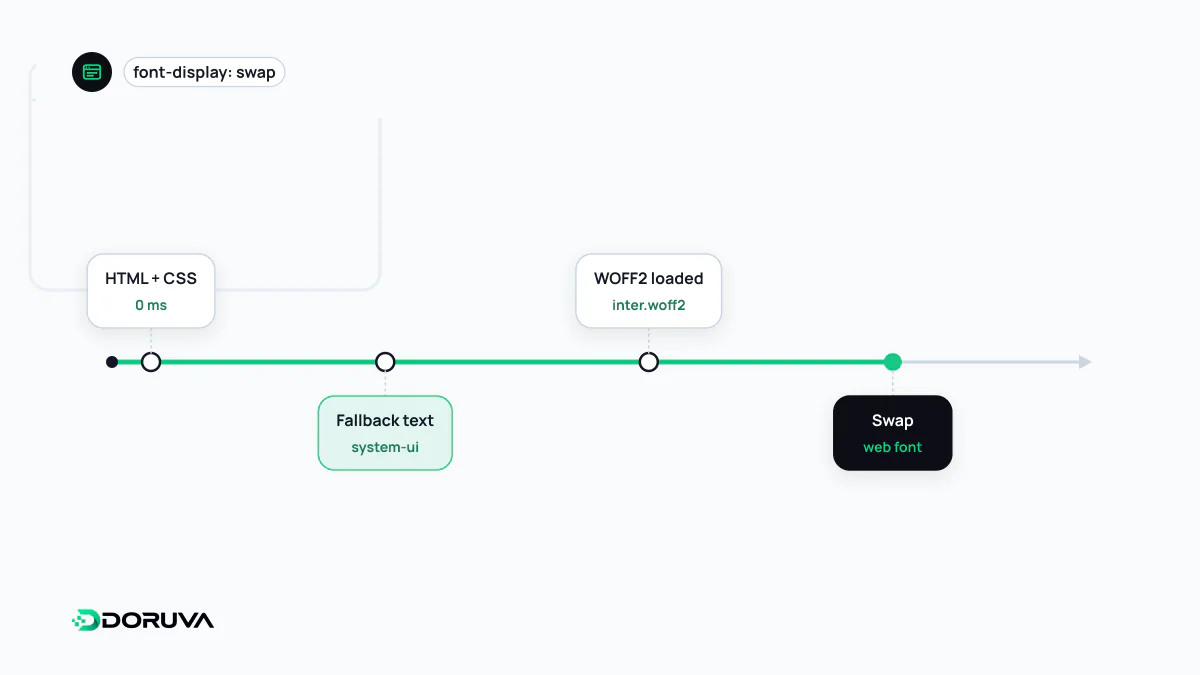
Why fonts are discovered so late
A web font is declared in CSS like this:
@font-face {
  font-family: "Brand Sans";
  src: url("/fonts/brand-sans-latin.woff2") format("woff2");
  font-weight: 400 700;
  font-display: swap;
}
The declaration alone does not start a download. The browser requests the font only after it has parsed the HTML, fetched the CSS, built the render tree and found visible text that needs that font. Fonts are among the last resources discovered on the critical rendering path, and a third-party font service's stylesheet adds one more link to the chain.
FOIT, FOUT and font-display
Until the font arrives, the browser can either hide the text (FOIT, flash of invisible text) or render it in a fallback font and swap later (FOUT, flash of unstyled text). The font-display descriptor chooses between them:
| Value | Text hidden for | Swaps in late font | Good for |
|---|---|---|---|
block | About 2–3 seconds | Always | Icon fonts, where a fallback is meaningless |
swap | Not at all | Always | Brand headings that must appear in the right face |
fallback | About 100 ms | Only within about 3 seconds | A balanced default for body text |
optional | About 100 ms | No; a late font is skipped for that page view | Body text when speed comes first |
swap shows text immediately but lines can jump when the font lands; optional avoids the jump but on a slow connection the brand font may never appear.
Taming the swap: fallback font metrics
When the fallback and the web font differ in glyph width and line height, paragraphs reflow at swap time and that movement counts towards CLS. The size-adjust, ascent-override and descent-override descriptors in @font-face let you tune a local fallback font to match the web font's metrics closely. Some frameworks calculate these values automatically at build time.
Fewer bytes: WOFF2, subsets and variable fonts
- WOFF2 is supported by every current browser and compresses about 30% better than WOFF, so serving TTF or EOT alongside it is rarely necessary any more.
- Subsetting: a font may contain thousands of glyphs. With
unicode-range, each script or language group goes into its own file and the browser downloads only the files whose characters actually appear on the page. Check your languages carefully: Turkish, for example, needs ğ, ş, ı and İ from the Latin Extended-A block, so a page that ships only a basic “latin” subset renders those letters in the fallback font, mid-word. - Variable fonts pack regular, semibold, bold and everything in between into a single file. For a site using three or four weights that is often lighter than separate files; for a site using one weight it may be heavier.
Preloading and where to host
For the one or two fonts used above the fold, preload lets the browser request them without waiting for the CSS:
<link rel="preload" href="/fonts/brand-sans-latin.woff2"
      as="font" type="font/woff2" crossorigin>
Fonts are fetched in CORS mode, so crossorigin is needed even on the same origin; without it the file is downloaded twice. Preloading too many fonts steals bandwidth from more important resources.
The performance difference between a third-party font service and self-hosting cuts both ways. Cache partitioning has removed the old “visitors already have it cached” argument, and a third-party host adds a connection whose cost preconnect can only partly hide. Self-hosting gives you control over cache headers and subsets and keeps visitors' IP addresses from being sent to another party. The readability side of choosing a font is covered under typography.