

What is Lazy Loading?
Definition
Lazy loading is the technique of loading resources such as images, iframes or code only when they are actually needed, rather than all at once when the page opens; for images, that usually means when the user scrolls near them. The goal is to reduce how much data is downloaded on initial load. Browsers support it natively for images and iframes through the loading="lazy" attribute.
Also known as: lazy load, loading=lazy, native lazy loading, deferred loading
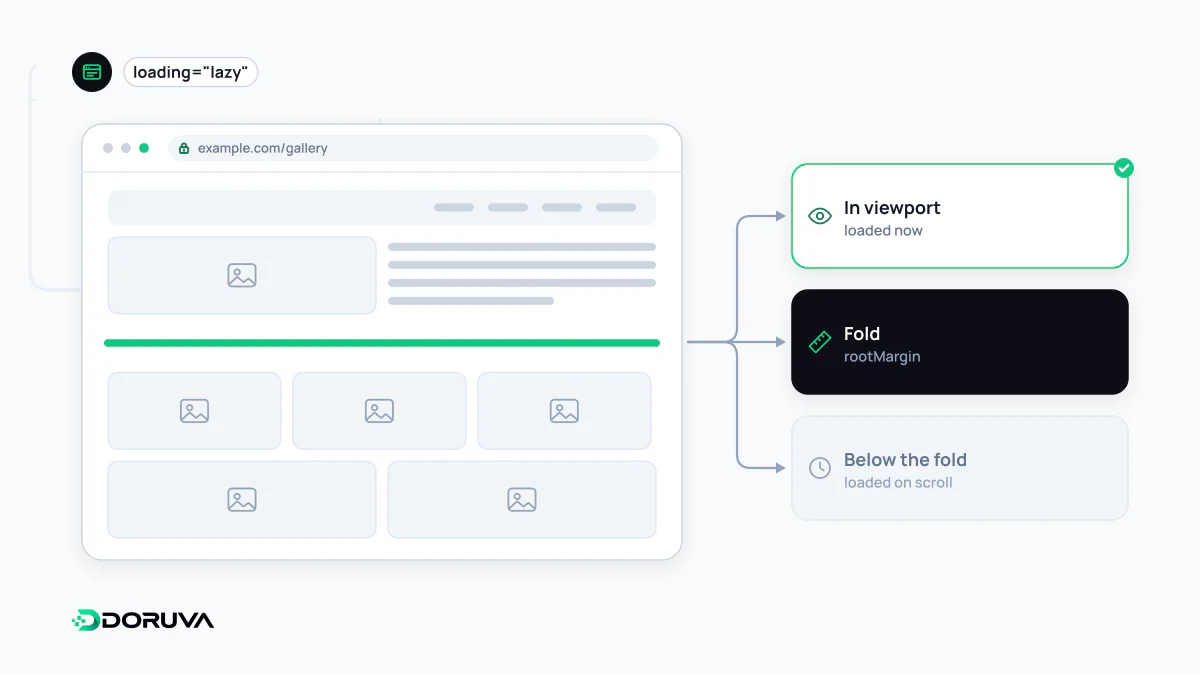
How it works
By default, a browser starts downloading every image it finds in the HTML, wherever it sits on the page. On a long product list or article that can mean dozens of files the visitor may never scroll to. Lazy loading postpones those downloads until an element comes within a certain distance of the viewport. The browser picks that distance and may adjust it for connection speed; the aim is for the image to be ready by the time the user gets there.
Native lazy loading
This used to require JavaScript libraries. Today the loading attribute on img and iframe elements is supported in all modern browsers and needs no extra code:
<img src="/gallery/product-3.webp" alt="Side view of the product"
     width="800" height="600" loading="lazy">

<iframe src="/demo/live-preview.html"
        title="Live preview" loading="lazy"></iframe>
The attribute takes two values: lazy and the default, eager. Always set width and height; otherwise the image pushes content below it down when it arrives and CLS goes up. For finer control (background images, infinite scroll, component-level loading) the IntersectionObserver API is the usual tool.
The idea isn't limited to media. Splitting JavaScript bundles (code splitting) so a component's code is fetched only when it's needed is the same principle applied to scripts.
When not to lazy-load
- The main image above the fold: the large image on the first screen is very often the page's LCP element. Giving it
loading="lazy"makes the browser hold the download until layout is known, which delays LCP. Leave it eager, and considerfetchpriority="high". - Images that may be above the fold on some devices: an image below the fold on desktop can be on the first screen in a mobile layout. Loading the first few images on the page normally is the safer default.
- A handful of small images: if a page only has a few icons, the savings are negligible.
Search engines and lazy loading
Google describes deferring non-critical content as a common performance best practice, but warns that a faulty implementation can hide content from Google. According to Google's lazy-loading guidance, Google Search doesn't interact with the page (it doesn't scroll or click), so content should load when it becomes visible in the viewport. Native lazy loading and IntersectionObserver both meet that requirement.
Patterns that cause trouble include old scripts that only listen for the scroll event, text hidden behind a "show more" button that fetches it on click, and setups that keep the image URL in a data- attribute and never write it back to src. In those cases images and text may never be indexed. For infinite-scroll lists, Google recommends giving each chunk its own URL and linking those URLs sequentially.
How to check it
In Search Console's URL Inspection tool, look at the rendered HTML and confirm image URLs appear in src attributes. Reloading a page with the Network tab open in Chrome DevTools and scrolling slowly shows exactly when each image is requested. Checking in Lighthouse whether the LCP element is lazy-loaded catches the most common mistake in seconds.