

What is WordPress Plugin?
Definition
A WordPress plugin is a package of PHP-based code that adds new functionality to a WordPress site or changes existing behavior without modifying WordPress core files. Plugins work by attaching to WordPress action and filter hooks; contact forms, SEO fields, caching, ecommerce and custom post types are typically added this way. Every plugin brings new code to the site, and with it a new security and maintenance responsibility.
Also known as: WP plugin, WordPress extension, WordPress add-on
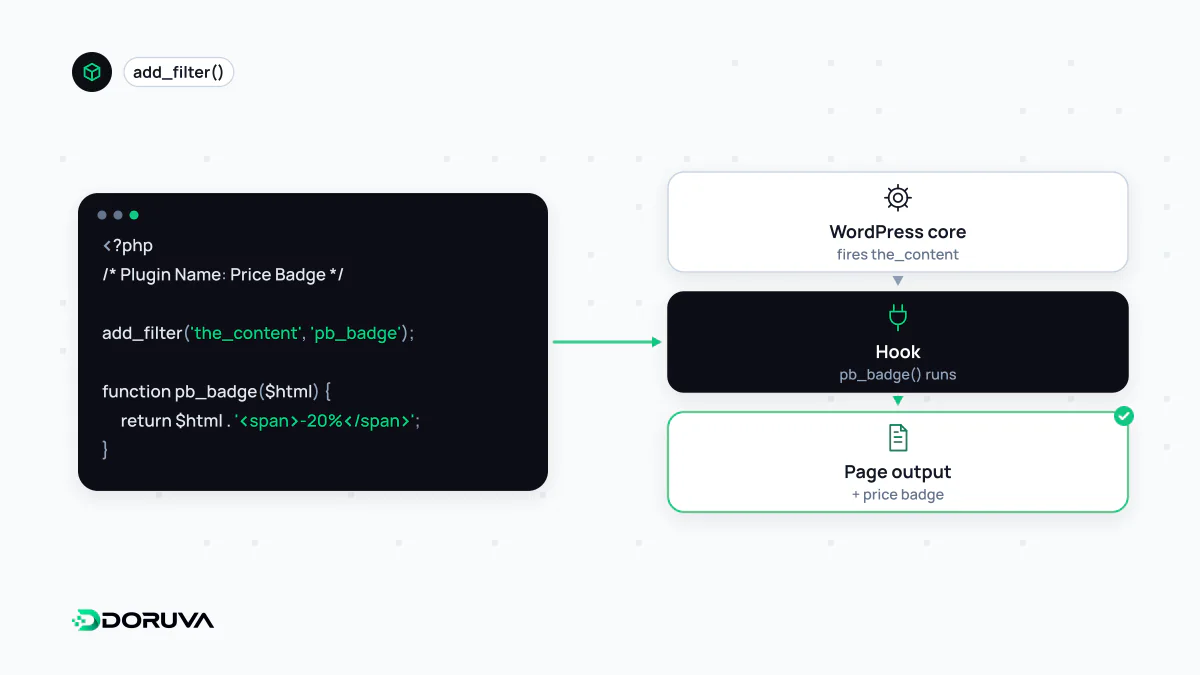
Hooks: how a plugin plugs in
The Plugin Handbook describes plugins as packages of code that extend WordPress's core functionality. At minimum, a plugin is one PHP file with a specially formatted comment block at the top. It never edits core; instead it attaches its own code to hooks WordPress fires while it runs. An action says “when this moment arrives, also do this”. A filter says “hand me that value before you use it so I can change it”.
This small plugin uses a filter to put an estimated reading time at the top of blog posts:
<?php
/**
 * Plugin Name: Acme Reading Time
 * Description: Adds an estimated reading time to posts.
 * Version: 1.0.0
 */

add_filter( 'the_content', function ( $content ) {
    if ( ! is_singular( 'post' ) ) {
        return $content;
    }
    $text    = trim( wp_strip_all_tags( $content ) );
    $words   = count( preg_split( '/s+/u', $text ) );
    $minutes = max( 1, (int) ceil( $words / 200 ) );

    return '<p>' . esc_html( $minutes . ' min read' ) . '</p>' . $content;
} );
Site behavior changes without a single core file being touched, and deactivating the plugin restores the original behavior.
Every plugin is a dependency
Installing a plugin means adding code someone else wrote, and you have not reviewed, to your site. WordPress also has no permission boundary between plugins: an active plugin can read the whole database, the file system and user data. Treat each one like any other software dependency. Who maintains it? When was it last updated? How quickly are reported issues fixed? An abandoned plugin that works today is tomorrow's vulnerability. Unlicensed “nulled” copies of premium plugins frequently come with a backdoor.
Update and security hygiene
- Keep an inventory. Know why each plugin is installed. Delete the ones you do not use rather than just deactivating them; code left on the server can still be a risk.
- Stay current. Since WordPress 5.5, automatic updates can be switched on plugin by plugin. That saves effort for low-risk plugins; for critical flows such as payments, controlled manual updates are safer.
- Test first. Run major updates in a staging environment before they reach production.
- Keep a way back. Make sure a fresh backup of files and database exists before updating.
- Limit administrators. Only a few people should be able to install plugins, the most tangible form of least privilege in WordPress.
Ground rules for plugin developers
WordPress's security guidance opens with one rule: never trust user input. In practice that means validating and sanitizing input before use (with functions such as sanitize_text_field()), escaping output as late as possible (esc_html(), esc_url()), verifying with a nonce that a form submission or action link really came from that user, and checking permissions with current_user_can() before doing anything. Prefixing function and option names avoids collisions with other plugins.
Do fewer plugins mean a faster site?
Only loosely. What matters is what each plugin does, not how many there are. One plugin that loads a large JavaScript bundle and external fonts on every page can cost more than ten small ones that only run in the admin area. When assessing plugins, look at which files they add to the front end and how many database queries they run; that tells you far more than the count.