

What is Dependency?
Definition
A dependency is a library, framework or tool, usually written by someone else, that a software project needs in order to build or run. Dependencies are installed through a package manager such as npm, pip or Composer; a manifest file declares the acceptable version ranges and a lockfile records the exact versions actually installed. Every dependency saves development time but also brings update, licensing and security responsibilities into the project.
Also known as: software dependency, package manager, npm package, lockfile, third-party library
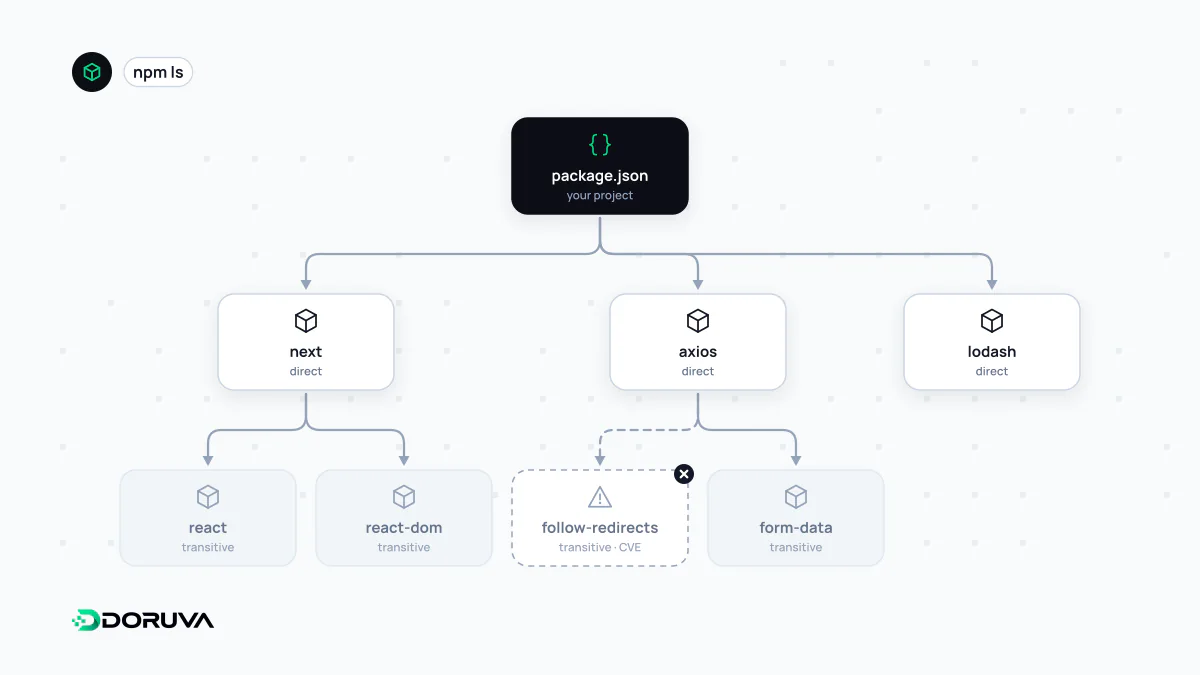
Direct and transitive dependencies
The packages you add on purpose are direct dependencies: a date library, a validation library, a framework. Each of them has dependencies of its own, which have theirs, and everything further down that chain is a transitive dependency. That is why a JavaScript project with a few dozen lines in package.json routinely ends up with hundreds of folders in node_modules.
The practical consequence: most of the code your application runs was not written by your team. A bug, slowdown or security flaw in a package you have never heard of can reach production through that tree.
Package managers, manifests and lockfiles
Rather than copying libraries around by hand, each ecosystem has a package manager: npm, pnpm or Yarn for JavaScript, pip, Poetry or uv for Python, Composer for PHP. They all revolve around two files:
- The manifest (
package.json,composer.json) states which versions of each package are acceptable. - The lockfile (
package-lock.json,composer.lock) records the exact versions that were resolved, transitive ones included.
"dependencies": {
  "react": "^19.1.0",
  "zod": "~3.24.2"
}
Under semantic versioning, ^19.1.0 accepts newer minor and patch releases in the 19.x line, while ~3.24.2 accepts only 3.24.x patches. Ranges are convenient, but they also mean two developers installing on different days can get different code. The lockfile removes that ambiguity, and the npm documentation says package-lock.json is intended to be committed; its integrity field stores a hash for each package so a tampered or corrupted download is detected. In CI, npm ci is the better choice than npm install: if the lockfile and manifest disagree, it fails instead of quietly rewriting the lock.
Supply chain risk
The 2025 edition of the OWASP Top 10 places “Software Supply Chain Failures” third, a clear sign that dependencies are now treated as an attack surface in their own right. The usual ways it goes wrong:
- Running an old version with a publicly known vulnerability.
- Relying on abandoned packages whose flaws will never be fixed.
- Installing a look-alike package whose name differs from a popular one by a character (typosquatting).
- A maintainer account being compromised and a malicious release published under a trusted name.
Basic hygiene on the defensive side: commit the lockfile and install from it in CI; run a known-vulnerability scan such as npm audit in the CI/CD pipeline; read automated update pull requests from Dependabot or Renovate before merging them; use npm audit signatures to verify registry signatures and provenance attestations; and give CI publishing tokens only the permissions they need.
Before you add a package
- Do you need it? Pulling in a package and its whole tree to avoid writing ten lines is usually a bad trade.
- Is it maintained? Release history, responsiveness on issues and the number of maintainers are useful signals.
- Is the licence compatible? Some open-source licences add obligations when you distribute the resulting software.
- What does it cost? In the browser it grows your JavaScript bundle; on the server it adds install time and attack surface.
Keeping up with updates
Leaving dependencies untouched for years eventually turns into a “big upgrade” that jumps several major versions and breaks everything at once, one of the most measurable forms of technical debt. Small, regular updates backed by automated tests carry far less risk: take patch releases often, minor releases on a schedule, and treat major upgrades as planned work after reading the changelog.