

What is CI/CD?
Definition
CI/CD combines continuous integration, where every code change is automatically built and tested, with continuous delivery or continuous deployment, where changes that pass are kept ready to release or are released to production automatically. Together they form a pipeline whose goal is to ship small changes frequently, safely and repeatably, with automated tests acting as the gate between stages.
Also known as: Continuous integration, Continuous delivery, Continuous deployment, CI/CD pipeline
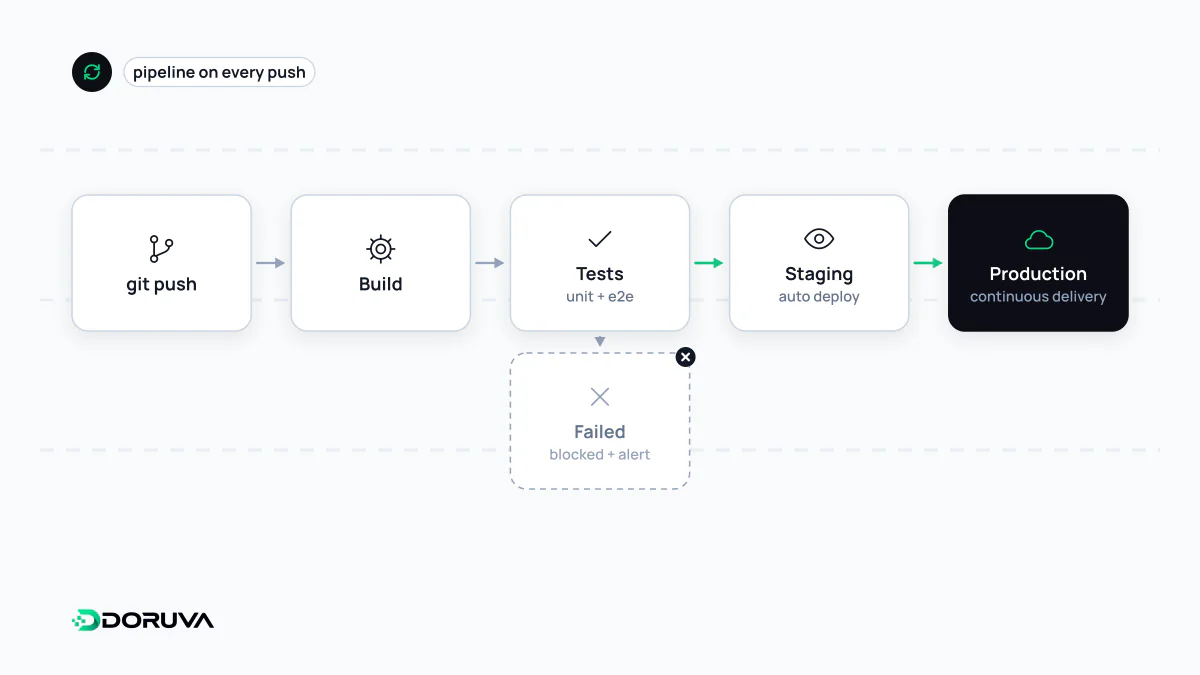
Three practices, three promises
"CD" can stand for two different things, which is why CI/CD is often used loosely. The difference is where automation stops:
| What is automated | Release to production | |
|---|---|---|
| Continuous integration (CI) | Build and tests on every push or pull request | Out of scope |
| Continuous delivery | CI plus a releasable artifact and deployment to staging | One click, after a human approves |
| Continuous deployment | Everything above | Automatic for every change that passes all checks |
At its core, CI is a habit rather than a tool: developers merge small changes into the main branch often, and every merge is verified automatically. Code that sits on a branch for weeks will hurt when it finally merges, whatever tooling you use.
Tests as the gate
A typical pipeline runs linting and type checks, unit tests, a build (for example a Docker image), integration tests, a staging deployment and finally production. The rule is simple: if a stage fails, nothing downstream runs. In this GitHub Actions workflow the deploy job cannot start until test passes:
name: ci
on:
  push:
    branches: [main]
  pull_request:

jobs:
  test:
    runs-on: ubuntu-latest
    steps:
      - uses: actions/checkout@v5
      - uses: actions/setup-node@v5
        with:
          node-version: 24
      - run: npm ci
      - run: npm run lint
      - run: npm test

  deploy:
    needs: test                       # gated on the test job
    if: github.event_name == 'push'   # never deploy from pull requests
    runs-on: ubuntu-latest
    environment: production
    steps:
      - uses: actions/checkout@v5
      - run: ./scripts/deploy.sh
Add a required-reviewer protection rule to the production environment and this is continuous delivery; leave it off and every green push goes live, which is continuous deployment. The GitHub Actions documentation covers the syntax; GitLab CI, Jenkins and similar tools follow the same logic.
Another principle worth keeping: build once, deploy many. The exact artifact that passed staging should be the one promoted to production. Rebuilding per environment means shipping something nobody tested.
Planning for rollback
Some bugs only appear in production, so getting back to a known-good state quickly matters as much as the pipeline itself:
- Versioned, immutable artifacts: tag every release with a version or commit SHA, and rolling back becomes redeploying the previous tag.
- Progressive rollout: blue-green deployments prepare the new version alongside the old one and switch traffic in one step; canary releases send a small share of traffic to the new version first.
- Feature flags: switch off a risky feature without reverting code.
- Mind the database: rolling back code does not roll back a schema. Design migrations in expand-then-contract steps so the previous version keeps working.
Common mistakes
- Tolerating flaky tests — once the team stops trusting a red build, the gate no longer protects anything.
- Skipping the pipeline for "urgent" manual deploys, which tend to be the riskiest changes of all.
- Committing secrets to the repository or pipeline file instead of using the CI tool's secret store.
- Living with slow pipelines; as feedback slows down, developers drift toward larger, less frequent changes.
In microservices architectures, where every service has its own release pipeline, this discipline stops being optional. CI/CD is also one of the most common forms of automation inside software teams.