

What is Deployment?
Definition
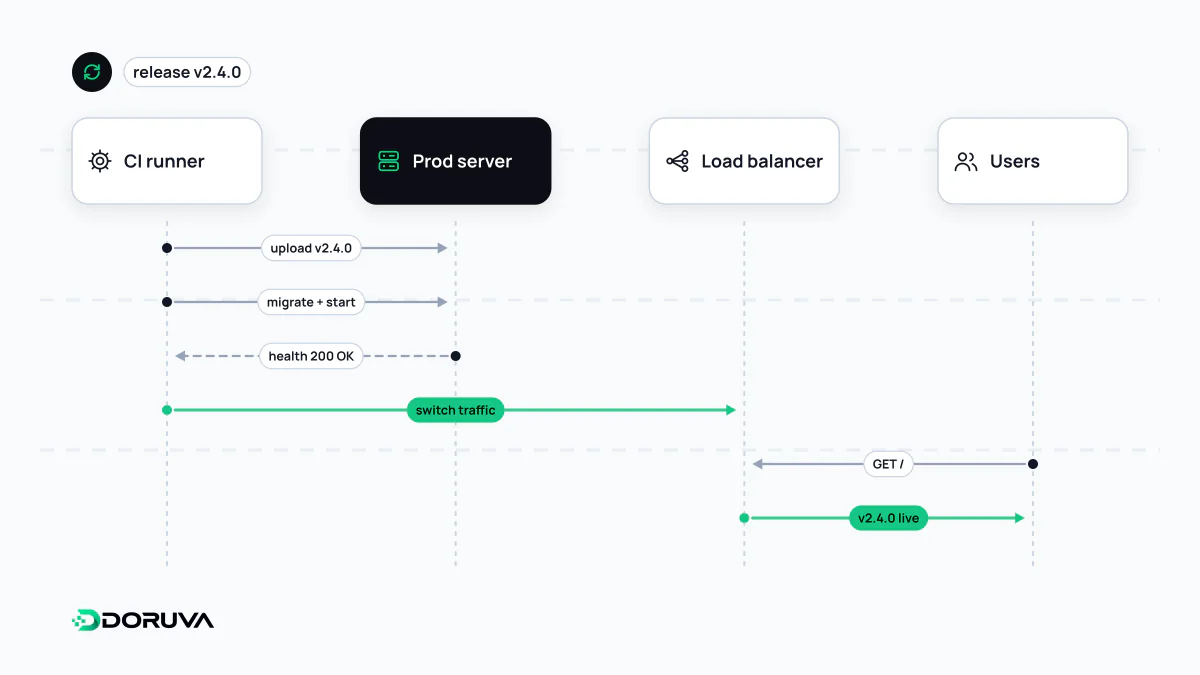
Deployment is the process of installing a tested build of a new software version in the production environment and getting it running. It covers transferring files or container images to servers, applying database changes, starting the new version, checking its health and routing traffic to it. Deployment is the technical rollout; releasing a feature to users can be treated as a separate step.
Also known as: software deployment, deploy, production deployment, shipping to production
Deploying is not releasing
"We shipped it" can mean two different things. A deployment puts new code onto production infrastructure and starts it. A release makes a feature available to users. On many projects both happen at once, but they can be pulled apart: a new checkout flow is deployed behind a feature flag that keeps it switched off, tried internally first, then opened to a slice of users and finally to everyone.
Separating the two lowers risk. When installing code and changing behaviour happen at different moments, turning off a misbehaving feature doesn't require another deployment; you flip the flag.
What a deployment involves
- Pick the artifact. The package or image that came out of the build process and passed testing is identified by its version tag.
- Apply database changes. Pending migrations run.
- Start the new version. New instances boot and must pass health checks.
- Shift traffic. The load balancer or reverse proxy starts sending requests to the new instances.
- Watch. Error rates, response times and business metrics get close attention for a while.
- Clean up. The old version is shut down once you're confident you won't need it.
Doing this by hand is slow and never quite the same twice. A CI/CD pipeline reduces it to one repeatable action.
Deployment strategies
| Strategy | How it works | Downtime and risk |
|---|---|---|
| Recreate | Stop the old version, start the new one | Brief downtime; simple but blunt |
| Rolling | Replace instances one at a time | No downtime; two versions run side by side during the rollout |
| Blue-green | Prepare the new version in a parallel environment, then switch all traffic at once | Instant way back; double the resources while both exist |
| Canary | Send a small share of traffic to the new version and widen it gradually | Limits the blast radius; needs good monitoring |
The blue-green deployment and canary deployment entries go into each in detail. Whichever you choose, the route back to the previous version should be settled before the deployment starts, not invented during an incident.
The hard part is the database
Code can be rolled back; a dropped column doesn't come back so easily. With rolling and canary deployments, old and new versions share the same database for a while, so every schema change must work with both. The standard technique is expand and contract: first add the new column while both versions keep working, move the code and data over to it, and only in a later deployment remove the old column.
How you know it worked
A command finishing without errors proves very little. After each deployment, run short smoke tests against critical pages and endpoints, and compare error rates and latency with the previous version. Write down in advance which threshold triggers a rollback, so that during an incident the team executes a decision instead of debating one. And if users may hit a maintenance page while you deploy, returning the right status code keeps search engines from treating a brief outage as a permanent problem.