

What is Rollback?
Definition
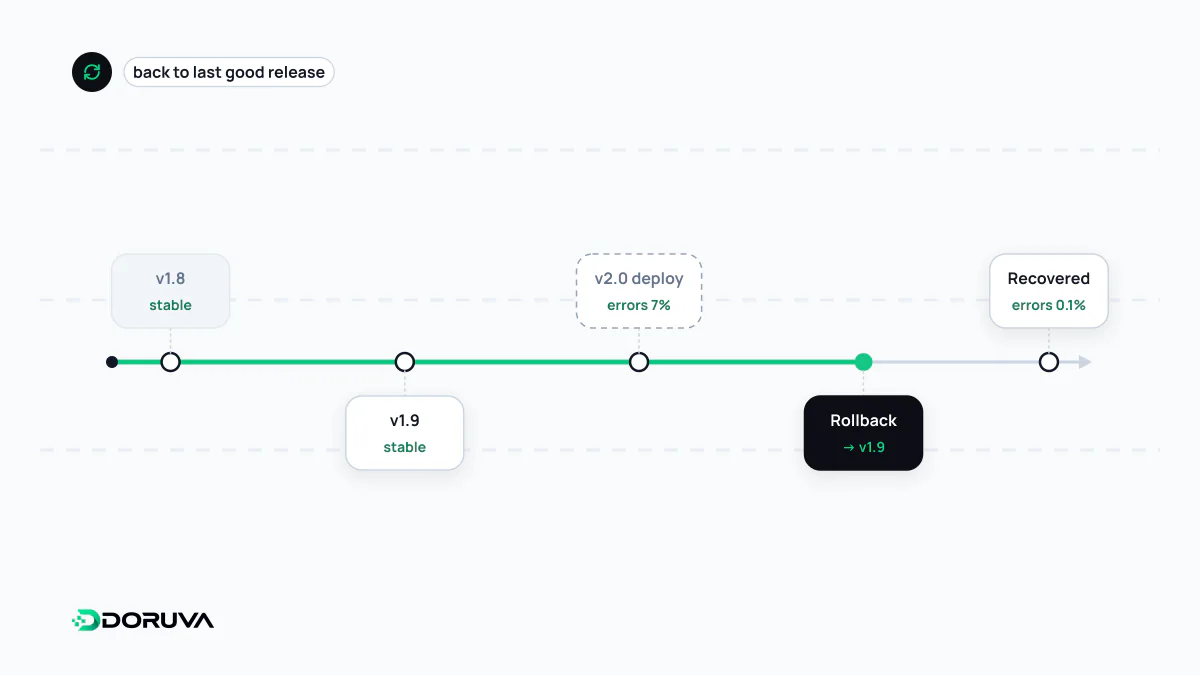
A rollback is the act of returning a system to its last known good version after a release causes errors, performance regressions or unexpected behaviour. Rolling back application code is usually quick if the previous build still exists, but database schema changes and data written by the new version do not revert on their own. A rollback is therefore a recovery path that must be designed before the release.
Also known as: roll back, deployment rollback, release rollback, revert a release
Why reverting deserves its own plan
Every deployment carries some risk: a bug the tests missed, a query that falls over on production data, an integration that behaves differently than expected. When it goes wrong, you can either fix it live or go back to the previous version. A rollback is the second option, and its real value is that it protects users without waiting for a diagnosis. Stop the bleeding first, investigate the root cause afterwards.
It is rarely as simple as “copy the old files back”, though. If builds are not versioned, configuration is not stored with the release or the database has changed underneath, nobody is sure which state to return to while the incident is unfolding.
Application rollback vs database rollback
Application code is stateless. If the previous build or container image still exists, running it again is enough. The database holds state. If the new release dropped a column, renamed a table or started writing data in a new format, the old code may not run against that schema, and reverting the schema often means losing whatever was written in between.
Teams that roll back routinely design database migrations in an expand/contract sequence:
- Expand: add the new column or table; the old code simply ignores it.
- Migrate: ship code that works with both shapes and backfill data in the background.
- Contract: remove the old column only a few releases later, once nobody will need to go back.
With that discipline, any release can revert to the one before it because the schema supports both. Protection against data loss is a different tool altogether: restoring from a tested backup.
Release habits that make rollback fast
- Immutable, tagged artifacts. Tag every build with a commit SHA or version and never rebuild on the server. Rolling back becomes redeploying the previous tag.
- One-command revert. Keep release directories side by side behind a symlink, or use your orchestrator's built-in undo, so the procedure is predictable under pressure.
- Version configuration too. If environment settings changed together with the code, reverting only the code can create a new failure.
- Revert at the traffic layer. Blue-green deployment keeps the old environment running, so going back is a single routing change; a canary deployment catches problems while only a small slice of users is exposed.
# Release directories: rolling back = pointing the symlink at the previous release
ln -sfn /srv/app/releases/2026-10-02_1412 /srv/app/current
systemctl reload app

# Kubernetes: return a Deployment to its previous revision
kubectl rollout undo deployment/web
Roll back or roll forward?
Sometimes shipping a quick fix (a forward-fix, or roll forward) is the better move. The decision usually comes down to a few questions:
| Situation | Usually better |
|---|---|
| Cause unknown, users are affected right now | Roll back |
| The release ran an irreversible schema change or data transformation | Forward-fix |
| Side effects already escaped (emails sent, payments captured) | Forward-fix plus compensating actions |
| The fix is a one-liner and the pipeline ships it in minutes | Forward-fix |
Rolling forward only makes sense when your CI/CD pipeline is fast and trustworthy. A hurried fix that skips the tests is the quickest way to stack a second incident on top of the first.
Deciding when to pull the trigger
The most expensive part of a rollback is often the hesitation before it. Write down in advance which signals trigger a revert: a jump in error rate, degraded response times, a drop in sign-ups or completed checkouts. Someone should watch those signals for the first minutes after each release, with a simple rule: when in doubt, roll back. Practise the procedure regularly, too. A rollback path that has never been exercised tends to fail exactly when it is needed.