

What is Blue-Green Deployment?
Definition
Blue-green deployment is a release strategy that keeps two identical production environments, called blue and green, side by side. The new version is installed on the environment that is not serving traffic, verified, and then all traffic is switched to it in one step at the load balancer or routing layer. If something goes wrong, traffic is switched straight back, which keeps downtime and rollback time minimal.
Also known as: blue/green deployment, blue green deploy, red-black deployment
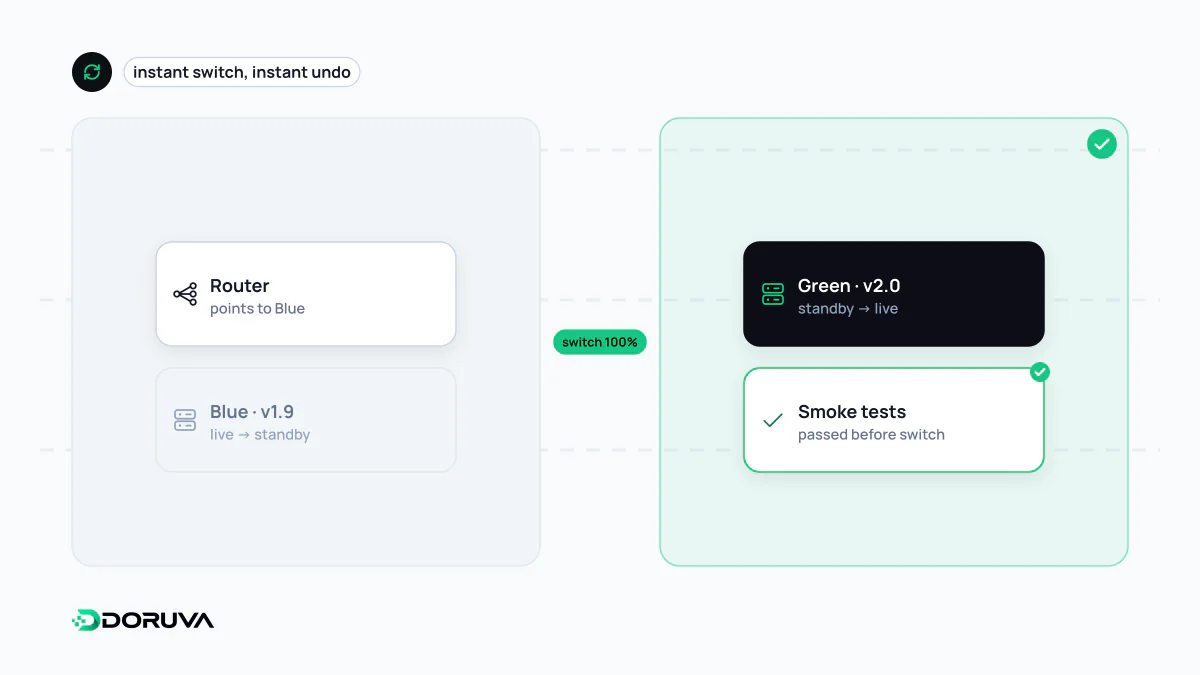
Two environments, one switch
In a classic in-place release, the new version is installed over the running one. The service may be unavailable for a few seconds or minutes, and if something breaks, going back means running the installation in reverse. Blue-green deployment avoids both problems with two identical environments. One of them, say blue, serves live traffic while the other, green, sits idle. A release then looks like this:
- Deploy the new version to the idle green environment. Live users are not touched.
- Run health checks and smoke tests against green with production configuration.
- Change the routing layer so that all new requests go to green.
- Leave blue untouched for a while. If problems appear, point traffic back to blue; if not, blue becomes the target of the next release.
The colours carry no meaning; what matters is that the roles swap with each release. That turns a rollback into a routing change instead of a reinstallation.
Where the switch lives
How instant and reversible the cutover is depends on which layer flips it:
- Load balancer or reverse proxy. The most common choice. You change the target group or upstream and reload; in-flight connections finish while new requests land on the new environment.
- Container orchestration. In Kubernetes, changing a Service's label selector sends traffic to a different set of pods.
- DNS. Possible, but the slowest option. Resolvers cache records for their TTL, so some clients keep hitting the old address for a while, and switching back suffers the same delay.
# Nginx: the live upstream now points at green
upstream app_live {
    server 10.0.0.12:3000;    # green (new release)
    # server 10.0.0.11:3000;  # blue (previous release, on standby)
}

# Validate, then reload without dropping connections
nginx -t && nginx -s reload
The hard part is shared state
You can duplicate application servers, but there is usually only one database. During the cutover and the rollback window, blue and green talk to the same schema, so it must work with both versions. Breaking migrations such as dropping or renaming a column have to be split across several releases. Other shared state needs the same care:
- Sessions. If sessions live in server memory, users are logged out at the switch. A shared session store (Redis, for example) or signed cookies removes the problem.
- Background work. If scheduled jobs and queue consumers run in both environments, the same work may happen twice. Decide explicitly which environment owns them.
- Long-lived connections. WebSockets and large uploads need time to drain from the old environment before it is shut down.
Cost and limits
Blue-green needs two full production stacks, at least while a release is in progress. In the cloud, the idle side can be scaled down after the switch, but it has to stay available for as long as you might want to go back. The other limit is that the cutover is all or nothing: a defect in green reaches every user the moment the switch flips. Teams that want to take that risk gradually split traffic by percentage with a canary deployment, and the two techniques combine well.
The idle environment is a useful last check before going live, but it is not a replacement for a staging environment: it is connected to production data, so destructive tests are off the table.