

What is Load Balancer?
Definition
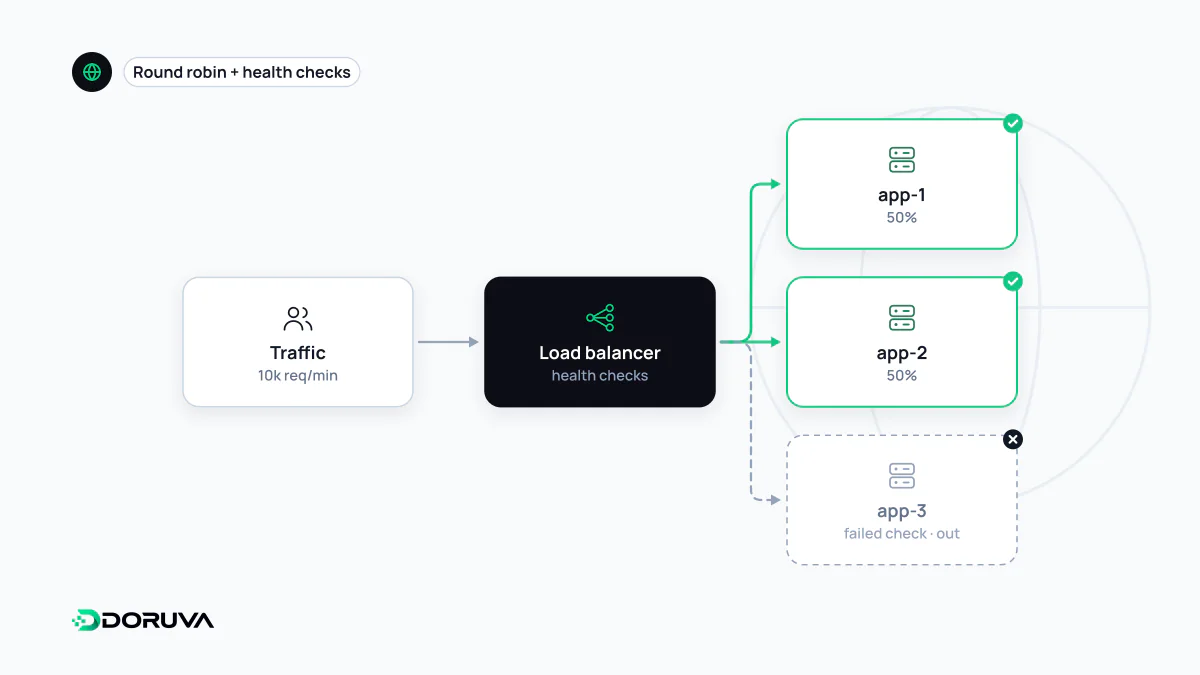
A load balancer is a network component that spreads incoming traffic across several servers running the same service and automatically stops sending traffic to servers that fail health checks. Clients connect to a single address, and the load balancer decides which backend handles each connection or request. It can work at layer 4 (TCP/UDP connections) or layer 7 (HTTP requests, routed by their content), adding capacity and keeping one server's failure from becoming an outage.
Also known as: load balancing, LB, application load balancer, network load balancer
One address in front of many servers
A single application server has two hard limits: it can only take so much load, and when it goes down the site goes with it. A load balancer sits in front of several servers running the same application and addresses both. Users and DNS only ever see the load balancer's address; the backends behind it (the upstream pool) can be added, removed or patched, and one crashing goes unnoticed from outside.
In practice a load balancer usually doubles as a reverse proxy: it terminates TLS, compresses responses and keeps backend addresses private. Cloud providers' managed load balancers, Nginx, HAProxy and services such as Cloudflare can all fill the role.
Layer 4 versus layer 7
| L4 (transport) | L7 (application) | |
|---|---|---|
| What it sees | IP addresses, ports, the TCP/UDP connection | HTTP method, URL path, headers, cookies |
| Routing unit | Per connection | Per request, e.g. /api/ to one pool and images to another |
| TLS | Typically passes encrypted traffic through | Terminates TLS so it can read the request |
| Overhead | Very low | Higher, but far more flexible |
| Typical use | Databases, mail, game servers, non-HTTP protocols | Websites and APIs |
Balancing algorithms
- Round robin: each backend takes the next request in turn. The default almost everywhere.
- Weighted: bigger machines get a larger share.
- Least connections: new requests go to the backend with the fewest active connections, which evens things out when request durations vary widely.
- IP hash: the same client IP always lands on the same backend, a crude form of session affinity.
In open-source Nginx these live in an upstream block, as described in the Nginx load balancing guide:
upstream app {
    least_conn;
    server 10.0.0.11:3000 max_fails=3 fail_timeout=30s;
    server 10.0.0.12:3000 max_fails=3 fail_timeout=30s;
}

server {
    listen 443 ssl;
    location / {
        proxy_pass http://app;
    }
}
Health checks
The real value of a load balancer is that it stops routing to broken servers. Passive checks watch real traffic: in the example above, a backend that fails three times within 30 seconds is taken out of rotation for a while. Open-source Nginx supports this; active checks, which probe a dedicated URL on a schedule, are an NGINX Plus feature in Nginx but standard in HAProxy and cloud load balancers.
Applications usually expose a lightweight endpoint such as /healthz for this, and its design involves a trade-off. If it only confirms the process is running, a server that has lost its database connection still looks healthy. If it checks every dependency, a brief database hiccup can pull every backend out at once. When the whole pool is down, users typically see a 502 Bad Gateway.
Sessions and single points of failure
If sessions live in a server's memory, the next request landing elsewhere logs the user out. Sticky sessions paper over this, but they skew the balance and still lose sessions when that server dies. The durable fix is making app servers stateless by moving session state into a shared store such as Redis or into a signed cookie.
The load balancer itself can also be the single point of failure. High availability means either a redundant pair sharing a floating IP or a managed load balancer whose redundancy the provider handles. And because backends see the balancer as the client, they should trust X-Forwarded-For only when it comes from your own load balancer; otherwise IP-based rate limiting and access logs can be spoofed.