

What is Nginx?
Definition
Nginx (pronounced “engine-x”) is an open-source web server originally written by Igor Sysoev that also works as a reverse proxy, load balancer, content cache and TCP/UDP proxy. Its event-driven architecture handles large numbers of concurrent connections with little memory, which is why it is widely used to serve static files, terminate HTTPS and sit in front of application servers.
Also known as: NGINX, engine-x, nginx web server
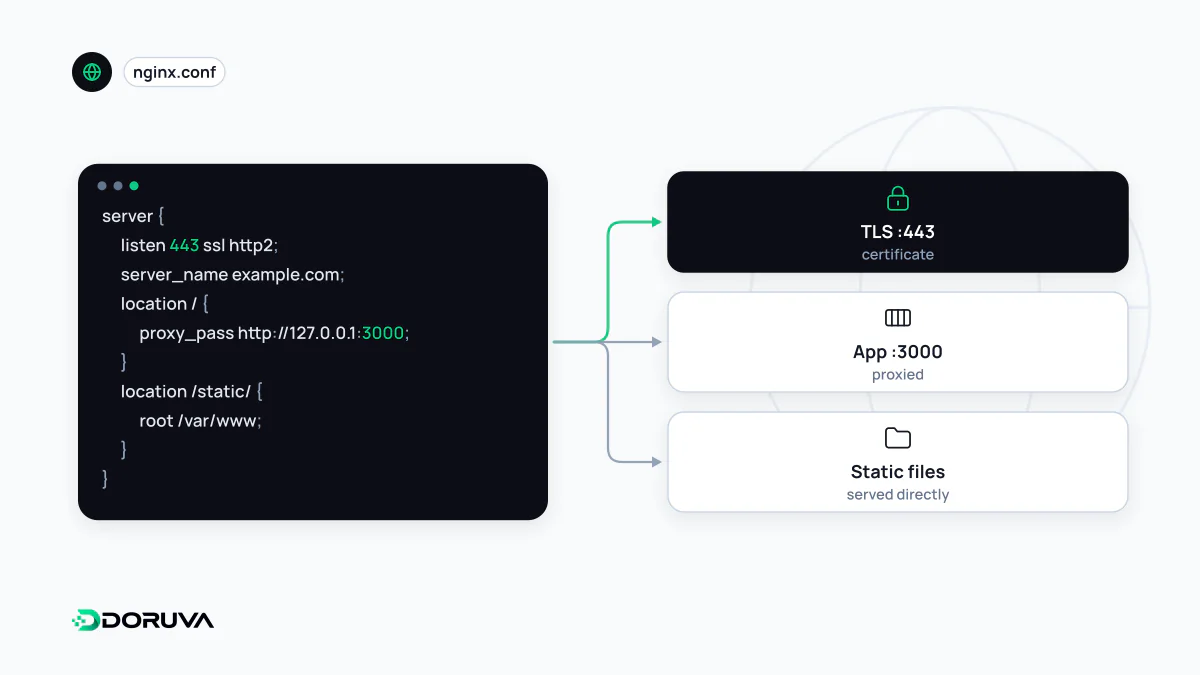
One binary, several jobs
Calling Nginx “a web server” undersells it. The project describes itself as an HTTP server, reverse proxy, content cache, load balancer, TCP/UDP proxy and mail proxy. On a typical production box it does several of these at once:
- Serving static assets such as CSS, JavaScript, images and pre-rendered HTML straight from disk.
- Terminating TLS, so certificates live in one place and the application behind it speaks plain HTTP on the loopback interface.
- Fronting an application server (Node.js, PHP-FPM, Python, Go) by forwarding requests and relaying responses.
- Spreading traffic across the servers listed in an
upstreamblock, acting as a simple load balancer.
The process model
A running Nginx consists of one master process and a handful of worker processes. The master reads configuration and supervises; the workers do the actual request handling. Rather than dedicating a thread to each connection, each worker runs an event loop that multiplexes thousands of sockets. A slow phone downloading a large response therefore does not tie up a thread while it trickles bytes.
The same design enables zero-downtime config changes. On nginx -s reload the master validates the new file, starts fresh workers, and lets the old ones finish their in-flight requests before exiting. If the new file has a syntax error, the previous configuration simply keeps running.
A minimal server block
Configuration is nested: an http context holds one server block per site, and each server holds location blocks matched against the request path. This example redirects plain HTTP to HTTPS, serves /static/ from disk and proxies everything else to an app on port 3000:
server {
    listen 80;
    server_name example.com;
    return 301 https://example.com$request_uri;
}

server {
    listen 443 ssl;
    server_name example.com;
    ssl_certificate     /etc/ssl/example.com/fullchain.pem;
    ssl_certificate_key /etc/ssl/example.com/privkey.pem;

    location /static/ {
        root /var/www/example;
        expires 30d;
    }

    location / {
        proxy_pass http://127.0.0.1:3000;
        proxy_set_header Host $host;
        proxy_set_header X-Real-IP $remote_addr;
        proxy_set_header X-Forwarded-For $proxy_add_x_forwarded_for;
        proxy_set_header X-Forwarded-Proto $scheme;
    }
}
With root, the full URI is appended to the path, so /static/app.css maps to /var/www/example/static/app.css. When matching, Nginx first remembers the longest matching prefix location, then tries regular-expression locations in the order they appear.
Mistakes that show up in production
- Dropping the Host header. Without an explicit
proxy_set_header Host, Nginx sends$proxy_host, the address fromproxy_pass. The app then believes it is127.0.0.1:3000and may build absolute URLs, canonical tags or redirects with the wrong hostname. - Losing the client IP. If
X-Forwarded-Foris not passed, every request in the app's logs appears to come from localhost, and per-client rate limiting collapses into one shared bucket. - Misreading gateway errors. A crashed or stalled upstream surfaces as 502 Bad Gateway or 504. The fault is usually the process behind Nginx, not Nginx itself.
- Reloading blind.
nginx -tchecks the configuration without applying it. Put it in front of every reload in your deploy scripts.
Choosing it, or not
On a self-managed VPS hosting several apps, certificates and static directories, Nginx is a mature, thoroughly documented choice. Apache remains convenient for legacy PHP apps that rely on per-directory .htaccess files, and Caddy needs less setup because it obtains and renews certificates on its own. If your app runs on a managed platform or behind a CDN, the provider may already operate this layer, and adding your own Nginx only makes sense when you have a concrete need for it.