

What is VPS (Virtual Private Server)?
Definition
A VPS (Virtual Private Server) is a virtual machine created by partitioning a physical server with virtualisation software and rented to a customer with its own operating system, root access and allocated CPU, memory and disk. It offers far more control than shared hosting, but responsibility for operating-system updates, security hardening and backups moves to the customer along with that control.
Also known as: virtual private server, virtual server, virtual machine, VM, cloud server
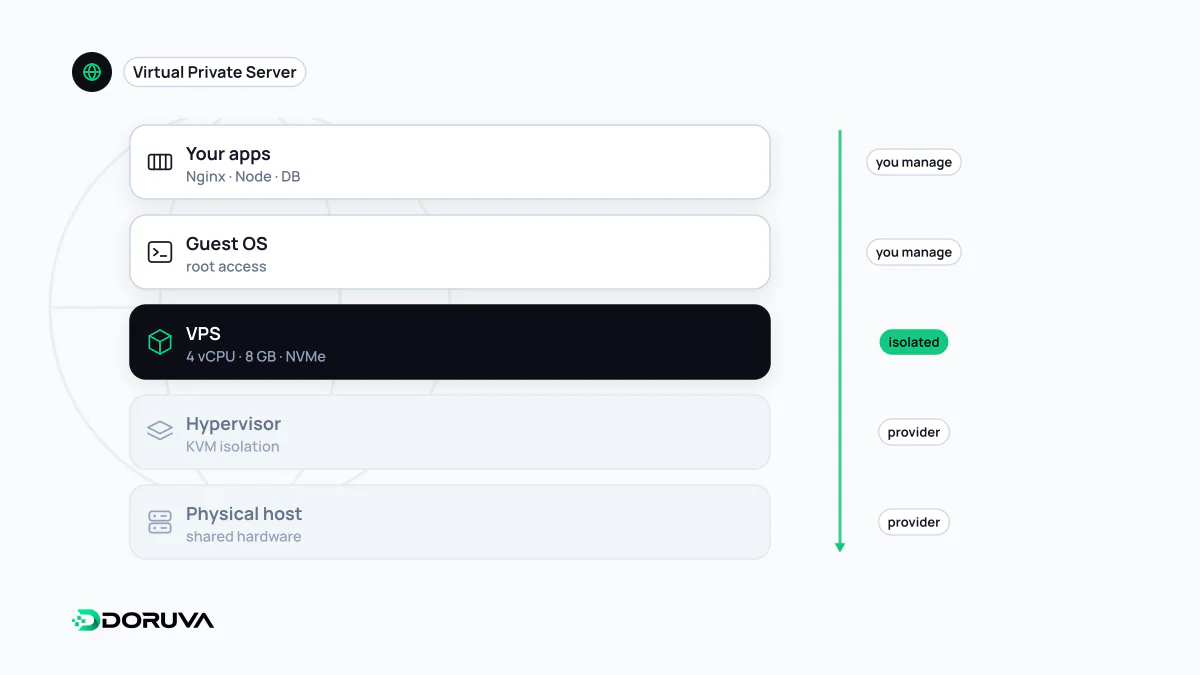
Virtual machines: servers inside a server
A powerful physical server in a data centre is divided into several virtual machines by a hypervisor such as KVM, Xen, VMware ESXi or Hyper-V. Each virtual machine runs its own operating-system kernel and sees its own disk and network interface; from the inside it behaves like an independent computer. A VPS is simply such a virtual machine sold as a hosting product. Providers in some markets also use "VDS" (virtual dedicated server), usually for plans with more strictly reserved resources, though the definition varies from one provider to the next.
Virtual machines and containers are often confused. A VM virtualises hardware and boots its own kernel; a container is an isolated process sharing the host's kernel. In practice they stack: Docker containers very often run inside a VPS.
Where a VPS fits among hosting options
| Shared hosting | VPS | Managed platform (PaaS) | |
|---|---|---|---|
| Control | Limited, via a control panel | Full root access | At the application level |
| OS maintenance | Provider | You | Provider |
| Resources | Shared with many sites | Allocated per plan | Scale with usage |
| Cost | Low and fixed | Fixed and predictable | Usage-based, variable |
| Good for | Simple sites, standard CMS installs | Custom software, several services, special configuration | Teams that don't want to manage infrastructure |
Shared hosting is fine for a WordPress site installed from a panel. Once an application needs a background worker, a specific database version or several services side by side, the control a VPS gives you becomes necessary. A PaaS hides the server entirely, at the price of less flexibility and a bill that grows with usage.
vCPUs and noisy neighbours
The vCPU count on a plan does not necessarily equal a physical core. Many providers share physical processors between several virtual machines, so when another customer on the same host runs something heavy, your performance can dip. That is the "noisy neighbour" effect. For workloads that need consistent performance, look for plans marketed as dedicated vCPU or similar, where cores are reserved.
Root access means root responsibility
A fresh VPS is probed by automated scanners within minutes of getting a public IP. The baseline hardening steps are:
- Allow SSH with keys only; disable password authentication and direct root login.
- Do daily work as a limited user, following the principle of least privilege.
- Use a firewall to expose only what is needed, usually SSH, 80 and 443. Never expose the database port to the internet.
- Turn on automatic security updates.
- Keep backups off the server. Provider snapshots help, but they are not enough on their own if the account or data centre has a problem; schedule real backups and test restoring them.
- Set up basic monitoring and alerts for disk space, memory and service health.
A typical setup
For small and mid-sized web applications, a common layout is a reverse proxy at the front handling TLS and compression (often Nginx or Caddy), the application running in containers behind it, and a database on the same machine or a separate one. That arrangement can run reliably on a single VPS for years. When traffic or availability needs grow, the next steps are a second server, a load balancer and a managed database.