

What is Web Hosting?
Definition
Web hosting is the service of running a website's files, database and application code on servers that are permanently connected to the internet, so visitors can reach the site at any time. Hosting models such as shared hosting, VPS, managed hosting and cloud platforms differ in resource isolation, who manages the server, how easily they scale and what they cost. Much of a site's speed, uptime and security depends on this layer.
Also known as: hosting, website hosting, web host, hosting provider
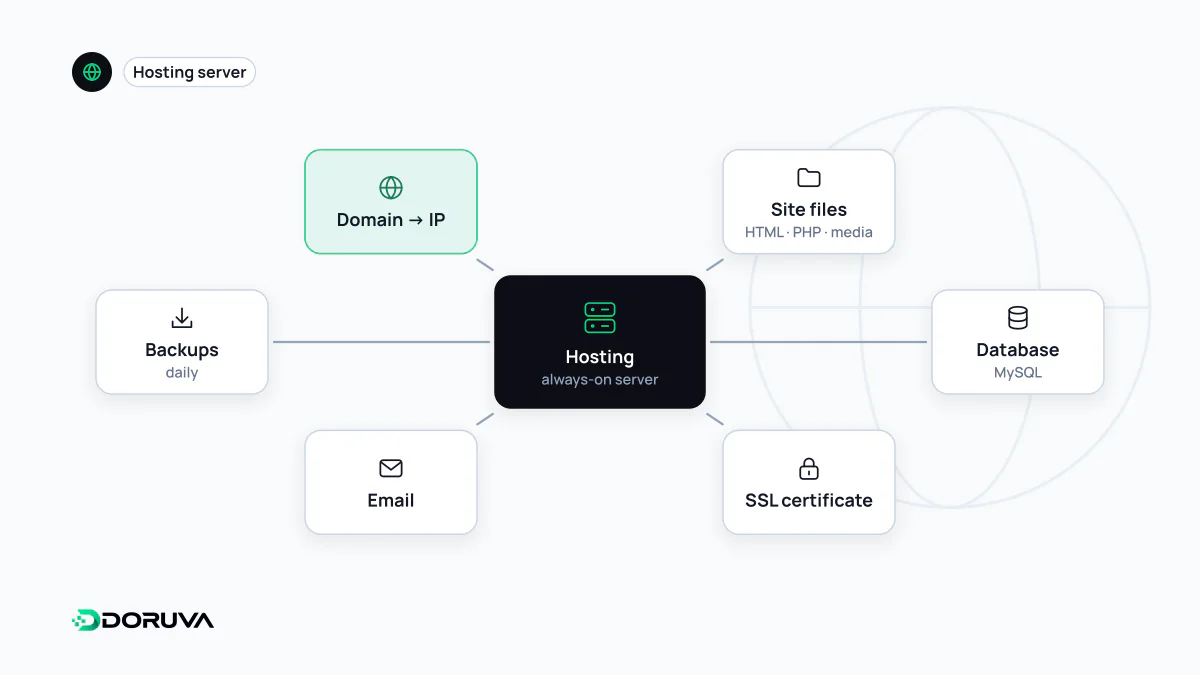
What actually keeps a site online
When someone types your address, the request has to be answered somewhere. That somewhere is a stack: a server with CPU, memory and storage; web server software such as Nginx or Apache; a runtime like PHP or Node.js; a database; network connectivity; a certificate for HTTPS; and the backups and monitoring that keep it all running. A hosting service provides some or all of those layers for you.
Hosting and your domain name are separate things. The domain is the address and, through DNS records, says which server to go to; hosting is where the site actually runs. You can buy both from one company, but keeping them apart is common and makes moving hosts easier.
The main hosting models
| Model | Resources | Who manages the server | Good fit for |
|---|---|---|---|
| Shared hosting | One server shared by many sites | The host | Low-traffic brochure sites and blogs |
| VPS | Virtualized CPU and memory reserved for you | Usually you, unless you buy a managed plan | Sites and apps that need custom configuration |
| Managed hosting | An environment tuned for one platform, e.g. WordPress | The host, at platform level | Businesses without a technical team that still want performance and maintenance |
| Cloud / PaaS | Resources that scale up and down on demand | Shared: provider runs infrastructure, you run the app | Projects with spiky or fast-growing traffic |
Renting an entire physical machine (a dedicated server) is another option: full control, but you also plan for everything, hardware failures included.
How hosting affects speed, uptime and search
Hosting is the invisible half of a site's technical health. A slow or overloaded server stretches TTFB, and that delay carries through to everything the page loads afterwards. Frequent outages are worse. According to Google's crawling documentation, when a significant number of URLs return 500, 503 or 429, Google's crawlers slow down for the whole hostname, and if that lasts for days, pages can drop out of the index.
Distance matters too: a server far from your visitors adds latency. A CDN closes much of that gap for static files, but it cannot make a slow origin generate dynamic pages faster. Checking response times and status codes regularly, for example with an SEO checker, catches hosting problems before customers start reporting them.
Questions to ask a host before you sign
- Software versions: which PHP, Node.js and database versions are supported, and who upgrades them, when? WordPress, for instance, lists recommended PHP and database versions and HTTPS support on its official requirements page.
- Backups: how often are backups taken, how long are they kept, are they stored off the server, and how does a restore work?
- Certificates: are SSL certificates issued and renewed automatically?
- Real limits: behind an “unlimited” plan, what are the CPU, concurrent process, inode and memory limits?
- Isolation: if another site on the same shared server is compromised, what protects yours?
- Access and tooling: do you get SSH, a staging environment and access to log files?
- Data location: which country are the servers in? For sites handling personal data, this can matter under GDPR or Türkiye's KVKK.
- Leaving: can you export all files and databases without restrictions?
The “unlimited plan” misconception
“Unlimited storage” and “unlimited bandwidth” on shared plans are, in practice, bounded by CPU and process limits or fair-use policies. When a site outgrows its plan, the bottleneck is rarely disk space; it is how many requests the account can process at once. Choosing a plan for expected traffic and the application's real needs works better than comparing headline numbers.