

What is DNS (Domain Name System)?
Definition
DNS (Domain Name System) is the distributed, hierarchical database that translates human-readable domain names such as example.com into IP addresses and other records that computers use. Browsers query it before connecting to a website, mail servers before delivering a message, and answers are cached for the duration of their TTL. Websites, email and domain verifications all depend on correct DNS records.
Also known as: Domain Name System, DNS server, nameserver, name server
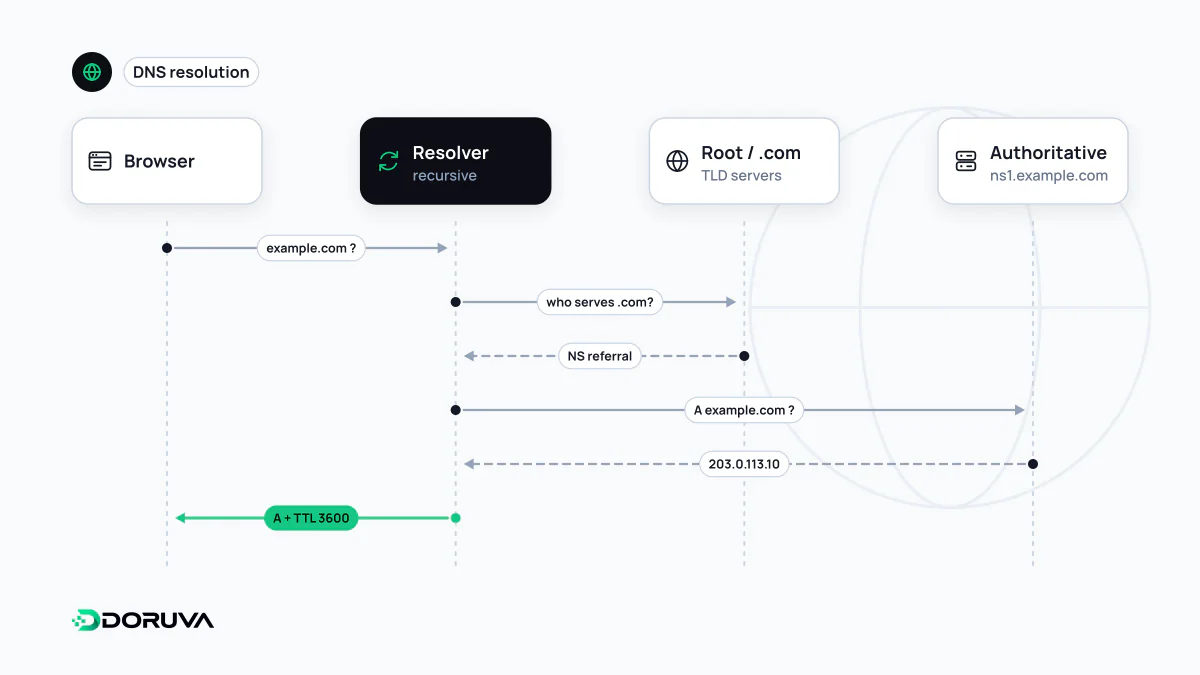
From a name to an address
When you type www.example.com, your device does not look the name up on its own. A stub resolver in the operating system hands the question to a recursive resolver, usually run by your ISP or a public service such as 1.1.1.1 or 8.8.8.8. If the answer is not already cached, the resolver walks the hierarchy:
- A root server replies with the servers responsible for
.com. - The TLD servers reply with the nameservers (NS records) delegated for
example.com. - The authoritative nameserver, the DNS provider where your zone lives, returns the actual answer, such as an IP address for
www.example.com.
The resolver caches that answer and returns it. The next person asking the same resolver gets it immediately. Caching at every layer is what lets DNS absorb an enormous query volume, and it is also why changes do not appear everywhere at once.
What TTL actually controls
Every record carries a TTL (time to live) in seconds. A TTL of 3600 tells resolvers they may reuse the answer for an hour without asking again. “Waiting for DNS to propagate” is really waiting for old cached answers to expire; nothing is pushed outward from your provider.
That has a practical use. A day before a planned change, such as moving to a new server, drop the record's TTL to something like 300 seconds. When you switch, stale answers age out within minutes instead of hours. Raise it again afterwards: a permanently tiny TTL means more lookups and can add a little latency to first connections.
Record types you will meet
| Record | Purpose |
|---|---|
| A / AAAA | Maps a name to an IPv4 / IPv6 address. |
| CNAME | Makes one name an alias of another name. |
| MX | Lists the servers that accept mail for the domain. |
| TXT | Free-form text: verification tokens and SPF, DKIM and DMARC policies. |
| NS | Names the nameservers that are authoritative for the zone. |
| CAA | Restricts which certificate authorities may issue certificates for the domain. |
Creating a subdomain is usually just adding another A or CNAME record in the same zone; no separate product is required.
Why DNS is a security boundary
Whoever can edit your DNS decides where your website and your mail go. Registrar and DNS provider accounts deserve the same protection as your primary email: strong passwords, multi-factor authentication, and a registrar transfer lock. Records pointing at services you no longer use should be removed, because an attacker who claims that service can serve content under your name. DNSSEC lets resolvers verify with signatures that authoritative answers were not tampered with; DNS over HTTPS (DoH) and DNS over TLS (DoT) encrypt the hop between client and resolver. They address different threats and are not substitutes for each other.
Checking records with dig
$ dig example.com A +short
203.0.113.10

$ dig example.com MX +short
10 mx1.example.com.
20 mx2.example.com.

$ dig @ns1.your-dns-provider.net www.example.com A
Querying the authoritative server directly, as in the last command, bypasses every cache and shows what the record truly is. If the authoritative answer is already correct but visitors still reach the old server, the record is fine and you are waiting on TTL.