

What is MX Record?
Definition
An MX (mail exchanger) record is a DNS record that tells sending servers which hosts accept email for a domain. Each MX record holds a preference value and a hostname; senders try the host with the lowest value first and fall back to the next if it is unreachable. MX only governs inbound mail; authenticating outbound mail is the job of SPF, DKIM and DMARC.
Also known as: mail exchanger record, mail exchange record, MX, MX priority
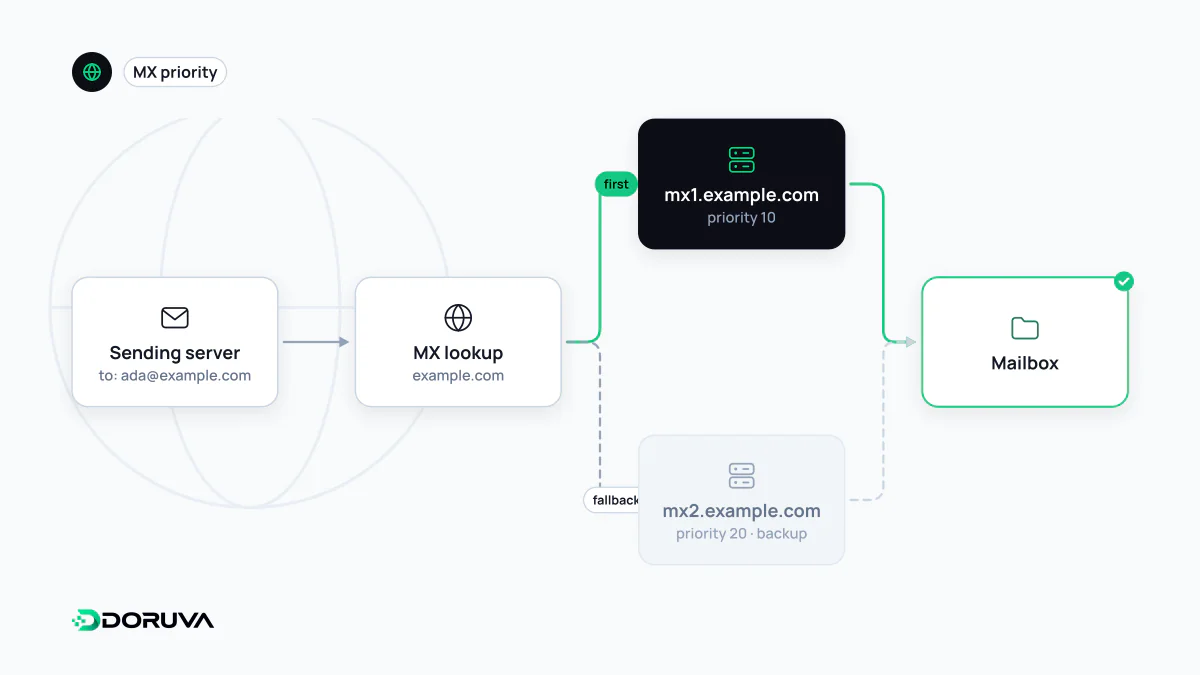
Reading the preference number
Before a mail server can deliver to [email protected], it asks DNS for the MX records of example.com:
example.com.  3600  IN  MX  10  mx1.mail-example.net.
example.com.  3600  IN  MX  10  mx2.mail-example.net.
example.com.  3600  IN  MX  20  backup.mail-example.net.
Lower numbers win. The two hosts at 10 are equal, and senders pick between them at random, which spreads the load. The host at 20 is only tried when neither 10 answers. Only the ordering matters, so 10/20 behaves exactly like 1/5. Treating the number as a “weight” and giving the main server the bigger value is a common mistake that sends everything to the backup.
No MX at all, and the null MX
If a domain has no MX record, SMTP falls back to its A or AAAA records, the so-called implicit MX. A domain that never handles mail can therefore have messages aimed at its web server, and undeliverable mail sits in senders' queues retrying for days. RFC 7505 defines a “null MX” to say explicitly that a domain accepts no mail:
parked.example. 3600 IN MX 0 .Senders then fail immediately instead of retrying. For parked or web-only domains, pairing a null MX with a v=spf1 -all SPF record and a DMARC record at p=reject also makes the domain much less useful to spoofers.
Inbound is not outbound
MX records only describe where mail to your domain is delivered. Whether mail from your domain is legitimate is decided by SPF, DKIM and DMARC. The two get mixed up constantly. A company whose inboxes live in Google Workspace might send newsletters through a separate marketing platform: MX points only at Google, while the marketing platform is authorised through SPF and DKIM records.
Switching mail providers
- Set up users and the domain at the new provider first, including its domain verification, usually a TXT record.
- Lower the TTL on the MX records ahead of the switch.
- Replace the old MX records with the new ones. Leaving both in place at different priorities lets some mail drift to the old system.
- Keep the old mailboxes alive for a few days and migrate anything that arrives late because of cached answers.
- Update SPF to cover the new provider's sending servers.
Errors that break delivery
- Putting an IP address in an MX record: the target must be a hostname, and that hostname needs its own A/AAAA records.
- Pointing MX at a CNAME: the standards forbid it and some senders will refuse to deliver.
- Using a CNAME on the bare domain and expecting MX to work there too: a CNAME cannot share its name with other records.
dig example.com MX +short shows what senders currently see.