

What is Firewall?
Definition
A firewall is hardware or software that allows or blocks network traffic entering or leaving a network or server according to predefined rules. Rules are usually written in terms of source and destination IP address, port and protocol. Its basic job is to make sure only the services that genuinely need to be reachable are exposed, with everything else closed by default.
Also known as: network firewall, packet filter, host firewall, host-based firewall
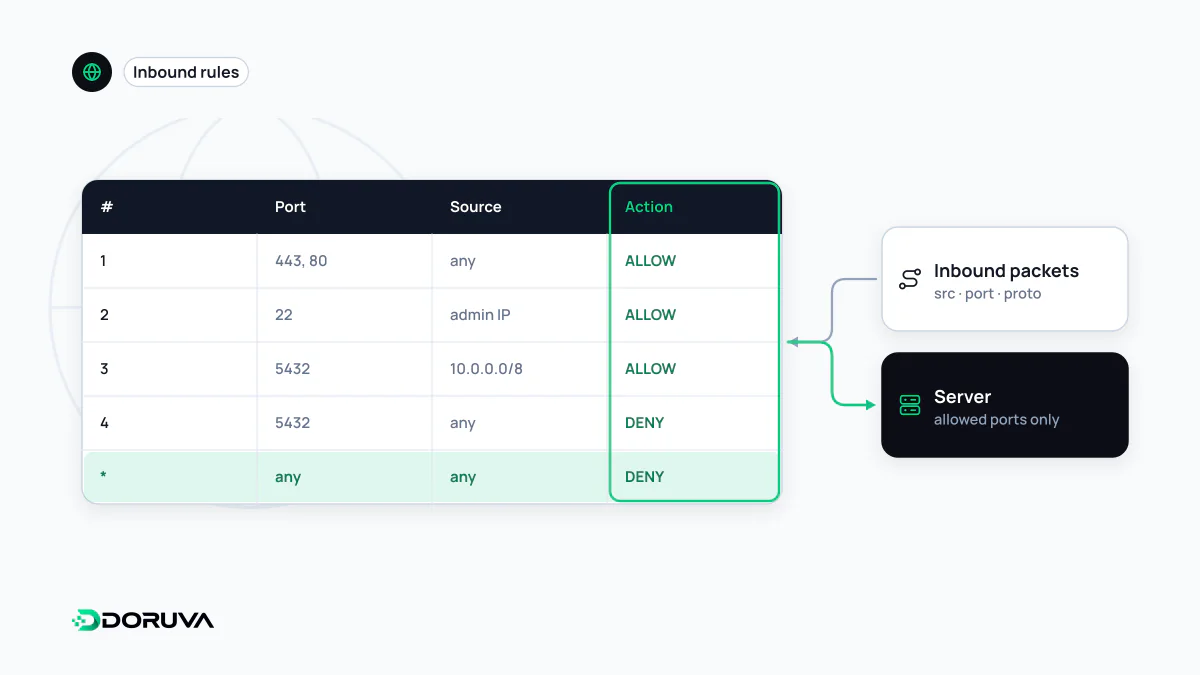
A rule table: who, to where, on which port
A firewall evaluates network packets against an ordered list of rules. Classic rules look at the packet's source address, destination address, destination port and protocol (TCP, UDP, ICMP): “anyone may reach TCP 443”, “only the office IP may reach SSH on port 22”, “drop everything else”. In most tools, rules are read top to bottom and the first match wins.
The core principle of a good configuration is default deny: close everything, then open only what is needed. It is the network-level form of the principle of least privilege. The opposite approach, allowing everything and blocking known bad traffic, is how a forgotten test service or an accidentally exposed database ends up reachable from the whole internet.
Kinds of firewall
- Stateless packet filter: judges each packet in isolation. Fast, but it cannot tell whether a packet is a reply to a connection that started inside.
- Stateful firewall: keeps a table of open connections, lets replies to outbound connections back in automatically and drops unsolicited inbound packets. This is the default approach today.
- Next-generation firewall (NGFW): enterprise appliances and services that recognise applications beyond ports and addresses and add features such as intrusion prevention.
- Host firewall: rules on the server itself, such as nftables or iptables on Linux, often managed through ufw or firewalld. Cloud platforms add provider-level rules, such as security groups, in front of or instead of these.
A sensible baseline for a VPS
On a typical VPS serving a website, the only ports that need to face the internet are usually HTTP (80), HTTPS (443) and SSH from known addresses. With ufw on Ubuntu:
ufw default deny incoming
ufw default allow outgoing
ufw allow from 203.0.113.10 to any port 22 proto tcp   # SSH from this IP only
ufw allow 80/tcp
ufw allow 443/tcp
ufw enable
Confirm that your own SSH access is allowed before enabling the rules, or you may lock yourself out. Databases, Redis and the application server's internal port (say 3000) should never be exposed and ideally listen only on 127.0.0.1, with public traffic arriving through a reverse proxy in front.
A common trap involves Docker. Docker's own documentation explains that traffic to published container ports is diverted before it reaches ufw's rules, so a port that looks closed in ufw may still be reachable if Docker publishes it. Bind container ports to 127.0.0.1 where possible, and verify the real exposure with a port scan from outside.
Outbound rules matter too
Most configurations only think about inbound traffic. Restricting outbound traffic makes life harder for an attacker who has compromised a server, since exfiltrating data or calling home to a command server is no longer trivial. For services that fetch user-supplied URLs, egress rules that block internal ranges also limit the damage of SSRF flaws.
What a network firewall cannot see
A network firewall knows which port a request arrived on, not what the request says. As long as port 443 is open to everyone, an SQL injection or XSS attempt on that port passes straight through to the application. Inspecting HTTP content is the job of a web application firewall (WAF). Likewise, a volumetric DDoS attack that exceeds the server's connection capacity has to be absorbed upstream, at the provider or CDN, before packets reach the machine; a host firewall cannot carry that load alone.