

What is Reverse Proxy?
Definition
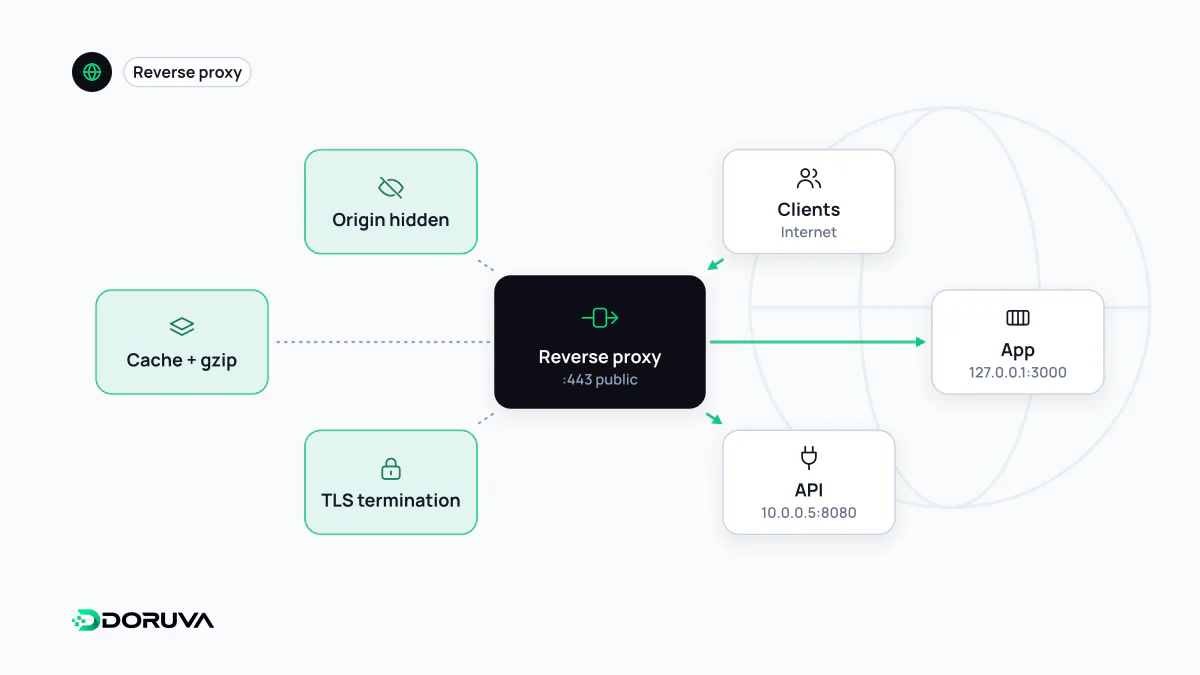
A reverse proxy is a server that accepts requests from clients, forwards them to one or more application servers behind it and returns their responses to the client. Clients only ever talk to the proxy and never see the servers behind it. TLS termination, load balancing, caching, compression and security filtering usually happen at this layer; Nginx, HAProxy and Caddy are common examples.
Also known as: reverse proxy server, HTTP reverse proxy, reverse web proxy
Forward or reverse: who is being represented?
A proxy sits between two parties and relays requests; what differs is whose side it is on. A forward proxy acts for clients, such as a corporate proxy through which employees reach the internet, so destination sites see the proxy rather than the individual users. A reverse proxy acts for servers. The visitor believes they are connected to example.com, but the machine answering passes the request to an application behind it and relays the response back. How many servers sit behind it, which ports they use and what they are written in stays invisible from outside.
One front door, many jobs
- TLS termination. Certificates and TLS encryption are handled at the proxy, and the application can speak plain HTTP on the local network. Certificate renewal happens in one place.
- Load balancing. Requests are spread across several application servers, and unhealthy ones are taken out of rotation. A dedicated load balancer is essentially a specialised reverse proxy.
- Caching and compression. Static files and cacheable responses are served straight from the proxy and compressed with Gzip or Brotli. A CDN is, in effect, a worldwide network of reverse proxies.
- Routing. Send
/api/to one service and everything else to another, or run several applications under one domain. - Security. It is the natural place to keep application ports off the internet and to enforce rate limits, request size limits and WAF rules.
A typical Nginx setup
A common arrangement: a Next.js, Node.js or Python application on 127.0.0.1:3000 with Nginx in front of it.
server {
    listen 443 ssl;
    server_name example.com;
    # ssl_certificate and ssl_certificate_key go here

    location / {
        proxy_pass http://127.0.0.1:3000;
        proxy_set_header Host $host;
        proxy_set_header X-Forwarded-For $proxy_add_x_forwarded_for;
        proxy_set_header X-Forwarded-Proto $scheme;
    }
}
The Host line matters. By default Nginx rewrites that header to the address in proxy_pass (127.0.0.1:3000), so an application that builds absolute URLs needs the real host passed through explicitly.
What the application behind it needs to know
With a proxy in the path, the application sees the proxy as the party that opened the connection. The real details arrive in HTTP headers, and misreading them causes two classic problems:
- Client IP. The visitor's address arrives in
X-Forwarded-For(its standardised counterpart is theForwardedheader from RFC 7239, which is used far less). Clients can send this header themselves, so only trust the value added by your own proxy; otherwise IP-based rate limits and access rules are easy to fool. If the application server is also reachable directly from the internet, no part of the header can be trusted. - Scheme. Because TLS ends at the proxy, the application sees plain HTTP. If it ignores
X-Forwarded-Proto, it may keep redirecting visitors to HTTPS and create a redirect loop, or writehttp://URLs into canonical tags and the sitemap.
Many error pages come from the proxy
Some errors visitors see are produced by the proxy, not the application. If the upstream application is down or returns an invalid response, the proxy answers 502 Bad Gateway; if the application does not respond in time, the result is 504 Gateway Timeout. In Nginx that limit is proxy_read_timeout, which defaults to 60 seconds. When these codes appear, the proxy's error log and the state of the upstream process are the first places to look.